Lifespan & permanence
Sandboxes are disposable by default they expire and clean themselves up. When you need one to stick around, you can extend its lifespan or make it permanent.
Default lifespans
| Who created it | Default lifespan | Can change? |
|---|---|---|
| Guest (no account) | 1 hour | No always 1 hour |
| Account | 1 week | Yes 1 hour to 1 month, or permanent |
Choose a lifespan when creating
In the create form, open Advanced settings and set Site lifespan to 1 hour, 1 day, 1 week, 2 weeks, 1 month, or Permanent. See Create a sandbox.
Make a sandbox permanent
A permanent sandbox never expires. You can flip an existing sandbox to permanent two ways:
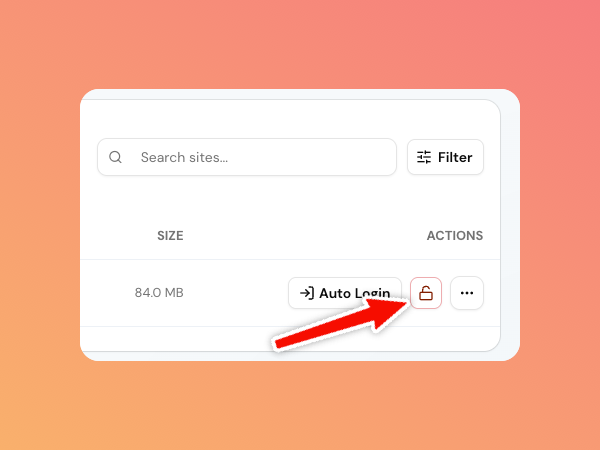
- From the dashboard: on the sandbox row, click the lock icon (it shows an open padlock for temporary sandboxes). Click it to make the sandbox permanent.
- From the detail page: click Make permanent in the page header (or the Make permanent link in the Expires row of the Overview section).
A permanent sandbox shows a Permanent badge and its expiry reads Never. You can only toggle permanence while a sandbox is creating or ready.
Make a sandbox temporary again
Click the (now closed) lock icon again, or Make temporary on the detail page. The sandbox goes back to a normal expiry and will clean itself up like any other.
What happens when a sandbox expires
When a sandbox passes its lifespan it becomes expired and moves to the Expired tab in your dashboard. How long it is kept depends on your plan: paid accounts keep an expired sandbox for 7 days, free accounts for 12 hours, and guests for 6 hours. After that grace period it is permanently deleted container, database, files, and route all go
away, so there's nothing left to manage or pay for.
During the grace period the sandbox is no longer running, so you can't open wp-admin or use its tools. If you want to keep working in it, recreate it (or save a template beforehand so you can spin up a copy).
Find sandboxes by lifecycle
The dashboard tabs filter by lifecycle state:
- Active running sandboxes (creating, ready, failed).
- Expired expired sandboxes still in their grace period.
- All everything.
Next steps
- Plans & limits unlock permanent sandboxes.
- Templates preserve a sandbox's content before it expires.