sandywp / plugins / post-types-order

Post Types Order
Sort posts and custom post type objects using a drag-and-drop, sortable JavaScript AJAX interface, or through the default WordPress dashboard
Ready in seconds.
v2.5.1 600,000+ installs WP 2.8+ PHP 5.6+
What you get inside
2 screens-
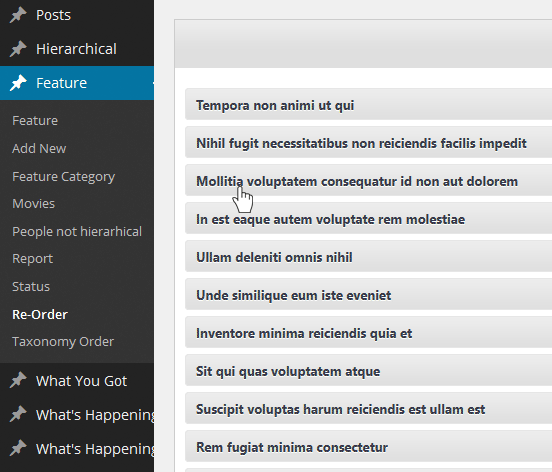
The ReOrder interface through which the sort can be created.
-
Sort can be managed within default WordPress post type interface.
About this plugin
Over 12 MILLIONS DOWNLOADS and near PERFECT rating out of 200 REVIEWS.
Easily Sort Posts and Custom Post Types with Drag-and-Drop
Take full control of your post order with a powerful plugin that lets you effortlessly reorder posts and custom post types using a simple drag-and-drop interface.
Customize the order directly from the default WordPress post archive list or use the dedicated Re-Order interface, which displays all available items for easy management. Whether you’re working with default posts or custom post types, organizing your content has never been easier.
Usage
This plugin was designed to be user-friendly, ensuring that anyone can easily use its sorting feature, regardless of their WordPress experience:
- Install the plugin via the “Install Plugins” interface or by uploading the post-types-order folder to the /wp-content/plugins/ directory.
- Activate the Post Types Order plugin.
- A new settings page will be added under Settings > Post Types Order. Visit this page and save the options for the first time.
- With the AutoSort option enabled, no code changes are needed, the plugin will automatically apply the customized post order.
- Use the Re-Order interface, available for every non-hierarchical custom post type, to change the post order as needed.
- For sorting posts via code, include ‘orderby’ => ‘menu_order’ within the custom query arguments. For more details, visit this guide Sample Usage
Example of Usage
As you can see, reordering posts is as simple as dragging and dropping, with the changes instantly reflected on the front end.
If the post order doesn’t update on your site, it could be due to one of two reasons: either there was a mistake during setup, or your theme/plugin is using a custom query that doesn’t follow WordPress Codex standards. But don’t worry—we’re here to help! You can report the issue in the forum, where many users are happy to assist, or you can contact us directly.
If you encounter any problems with the plugin, feel free to reach out via the forum or contact us directly through our support page, and we’ll take a look.
Need advanced features ?
For advanced features and functionality, check out the extended version of this plugin at Advanced Post Types Order
* Hierarchically post types order
* Manual Drag & Drop / Automatic Sorting
* Specify exact area where to apply through conditionals
* Advanced query interface filtering and complex sorts including multiple post types and taxonomies
* Posts Order by Custom Taxonomies
* Enhanced Interface, List / Grid View
* Allow Interface Filters (Categories, Dates, Search etc)
* Post Types Thumbnails
* Advanced query usage
* MultiSite Network Support, WPML, Polylang, WooCommerce, WP E-Commerce, Platform Pro, Genesis etc
* WPML 100% compatibility with sort synchronization across languages
* Mobile Touch Drag & Drop Ready
* Sort interfaces through admin and front end
* Pagination for sort lists
* Free Updates
* Free Support
This plugin is developed by Nsp-Code
Localization
Would you like to contribute a translation in your language? Please check at https://translate.wordpress.org/projects/wp-plugins/post-types-order
There isn’t any Editors for your native language on plugin Contributors? You can help to moderate! https://translate.wordpress.org/projects/wp-plugins/post-types-order/contributors
Questions
- Since I have no PHP knowledge at all, is this plugin for me?
Absolutely! You don’t need any PHP knowledge to use this plugin.
Unlike many other plugins, you won’t have to make any code changes for your custom post order to apply. There’s an option to automatically update WordPress queries so posts are displayed in your custom order. If you prefer to handle this manually, you can disable the AutoSort option.- How to manually apply the sort in queries
Simply include
'orderby' => 'menu_order'in your custom query arguments.- What types of posts/pages can I sort with this plugin?
You can sort all post types you’ve defined in WordPress, as long as they are not hierarchical. This includes default post types like Posts, as well as custom types like Movies, Reviews, Data, etc.
- How does the post order apply in the admin interface?
There’s an option to display the custom post order, as defined in the sort list, directly within the main admin post list interface.
- I have a feature request. Can it be implemented?
All ideas are welcome! I add them to my list for future versions. However, this may take some time. If you’re in a hurry, consider making a small donation, and I can prioritize the feature for you.
- Can I exclude certain queries from the custom sort when AutoSort is enabled?
Yes, you can! To exclude certain queries, include the
ignore_custom_sortargument in your custom query. An example is available at Sample Usage- How can I force custom sorting for specific queries when AutoSort is enabled?
You can use the
pto/posts_orderbyfilter to force the sort. An example is provided at Sample Usage- I need additional features like front-end sorting, shortcodes, filters, conditionals, advanced queries, or taxonomy/category sorting
Consider upgrading to our advanced version of this plugin, which offers these features at a very reasonable price Advanced Post Types Order
sandywp / also on the shelf
Try another plugin

4.4 · 400K+ installs
Intuitively reorder Posts, Pages, Custom Post Types, Taxonomies, and Sites with a simple drag-and-drop interface.

4.8 · 300K+ installs
Easily reorder posts, pages, custom post types, and taxonomies with intuitive drag-and-drop sorting in the WordPress admin.
4.5 · 6K+ installs
Order terms (Users, Posts, Pages, Custom Post Types and Custom Taxonomies) using a Drag and Drop with jQuery ui Sortable.
Spin up a real WordPress site in seconds.
Test plugins, build a demo, hand a client a link — then squash it and start again. No local setup, no Docker.