sandywp / plugins / simple-custom-post-order

Simple Custom Post Order
Easily reorder posts, pages, custom post types, and taxonomies with intuitive drag-and-drop sorting in the WordPress admin.
Ready in seconds.
v2.8.8 300,000+ installs WP 6.2+ PHP 7.4+
What you get inside
3 screens-
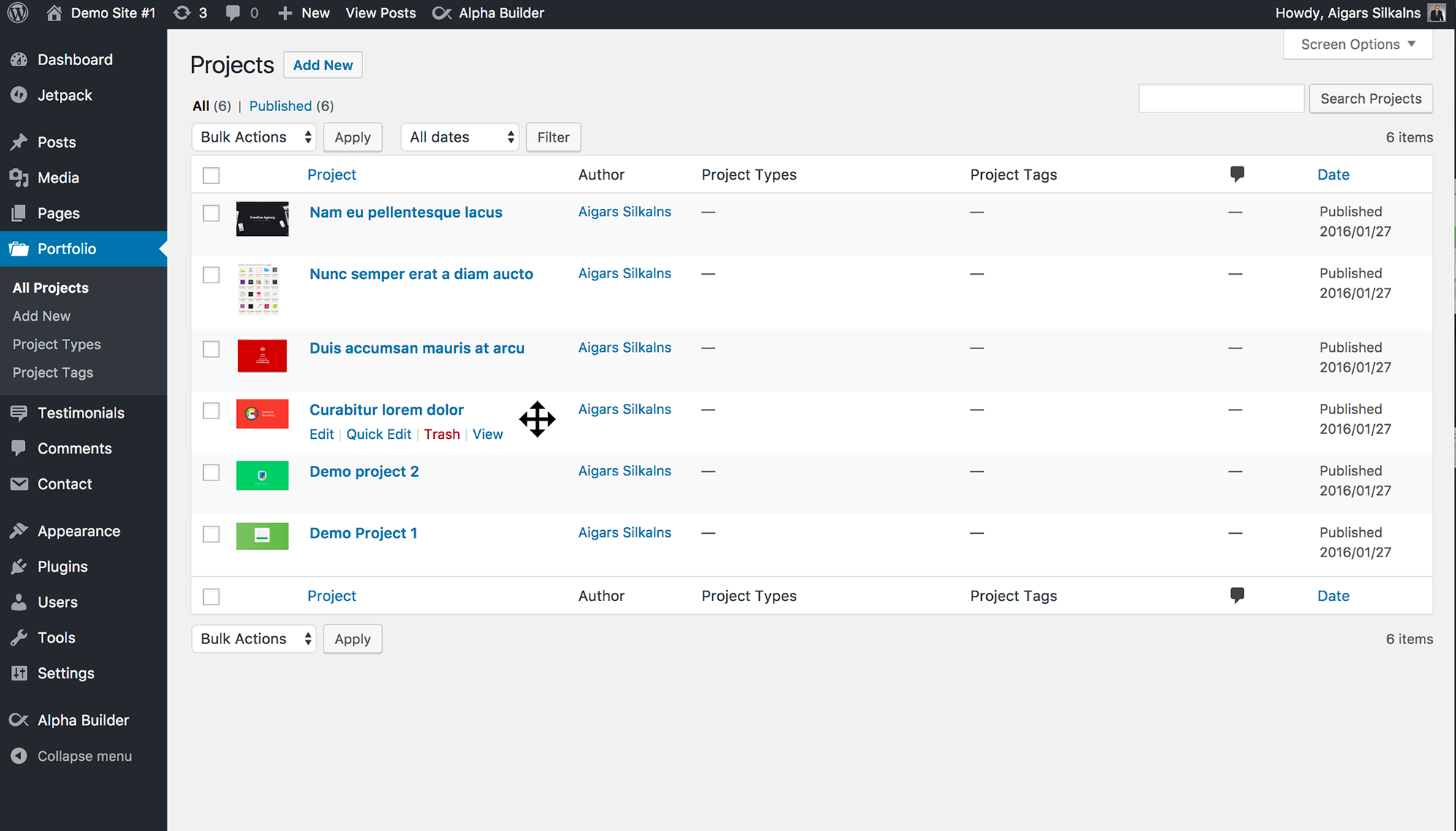
Drag-and-drop reordering of posts in the admin list table
-
Drag-and-drop reordering of custom post types
-
Plugin settings page - select post types and taxonomies to enable
About this plugin
Simple Custom Post Order is the easiest way to manually sort your WordPress content using drag-and-drop functionality. Whether you’re managing blog posts, portfolio items, WooCommerce products, team members, testimonials, or any custom post type, this plugin gives you complete control over your content order.
Why Choose Simple Custom Post Order?
- Zero Configuration – Works instantly after activation
- Drag & Drop Interface – Intuitive sorting directly in your admin post lists
- Universal Compatibility – Works with any post type and taxonomy
- Lightweight & Fast – No bloat, minimal impact on site performance
- Modern & Dependency-Free – Vanilla JavaScript drag-and-drop (no jQuery UI) with touch and full keyboard support
- Reliable Saving – Robust AJAX saving that works behind reverse proxies, custom ports, and HTTPS setups
- Developer Friendly – Clean code with action hooks for customization
Key Features
Sort Any Content Type
- Posts – Reorder your blog posts in any sequence you prefer
- Pages – Organize pages beyond alphabetical or date order
- Custom Post Types – Perfect for portfolios, team members, testimonials, products, events, FAQs, services, and more
- WooCommerce Products – Manually sort products in your shop
- Taxonomies – Reorder categories, tags, and custom taxonomies
Intuitive Admin Interface
- Smooth drag-and-drop sorting directly in the WordPress post list table
- Touch-friendly — press, hold, and drag to reorder on phones and tablets
- Fully keyboard accessible — tab to a row, then use Space and the arrow keys to reorder, with screen-reader announcements
- Clear save feedback — a “Saving… / Order saved” status appears as you sort
- Optional drag handle — show a grip icon on hover, or keep rows draggable from anywhere
- Changes saved automatically via AJAX – no page refresh needed
- Works seamlessly with the default WordPress admin experience
Smart Query Integration
- Automatically applies custom order to front-end queries
- Respects custom
orderbyparameters when explicitly set - Does not interfere with search results (maintains relevance sorting)
- Compatible with
get_posts(),WP_Query, and standard loops
Reset & Restore
- One-click reset to restore default ordering
- Reset individual post types without affecting others
- Useful when you need to start fresh with your content organization
Perfect For
- Bloggers – Feature important posts at the top of your blog
- Business Websites – Showcase key services or team members first
- Portfolio Sites – Display your best work in a specific order
- Online Stores – Highlight featured or seasonal products
- Membership Sites – Organize course content or resources
- News Sites – Pin important stories or announcements
- Event Websites – Arrange events in your preferred sequence
- Documentation Sites – Structure help articles logically
Use Cases
Portfolio Management
Arrange your portfolio items to showcase your best work first, group similar projects together, or create a visual narrative of your creative journey.
Team Page Organization
Display team members by hierarchy, department, or seniority rather than by when they were added to the system.
Product Highlighting
Feature seasonal items, bestsellers, or new arrivals at the top of your WooCommerce shop without relying solely on sorting by date or price.
Content Curation
Create curated reading lists by manually ordering posts in the exact sequence you want readers to discover them.
FAQ Organization
Sort frequently asked questions by importance or topic, ensuring the most relevant questions appear first.
Testimonial Display
Show your most compelling testimonials first to maximize their impact on potential customers.
Developer Features
Action Hooks
scp_update_menu_order– Fires after post order is updatedscp_update_menu_order_tags– Fires after taxonomy term order is updated
Filter Hooks
scpo_post_types_args– Modify which post types appear in settingsscpo_use_sortablejs– Force the drag engine in code (overrides the setting); returntruefor the modern SortableJS engine orfalsefor the classic jQuery UI sorterscpo_capability– Change the capability required to reorder (defaultedit_posts)
Drag & Drop Engine
Choose between the modern, dependency-free SortableJS engine (default) and the classic jQuery UI sorter under Settings > SCPOrder. The classic engine remains fully supported as a fallback.
Advanced View Mode
Enable the advanced view in settings to see all registered post types, including those normally hidden from the admin menu.
Supported Post Types
Simple Custom Post Order works with:
- WordPress Posts
- WordPress Pages
- WooCommerce Products
- Easy Digital Downloads Products
- Portfolio items (Jetpack, custom)
- Team member post types
- Testimonial post types
- Event post types (The Events Calendar, etc.)
- FAQ post types
- Any custom post type with
show_uienabled
Supported Taxonomies
- Categories
- Tags
- WooCommerce Product Categories
- WooCommerce Product Tags
- Custom taxonomies with
show_uienabled
How It Works
- Install & Activate – Install the plugin from WordPress.org or upload manually
- Configure – Go to Settings > SCPOrder and select which post types and taxonomies to enable
- Reorder – Visit any enabled post type list and drag items to reorder
- Done – Your custom order is automatically applied everywhere on your site
The plugin uses WordPress’s native menu_order field for posts and pages, and adds a term_order column for taxonomy terms. This approach ensures compatibility and data persistence.
Performance Optimized
- Targeted cache invalidation (only clears cache for modified items)
- Efficient database queries using prepared statements
- Scripts loaded only on relevant admin pages
- No front-end performance impact
Security First
- All database queries use prepared statements
- AJAX requests protected with nonce verification
- Capability checks ensure only authorized users can reorder
- Input sanitization on all user data
Additional Information
Support
For support questions, please use the WordPress.org support forum.
Bug Reports
Report bugs on our GitHub repository.
Contributing
Contributions are welcome! Please submit pull requests to our GitHub repository.
Credits
This plugin is made with love by the team at Colorlib.
Questions
- Does this plugin work with custom post types?
Yes! Simple Custom Post Order works with any custom post type that has
show_uienabled. This includes post types from popular plugins like WooCommerce, Easy Digital Downloads, Jetpack, and any custom post types you’ve created.- Will the custom order appear on my website’s front-end?
Yes, the custom order is automatically applied to all front-end queries for enabled post types. Your posts, pages, and custom content will display in your chosen order throughout your site.
- Does it work with page builders like Elementor or Divi?
Yes, as long as the page builder uses standard WordPress queries, your custom order will be respected. Most major page builders are compatible.
- Can I reset the order back to default?
Yes! Go to Settings > SCPOrder and use the “Reset Order” section at the bottom of the page. Select the post types you want to reset and click “Reset order”. This will clear the custom ordering for selected post types.
- Does it affect search results?
No, the plugin automatically preserves WordPress’s relevance-based sorting for search results. Your search functionality will work exactly as expected.
- Is it compatible with WooCommerce?
Yes, you can use Simple Custom Post Order to manually sort WooCommerce products, product categories, and product tags.
- Will it slow down my website?
No, the plugin is highly optimized. It only loads scripts on relevant admin pages and uses efficient database queries. There is no impact on front-end performance.
- Can multiple users reorder at the same time?
While technically possible, we recommend coordinating reordering activities to avoid conflicts. The last save wins if two users modify the same list simultaneously.
sandywp / also on the shelf
Try another plugin

Real Custom Post Order: Create a custom order for your content
4.8 · 8K+ installs
Custom post order for posts, pages, WooCommerce products and custom post types using drag and drop. Simple and intuitive sorting…

4.6 · 1K+ installs
Order posts separately for each terms and taxonomies

3.2 · 500+ installs
Order your post by category or custom post type by drag & drop interface.
Spin up a real WordPress site in seconds.
Test plugins, build a demo, hand a client a link — then squash it and start again. No local setup, no Docker.