sandywp / plugins / wp-accessibility-helper

WP Accessibility Helper (WAH)
Short Description WP Accessibility Helper helps solve accessibility problems
Ready in seconds.
v0.6.7 10,000+ installs WP 4.3+ PHP 7.4+
What you get inside
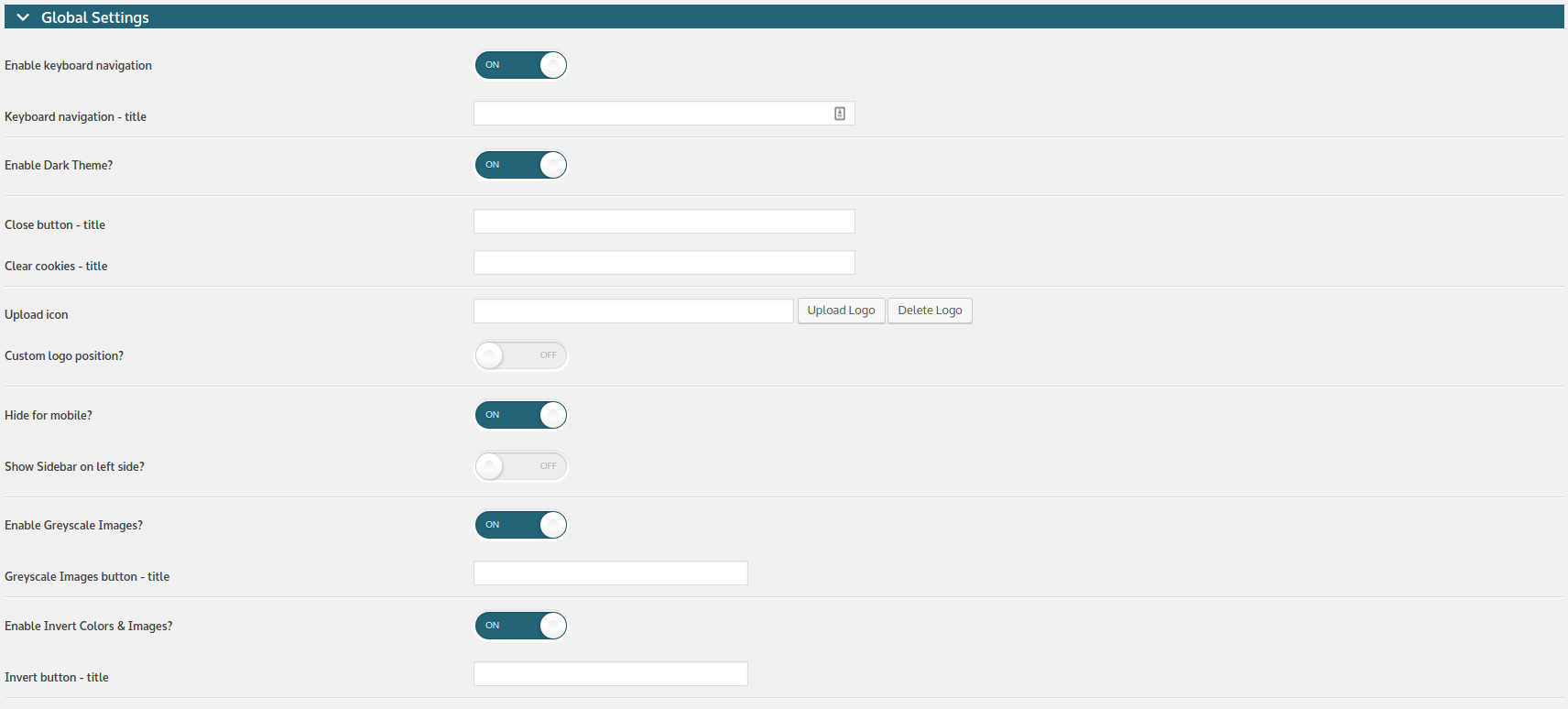
8 screens-
WP Accessibility Helper - Settings Page ( screenshot #1 )
-
WP Accessibility Helper - Settings Page - part 2 ( screenshot #1 )
-
WP Accessibility Helper - Front-end opened sidebar ( screenshot #3 )
-
WP Accessibility Helper - Attachments control center (admin-side) ( screenshot #4 )
-
WP Accessibility Helper - Landmark control center (admin-side) ( screenshot #5 )
-
WP Accessibility Helper with "Rowling" WordPress Theme ( screenshot #6 )
-
WP Accessibility Helper - sortable widgets (drag and drop)
-
WP Accessibility Helper - custom contrast variations
About this plugin
WordPress Accessibility made easy!
Web accessibility refers to the inclusive practice of removing barriers that prevent interaction with, or access to websites, by people with disabilities. When sites are correctly designed, developed and edited, all users have equal access to information and functionality.
WP Accessibility Helper helps solve accessibility problems like font size, contrast, titles and aria-label tags, images alt and more.
Official website
English version:
https://accessibility-helper.co.il/
Hebrew version:
https://accessibility-helper.co.il/il/
Privacy terms
- WAH free uses cookies to save contrast variation colors selected by user
- We are using cookies for internal usage only and never provide this data to the third party organizations/companies
Questions
- How can I report security bugs?
You can report security bugs through the Patchstack Vulnerability Disclosure Program. The Patchstack team help validate, triage and handle any security vulnerabilities. Report a security vulnerability.
- I can not see the accessibility icon. What shoud I do?
Please verify that your WordPress theme has: `
wp_head();wp_footer();
and your body tag has
body_class();
`- Font Settings
You should use REM units resize, only when your theme is built with REM units, not in PX (pixels). Zoom in/out page will be useful for websites with unclear html/css standards, a website that was overridden and fixed several times. For example, one part of a code was written in REM units, and the second part – in pixels or percents… Script base resize option will be useful for… everyone =) This script calculates font size for the next HTML tags: h1,h2,h3,h4,h5,h6,a.
- Full list of the (free version) plugin features:
- Skip links menu
- Reset font size button added ( when script base font resize option selected )
- Skip link inside accessibility sidebar
- Font resize (REM or ZOOM or SCRIPT)
- DOM Scanner – check pages and post for accessibility errors, like: image alt, links role and titles, and much more.
- Custom colors for contrast mode
- Lights Off mode
- Actions & Filters Hooks was added (please read FAQ section)
- Custom logo position
- Contrast mode (color gamma)
- Unload all css files (display page in raw html)
- Underline all links
- Highlight all links
- Attachments control center with ability add/edit images titles and alt tags ( screenshot #4 )
Alt+Z– open accessibility sidebarAlt+X– close accessibility sidebar- more info about accesskeys HERE
- Control all attachments images from one place with AJAX functions
role="link"for eachatag- Remove title attributes from links
- HTML5 Landmark control center ( screenshot #5 )
- Save contrast mode with user cookies
- Clear selection from cookies
- Hide for mobile devices – controls
- Sidebar position (left or right)
- Greyscale images controls
- Dark & Light Themes controls
- Font family controls (CSS Web Safe Font Combinations)
- Invert colors & images mode
- Remove CSS Animations option
- Readable Font option (quick swtich to Arial font family)
- Sortable widgets order (drag and drop)
Introduce Visual DOM Scanner! Documentation here.
- Video tutorials
- About the plugin author:
- Created and supported by Alex Volkov
- Official website
- Suggestions and ideas
- Ideas or new features requests upload HERE
- Video
WP Accessibility Helper Attachments control screen
sandywp / also on the shelf
Try another plugin

Web Accessibility (formally known as Ally) – WCAG Scanning, Guided Fixes,…
2.9 · 500K+ installs
Web Accessibility (formally known as Ally) is a free, powerful, and user-friendly plugin that helps WordPress creators build more…

4.8 · 60K+ installs
WP Accessibility fixes common accessibility issues in your WordPress site.

AccessibleWP – Accessibility Toolbar
4.5 · 20K+ installs
Add a professional accessibility toolbar to your WordPress site and make it easier for users with disabilities.
Spin up a real WordPress site in seconds.
Test plugins, build a demo, hand a client a link — then squash it and start again. No local setup, no Docker.