sandywp / plugins / pojo-accessibility

Web Accessibility (formally known as Ally)
WCAG Scanning, Guided Fixes, Usability Widget
Web Accessibility (formally known as Ally) is a free, powerful, and user-friendly plugin that helps WordPress creators build more accessible websites …
Ready in seconds.
v4.1.4 500,000+ installs WP 6.7+ PHP 7.4+
What you get inside
7 screens-
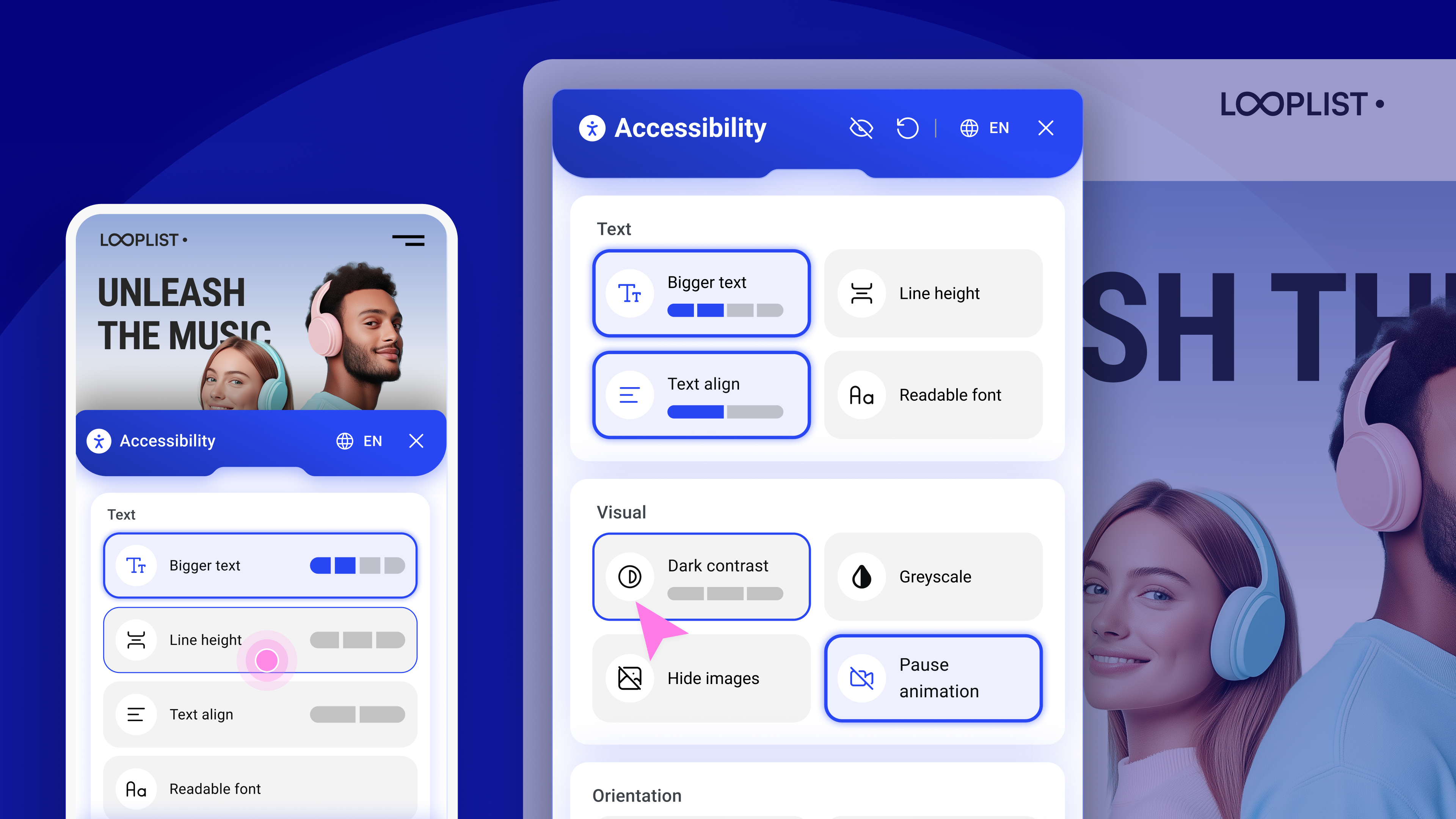
Usability widget: Large, well organized controls let visitors adjust text, contrast, animations, and more for a more comfortable browsing experience.
-
Accessibility button: Add a button that opens the accessibility menu in one click, and tailor its icon, color, label, and placement to match your brand.
-
Accessibility statement: Quickly generate and publish a custom statement that signals your commitment, improves transparency, and offers a clear way to report…
-
Accessibility Assistant: Scan any page to instantly detect over 180 common accessibility issues and get clear, guided steps for remediation inside your site…
-
Scan results: View issues highlighted in context and grouped by type such as alt text, ARIA, page structure, and more. Expand any item for step-by-step…
-
Color contrast: Fine tune text and background colors with live checks that validate contrast ratios.
-
Scanner dashboard: Track your site's accessibility scans, monitor open issues, and follow progress over time.
About this plugin
Web Accessibility (formally known as Ally) is a free, powerful, and user-friendly plugin that helps WordPress creators build more accessible websites with ease.
It simplifies accessibility with three essential tools:
- Accessibility Assistant – Scan your pages, detect accessibility violations, and follow guided steps to fix them. Make manual adjustments or apply AI-powered suggestions, and track your progress.
- Usability widget – Let visitors personalize their browsing experience with a floating accessibility menu. Features include font resizing, color contrast, image hiding, animation pausing, language selection, screen reader support, and more.
- Accessibility statement generator – Create a fully customized accessibility statement and publish it automatically on your site, helping meet WCAG and legal requirements.
No expertise required – Just activate, configure, and start making your site more inclusive today. Built by Elementor and designed for every WordPress site.
Why does web accessibility matter?
- Who Needs It? Every website owner, for businesses, creators, and agencies.
- Who is Responsible? Website owners are legally and ethically responsible for accessibility. The web creator who designs and builds the site must implement and adjust accessibility features to ensure compliance with WCAG guidelines and provide an inclusive experience for all users.
- Why Now? Rising legal requirements (WCAG, EAA) and better user experience.
- Why Should You Care? An accessible website isn’t just ethical; it’s good business. By prioritizing inclusivity, you improve user experience for everyone, boost your search engine rankings, and attract a wider audience.
It’s the Law
As accessibility standards continue to evolve and become mandatory, it’s important to start making website adjustments to comply with fast-approaching global regulations. Among its other capabilities, this plugin lets you instantly generate your website’s Accessibility Statement, which is now mandatory in most locales.
The Web Accessibility plugin is not a substitute for a thorough accessibility audit and is NOT intended to completely make your website legally compliant. However, with it, you’re one step closer to making your website inclusive to more visitors, including those with visual, auditory, or cognitive challenges.
Ensuring that your website complies with all applicable accessibility requirements is your responsibility. We recommend working with qualified accessibility professionals to help achieve full compliance.
Key Features & Benefits
Accessibility Assistant
- Scan any URL on demand to detect accessibility gaps
- Launch directly from WordPress or Elementor
- Step-by-step guidance to fix issues
- AI-powered remediation suggestions
- Progress tracking via a visual dashboard
- No accessibility expertise required
How It Works
Accessibility Assistant scans individual URLs for accessibility violations, categorizes them by type and severity, and provides actionable insights. You can apply manual fixes manually or use AI suggestions while tracking your progress over time. Accessibility Assistant helps you:
- Detect missing alternative text
- Label dynamic content & ARIA landmarks
- Validate forms & flag input errors
- Ensure keyboard & assistive tech compatibility
- Identify accessibility violations in tables
- Repair incorrect page structure & navigation
- Flag color contrast & visual style violations (coming soon)
- And detect 180+ other common accessibility violations based on WCAG 2.1 AA
Accessibility Statement Generator
- Auto-generate a complete accessibility statement
- Customize and publish to a dedicated page
- Link it using the widget
Usability Widget
- Offer visitors a customizable menu with features like:
- Contrast Modes (high, dark, light, negative)
- Font resizing & readable font toggle
- Pause animations & hide images
- Line height & text alignment options
- Keyboard navigation enhancements
- Underlined links & reading guide
- Skip to content / sitemap viewer
- Language selector
- Skip to Main Content
- Restore defaults & widget toggle
Premium widget features are also available within paid plans, including:
- Screen reader compatibility improvements
- White labeling (remove Elementor branding)
- Language selector directly in the widget
- Usage analytics to gain actionable insights from visitor interactions
Widget customization options for web creators
Tailor the widget’s look and behavior with options like:
- Show/hide widget icon on mobile or desktop
- Select icon type and size
- Choose colors for icon, header, and text
- Define icon position (corner selection)
- Add/edit sitemap URL
- Enable/disable features per device or user role
Get Started Today
Create a better user experience for all with Web Accessibility
Need help? Visit our help center or contact Support.
This plugin requires a connection to an active Elementor account to identify the user and provide the purchased service. This connection is initiated manually by the user via the plugin’s settings panel. Learn more about our terms and conditions. This plugin uses a 3rd party service operated by Elementor.
More accessibility features are on the way, so stay tuned!
Related Plugins
- Email Deliverability: Manage transactional emails with ease. High deliverability, detailed logs and statistics, and no SMTP plugins needed.
- Image Optimizer: Compress and optimize your images, giving you leaner, faster websites. Automatically optimize any new image you upload or run a bulk optimization process for existing uploads.
Questions
- What is the Web Accessibility plugin?
Web Accessibility is an accessibility plugin for WordPress websites. It helps web creators build more inclusive websites using a customizable widget, on-demand accessibility scans, AI-powered issue remediation, and a centralized dashboard to track progress.
- Who is Web Accessibility for?
Web Accessibility is ideal for freelancers, agencies, and DIY website owners who want to improve accessibility and align with WCAG standards
- Is Web Accessibility GDPR compliant?
Yes, Web Accessibility is GDPR compliant. To meet your privacy obligations, you must list Elementor as a sub-processor in your privacy notice. Our Data Processing Agreement (DPA) outlines all privacy-related requirements.
- Can Web Accessibility guarantee that my site is fully accessible?
No automated tool can promise full accessibility. Web Accessibility helps you detect and fix the most common violations, but achieving full compliance requires human testing and judgment. Think of Web Accessibility as a powerful assistant-not a complete substitute for manual review.
- What is an accessibility statement, and how do I create one?
An accessibility statement is a public declaration of your commitment to inclusive digital experiences. Web Accessibility helps you easily generate and publish one as a dedicated page on your website.
- Why do I need an Elementor account to use Web Accessibility?
An Elementor account lets you manage your Web Accessibility settings, track usage, and unlock advanced features like the Assistant and AI fixes.
- Can I customize the widget’s appearance?
Yes. You can personalize the widget’s icon, colors, size, position, and which features are shown on mobile or desktop.
- Can visitors hide the widget?
Yes. Visitors can choose to temporarily dismiss the widget for a session, 24 hours, or one week.
sandywp / also on the shelf
Try another plugin

4.8 · 60K+ installs
WP Accessibility fixes common accessibility issues in your WordPress site.

AccessibleWP – Accessibility Toolbar
4.5 · 20K+ installs
Add a professional accessibility toolbar to your WordPress site and make it easier for users with disabilities.

4.7 · 10K+ installs
Short Description WP Accessibility Helper helps solve accessibility problems
Spin up a real WordPress site in seconds.
Test plugins, build a demo, hand a client a link — then squash it and start again. No local setup, no Docker.