sandywp / plugins / wp-accessibility

WP Accessibility
WP Accessibility fixes common accessibility issues in your WordPress site.
Ready in seconds.
v2.3.5 60,000+ installs WP 5.9+ PHP 7.4+
What you get inside
1 screen-
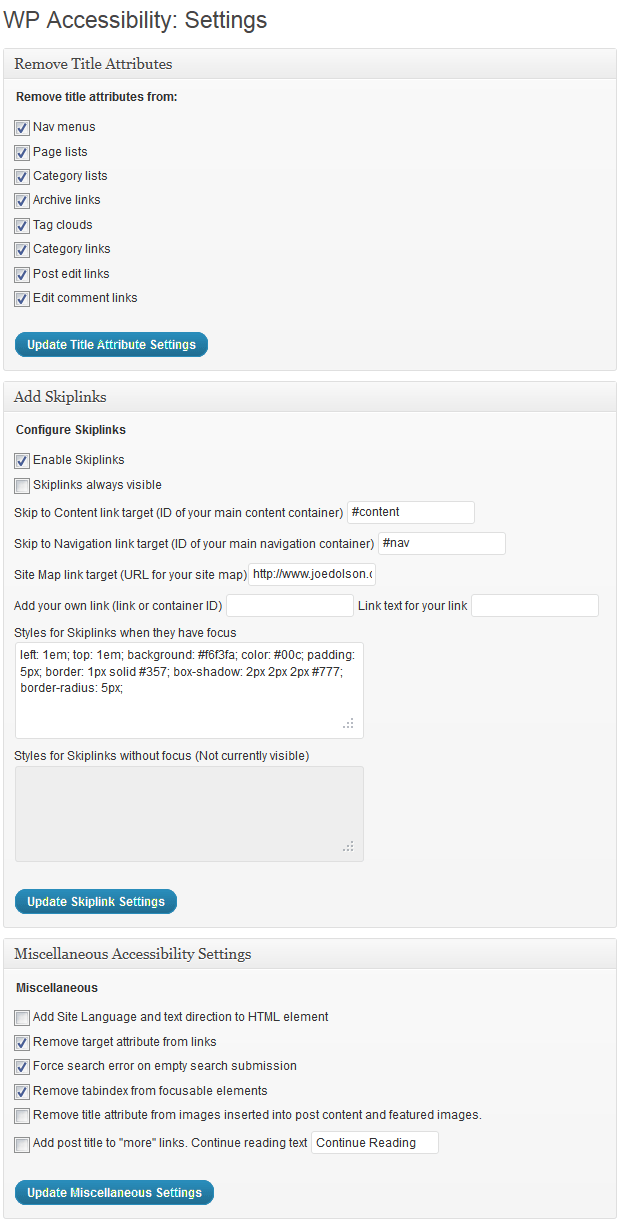
Settings Page
About this plugin
This plug-in helps with a variety of common accessibility problems in WordPress themes. While most accessibility issues can’t be addressed without directly changing your theme, WP Accessibility adds a number of helpful accessibility features with a minimum amount of setup or expert knowledge.
WP Accessibility is not intended to make your site compatible with any accessibility guidelines.
All features can be disabled according to your theme’s needs. For advanced users, all of the functions based on modifying stylesheets can be customized using your own custom styles by placing the appropriate stylesheet in your theme directory.
Theme Accessibility Features added by WP Accessibility
These are features that address issues caused by inaccessible themes.
- Add skip links with user-defined targets. (Customizable targets and appearance.)
- Add language and text direction attributes to your HTML attribute if missing.
- Add an outline to the keyboard focus state for focusable elements.
- Add a long description to images. Use the image’s “Description” field to add long descriptions.
- Enforcement for alt attributes on images in the Classic editor.
- Identify images without alt attributes in the Media Library
- Add labels to standard WordPress form fields (search, comments)
- Add post titles to “read more” links.
- Remove tabindex from elements that are focusable. (Also fixes plugin-caused problems.)
- Remove user-scalable=no to allow resizing.
WordPress Core Accessibility Issues fixed by WP Accessibility
These are features that address issues caused by current or past WordPress core accessibility issues. (Issues added in content, such as target or title attributes, are persistent even when WordPress is updated.)
- Force a search page error when a search is made with an empty text string. (If your theme has a search.php template.)
- Remove redundant title attributes from tag clouds.
- Disable default enabling of full screen block editor.
- Reverse infinite scrolling by default as of WordPress 7.1.
Content specific fixes:
- Strip title attributes from images inserted into content.
- Remove the target attribute from links.
Accessibility Tools in WP Accessibility:
These are tools provided to help you identify issues you may need to fix.
- Test the color contrast between two provided hexadecimal color values.
- Enable diagnostic CSS to show CSS-detectable problems in visual editor or on front-end of site.
- Search your media library on content in alt text fields.
Learn more! Read about the accessibility issues corrected by WP Accessibility!
The plug-in is intended to help with deficiencies commonly found in themes and to solve some issues in WordPress core. It can’t correct every problem (by a long shot), but provides tools to fix some issues, supplement the accessibility of your site, or identify problems.
Statistics Collection
WP Accessibility includes a statistics collection feature to help you identify how WP Accessibility is used on your site. This package does not collect any personally identifying data.
Learn more about WP Accessibility statistics.
Contribute!
Questions
- WP Accessibility is inserting some information via javascript. Is this really accessible?
Yes. It does require that the user is operating a device that has javascript support, but that encompasses the vast majority of devices and browsers today, including screen readers.
- I installed WP Accessibility and ran some tests, but I’m still getting errors WP Accessibility is supposed to correct.
Even if WP Accessibility is running correctly, not all accessibility testing tools will be aware of the fixes. Here’s a resource for more information: Mother Effing Tool Confuser.
sandywp / also on the shelf
Try another plugin

Web Accessibility (formally known as Ally) – WCAG Scanning, Guided Fixes,…
2.9 · 500K+ installs
Web Accessibility (formally known as Ally) is a free, powerful, and user-friendly plugin that helps WordPress creators build more…

AccessibleWP – Accessibility Toolbar
4.5 · 20K+ installs
Add a professional accessibility toolbar to your WordPress site and make it easier for users with disabilities.

4.7 · 10K+ installs
Short Description WP Accessibility Helper helps solve accessibility problems
Spin up a real WordPress site in seconds.
Test plugins, build a demo, hand a client a link — then squash it and start again. No local setup, no Docker.