sandywp / plugins / the-events-calendar

The Events Calendar
The Events Calendar: #1 calendar plugin for WordPress. Create/manage events (virtual too!) on your site with the free plugin.
Ready in seconds.
v6.17.3.1 600,000+ installs WP 6.7+ PHP 7.4+
What you get inside
8 screens-
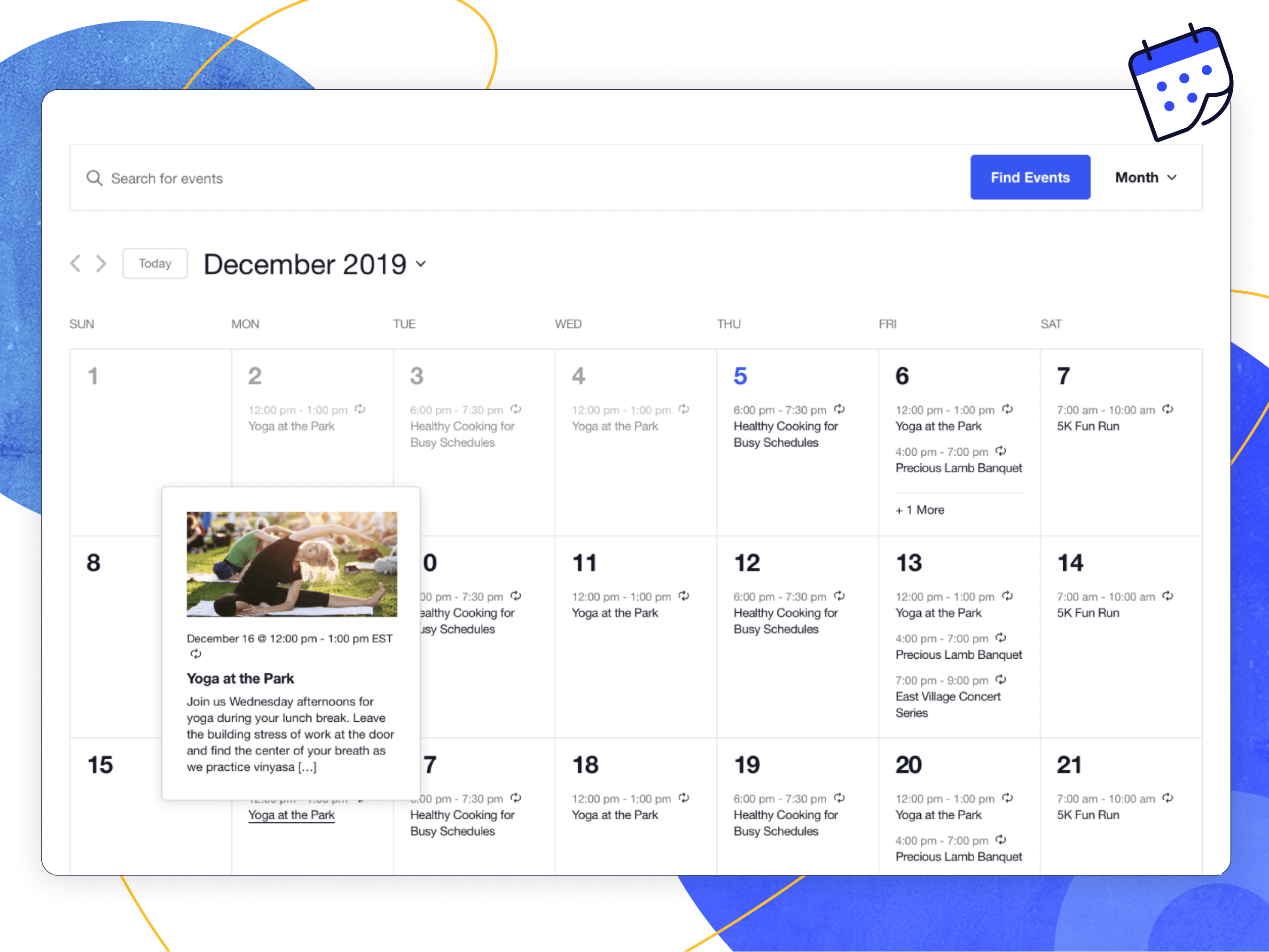
Month View with hover
-
Mobile Views
-
Single event
-
List View
-
Event Editor
-
Events admin listing
-
General Settings
-
Display Settings
About this plugin
Easily create and manage an events calendar on your WordPress site with The Events Calendar free plugin. Whether your events are in-person or virtual events, this WordPress calendar plugin boasts professional features backed by our world-class team of developers and designers.
See more videos on our YouTube channel
Packed with loads of features, The Events Calendar is ready to go out of the box. It’s also extensible, easy to use, and completely customizable.
📅 The #1 Calendar for WordPress
See the calendar in action on our demo experience. Just getting started? Read through the New User Primer to get set up.
Looking for additional features like recurring events, ticket sales, user-submitted events, automatic imports, and more?
Check out Events Calendar Pro, Event Aggregator, and more add-ons.
🔌🎨 Plug and Play or Customize
The Events Calendar is built to work out of the box. Simply install the plugin, configure your settings, and start creating events in minutes.
Want to add your personal touch? Use The Events Calendar as the foundation for customization. Personalize to your heart’s content with the help of a skeleton stylesheet, partial template overrides, template tags, hooks and filters, careful documentation, and a library of free extensions.
Whether your vision is big or small, you’re in good company. Hundreds of thousands of small businesses, musicians, venues, restaurants, and non-profits are publishing and promoting their in-person and virtual events with The Events Calendar. Our plugins have also been scaled to work on large networks for Fortune 100 companies, universities, and government institutions.
✨ Features
Our feature-rich plugin comes with everything you need to create and manage your calendar.
✔️ Rapidly create events
✔️ Saved venues & organizers
✔️ Calendar month view with tooltips
✔️ Event List view
✔️ Day view
✔️ Block Editor support
✔️ Event search
✔️ Google maps
✔️ Widget: Upcoming events list
✔️ Events Taxonomies (Categories & Tags)
✔️ Google Calendar and iCal exporting
✔️ WP REST API endpoints
✔️ Completely ajaxified for super smooth browsing
✔️ Completely responsive from mobile to tablet to desktop
✔️ Tested on the major theme frameworks such as Avada, Divi, Enfold, Genesis, and many more.
✔️ Increase your SEO with JSON-LD Structured Data
✔️ Internationalized & translated
✔️ Multiple stylesheets to improve integration
✔️ Extensive template tags for customization
✔️ Hooks & filters galore
✔️ Caching support
✔️ Debug mode for developers
✔️ Library of extensions
📃 Documentation
All of our documentation can be found in our Knowledgebase.
Additional helpful links:
If you have any questions about this plugin, you can post a thread in the WordPress.org forum. Please search existing threads before starting a new one.
Add-Ons
Take your calendar to the next level by pairing it with our plugins for ticketing, crowdsourcing, email marketing, and more. Learn more about all our products on our website.
Our Free Plugins:
🎟️ Event Tickets
📐 Advanced Post Manager
Our Premium Plugins and Services:
⚡ Events Calendar PRO
↪️ Event Aggregator (service)
🎟️ Event Tickets Plus
✉️ Promoter
👥 Community Events
✏️ Filter Bar
🗓️ Eventbrite Tickets
Help
If you aren’t familiar with The Events Calendar, check out our New User Primer. It will have you creating events in no time.
Ready to dig deeper? Check out these resources:
We check in on the The Events Calendar forum here on WordPress.org about once a week to help users with basic troubleshooting and identifying bugs. If you’re looking for premium, personalized support, consider upgrading to Events Calendar Pro.
Still have a question? Shoot us an email at [email protected].
Questions
- Are there any troubleshooting steps you’d suggest I try that might resolve my issue before I post a new thread?
First, make sure that you’re running the latest version of The Events Calendar. If you’re running Events Calendar PRO or any other add-ons, make sure those are current / running the latest code as well.
The most common issues we see are either plugin or theme conflicts. You can test if a plugin or theme is conflicting by manually deactivating other plugins until just The Events Calendar is running on your site. If the issue persists from there, revert to the default Twenty Twenty theme. If the issue is resolved after deactivating a specific plugin or your theme, you’ll know that is the source of the conflict.
Note that we aren’t going to say “tough luck” if you identify a plugin/theme conflict. While we can’t guarantee 100% integration with any plugin or theme out there, we will do our best (and reach out the plugin/theme author as needed) to figure out a solution that benefits everyone.
- I’m still stuck. Where do I go to file a bug or ask a question?
Users of the free The Events Calendar should post their questions in the plugin’s WordPress.org forum, which we visit about once a week. Please make sure to read our sticky post providing an overview of the support we provide free users BEFORE posting. If you find you’re not getting support in as timely a fashion as you wish, you might want to consider purchasing a license for Events Calendar Pro.
If you’re already an Events Calendar Pro user, you’re entitled access to our actively-monitored Premium Support on our website. We can provide a deeper level of support here and hit these forums on a daily basis during the work week. Generally, except in times of increased support loads, we reply to all tickets within 24-48 hours during the business week.
- What’s the difference between The Events Calendar and Events Calendar Pro?
The Events Calendar is our cornerstone plugin, and it’s required in order to run any of our premium calendar add-ons, including Events Calendar Pro, Community Events, Filter Bar, and others.
In other words, Events Calendar Pro runs alongside The Events Calendar and enhances it with extra features, including recurring events, additional calendar views, calendar shortcodes, advanced widgets, custom event fields and more.
- What add-ons are available for The Events Calendar, and where can I read more about them?
The following add-ons are available for The Events Calendar:
- Events Calendar Pro, for adding premium calendar features like recurring events, advanced views, cool widgets, shortcodes, additional fields, and more!
- Event Aggregator, a service that effortlessly fills your calendar with events from Meetup, Google Calendar, iCalendar, Eventbrite, CSV, and ICS.
- Event Tickets (free), which allows you to sell tickets and collect RSVPs to events. It can run alongside The Events Calendar or as a standalone plugin that adds ticket and RSVP functionality to WordPress posts and pages.
- Event Tickets Plus, which allows you to sell tickets for your events using your favorite e-commerce platform.
- Promoter, automated email communication made just for The Events Calendar and Event Tickets. Stay in touch with your attendees every step of the way.
- Community Events, for allowing frontend event submission from your readers.
- Filter Bar, for adding advanced frontend filtering capabilities to your events calendar.
- Eventbrite Tickets, for selling tickets to your event directly through Eventbrite.
- Can I import events to my calendar?
Yes! The Events Calendar has a built-in CSV import tool. If you want to step it up and automatically import events from Google Calendar, Meetup, Eventbrite and more, check out Event Aggregator.
- How do I sell tickets to events on my calendar?
You’ll want to use our Event Tickets plugin for that. This free plugin works alongside The Events Calendar and lets you create RSVPs and tickets for events. Event Tickets integrates with PayPal so you can collect payments for tickets, while our premium solution, Event Tickets Plus fully integrates with WooCommerce or Easy Digital Downloads. If you want to include digital tickets like Apple Wallet passes and PDF tickets check out Event Tickets Wallet Plus.
- Can I have more than one calendar on my site?
Unfortunately, no. However, you can use event categories or tags to create calendar views that only display certain events. For example, you could create a direct link to a calendar view that only shows events categorized as “Fitness,” like this example from our demo site.
With Events Calendar Pro, you can use shortcodes to embed your calendar on other WordPress pages and posts, then filter that calendar by category.
- Can I allow people to submit events to my calendar?
This is available with the Community Events add-on to facilitate submissions. Install Community Events alongside The Events Calendar and a page will be added to your WordPress site with a form that visitors can use to submit events. As the calendar owner, you have full control over whether event submissions are published immediately or require moderation first.
If you want to let users sell tickets for the events they submit, check out Community Tickets. It runs with The Events Calendar, Community Events, and Event Tickets and empowers visitors to create and sell tickets, splitting the profits with you.
sandywp / also on the shelf
Try another plugin

Events Manager – Calendar, Bookings, Tickets, and more!
4.2 · 60K+ installs
Events calendar with bookings, scheduling, appointments, event registration, tickets, recurring events, and venue management.

SimplyBook.me – Booking and reservations calendar
4.5 · 30K+ installs
Simply add a booking calendar to your site to schedule bookings, reservations, appointments and to collect payments.

Timetable and Event Schedule by MotoPress
4.3 · 30K+ installs
Smart event organizer and time-management tool with a clean minimalist design for featuring your timetables and upcoming events.
Spin up a real WordPress site in seconds.
Test plugins, build a demo, hand a client a link — then squash it and start again. No local setup, no Docker.