sandywp / plugins / events-manager

Events Manager
Calendar, Bookings, Tickets, Appointments and more!
Events calendar and booking system: bookings, reservations, appointments, scheduling, event registration, tickets and recurring events.
Ready in seconds.
v7.6 60,000+ installs WP 6.1+ PHP 7.4+
What you get inside
8 screens-
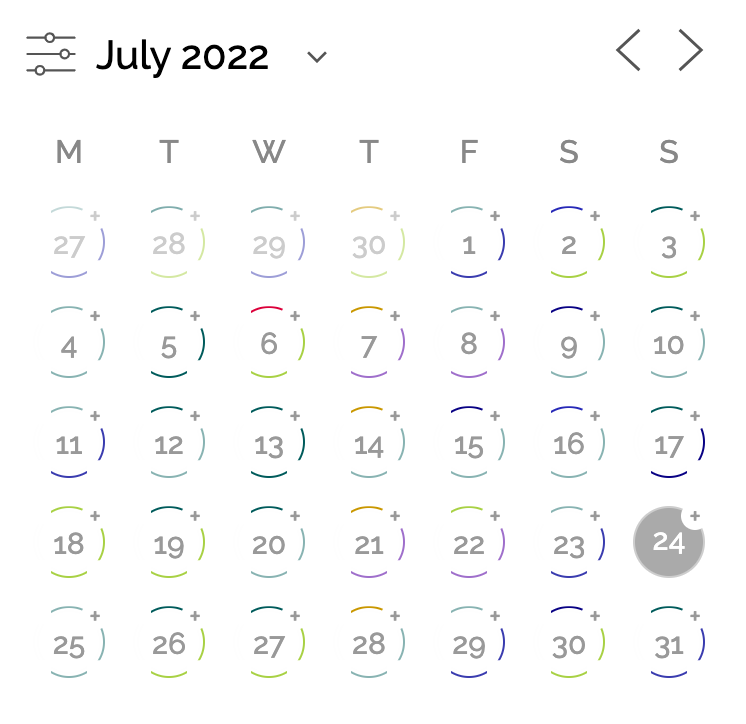
Innovative responsive calendar with rings to show eventful dates, colored by category, clickable to expand more event information.
-
Completely customizable event widgets/blocks and shortcodes.
-
Beautiful event pages which can be completely customized via our settings page.
-
Share your events to popular calendar clients.
-
Display information about your location in widgets, blocks and shortcodes too.
-
Full-featured statistics and insights into your ticket sales via multiple graph types, including comparison and stacking.
-
Easily skip to the future with our new calendar navigation and search filters.
-
Easy-to-use search filters, whether on the phone or desktop.
About this plugin
Events Manager is a full-featured event calendar and booking system for WordPress: bookings, reservations, appointments, scheduling, event registration and ticketing, ideal for everything from simple meetups to full-scale event planning. Schedule one-off dates, recurring series or timeslots, take online bookings and sell tickets, all from one plugin built with flexibility, reliability and powerful features in mind.
Main Features
- NEW Migrate from The Events Calendar: events, venues, organizers, categories, tags, tickets and attendees, keeping your existing web addresses
- NEW Import events, locations and organizers from a CSV file
- NEW Hybrid events: sell in-person and online tickets for the same event, with virtual locations and links hidden until shortly before the start
- NEW Spaces held for visitors while they complete the booking form
- NEW Event organizers
- NEW Integrate easily with your favourite AI via MCP, unlock the power of AI-powered Events!
- NEW API Rest Integration
- NEW EU Compliance Tools for “Right of withdrawal” (EU ‘Widerrufsbutton’)
- Beautiful calendars, search pages, lists, grids and booking forms to enhance your site events.
- Availability and reservation calendar: real-time availability per event, ticket and timeslot, shown on booking forms and exposed via the REST API
- Easy event registration and booking forms (single day with start/end times), with custom form fields in Pro
- Recurring and long (multi-day) event registration
- Build complex recurrence patterns with exclusion/blackout dates
- NEW Multiple time slots (timeslots) within the day for events with advanced creation options, so any event can work as a simple appointment scheduler
- Overlapping timeslots
- Buffer between timeslots
- Appointment booking with buffers between slots and capacity per slot
- Class and session timetables: a timetable built from timeslots, recurring events and calendar or list views
- Bookings and attendee management: approvals and rejections, attendee lists, CSV export and confirmation emails
- A complete booking and reservation system for events and timeslots, with online booking for members or guests and payments via PayPal, Stripe, Square and more (Pro)
- Sell tickets online with multiple ticket types, pricing and availability limits per ticket (payments via Pro)
- Event ticketing with PDF tickets by email, check in/out and QR scanning on your phone (Pro)
- Free RSVP or paid registration for any event, with attendee limits, approvals and waiting lists (Pro)
- Capacity limits per event, ticket and timeslot, with sold-out handling and waitlists (Pro)
- Fully-featured graph and statistics including bar/line/pie with comparison and stacking
- MultiSite Event Support
- Cross-Network Event Sharing – show your events and booking forms on other subsites or main site
- Network-wide Global Booking Management
- BuddyPress and BuddyBoss Support
- Create modular (independent) event subsites or inter-networked events
- Multiple custom event types (Archetypes), such as Workshops, Seminars, Events, Webinars, Appointments etc.
- Customize your labels, slugs and CPT names
- Enable or disable specific features for specific event archetypes.
- Multiple Location Types
- Physical Locations
- Virtual locations for online events (custom links and URLs)
- Hybrid events combining a physical and a virtual location
- Zoom Webinars/Meetings Integration
- BuddyPress & BuddyBoss Support
- Submit Events
- Group Events
- Personal Events
- Activity Stream
- more on the way
- Guest/Member Event submissions
- Assign event venues and locations and view events by location
- Event categories
- Easily create custom event attributes (e.g. dress code)
- Google Maps (see our API usage recommendations)
- Advanced permissions – restrict user management of events and locations.
- Widgets for Events, Locations and Calendars
- Fine grained control of how every aspect of your events are shown on your site, easily modify templates from the settings pages and template files
- iCal Feed (single and all events)
- Add to calendar buttons for Google Calendar, Outlook, Office 365, Apple Calendar and iCal
- RSS Feeds
- Compatible with SEO plugins
- Timezone Support – create events in different timezones
- Plenty of template tags and shortcodes for use in your posts and pages
- Gutenberg block editor support, with native blocks for the Events Calendar, Events List, and Locations List, usable in posts, pages, the site editor and the widget editor
- Actively maintained and supported
- Lots of documentation and tutorials
- NEW Gutenberg Supported
- And much more!
Use Cases
Events Manager runs on one model: an event with dates or timeslots, a capacity and optional tickets. That covers a lot more than events, and these are all in use today:
- Conferences and festivals: multi-day events with multiple ticket types, sessions, attendee forms and QR check-in (Pro)
- Seminars, workshops and webinars with online registration and event ticketing
- Concerts and gigs: sell concert tickets with multiple ticket types, PDF tickets and QR check-in (Pro), general admission only
- Theatre tickets (theater) and museum tickets: repeat performances, timed entry for galleries and exhibitions, multiple ticket types and PDF tickets, general admission without seat maps
- Community events calendars where members and guests submit their own events for approval, with BuddyPress and BuddyBoss support
- Church events, nonprofit events and charity fundraisers (non-profit): recurring services, galas and volunteer days with free RSVPs or paid tickets across multiple locations
- School, college and university events: term calendars, bookable parent evening timeslots and paid trips with capacity limits
- Sports events for clubs: fixtures, tournaments and race entries with registration, capacity limits and payment
- Fitness classes, gym bookings, yoga, pilates and dance classes: weekly timetables with limited spaces per session
- Courses, training sessions, lessons and coaching: dated or recurring sessions with attendee limits and payments
- Consultation booking for advisers, consultants and practitioners on a single bookable calendar, with a custom form and optional payment
- Appointment scheduling and online scheduling for solo practitioners, tutors and studios
- Tour booking for guided walks, city tours and timed visits: scheduled departures with a head count and a price per place
- Escape rooms and activity venues: fixed-length sessions with buffers between them and a group size cap
- Restaurant reservations for set sittings, tasting menus and supper clubs: each service is a timeslot with a cover limit, booked by head count rather than per table
- Online reservations for sittings, sessions and classes, each with its own time, capacity and optional payment
- Let visitors book online without creating an account, for any event, ticket or timeslot, and pay on the spot (Pro)
AI Integration
AI is here, and we’re on board! Check out what’s possible with our new and evolving AI integration possibilities:
Data Privacy and GDPR Compliance
We provide the tools to help you be GDPR compliant, including:
- export/erasure of data via the WordPress Privacy Tools, including booking, event and location data
- consent checkboxes on our booking, event and location forms on the frontend
- settings to control what can be exported/erased as well as where/when to place consent requests
- sample text for your site privacy policy describing what Events Manager does with personal data
Premium Features
We have a premium Pro add-on for Events Manager which not only demonstrates the flexibility of Events Manager, but also adds some important features including but not limited to:
- WooCommerce integration (sold separately)
- PayPal, Stripe, Authorize.net, Square, Xero and Offline Payments
- Custom booking forms
- Individual Attendee custom forms
- Upload fields for bookings, attendees and users
- Printable Invoices and Tickets
- Send PDF tickets/invoices by email automatically
- QR code check-in and ticket scanner: scan tickets on your phone and check attendees in or out
- iOS phone app for organisers: manage bookings and check attendees in on the go (Android app coming soon)
- Waitlist / waiting list for sold-out events and tickets
- Automation – ultimate flexibility in automation!
- Triggers:
- X time before/after events start
- When a booking status changes
- When a booking was booked x time ago
- Actions
- Send Webhook (Zapier, MS Automation and many other services)
- Send Email
- Send WhatsApp, SMS, Telegram notifications
- Automated event reminders, booking reminders and appointment reminders by email, or by SMS, WhatsApp and Telegram with the Connect add-on
- SMS reminders, WhatsApp and Telegram reminders, notifications and interactive flows via the Events Manager Connect add-on
- Coupon and discount codes
- Custom booking email per event and gateway
- Faster support via private Pro forums
For more information or to go pro, visit our plugin website.
Additional Plugin Integrations
Whilst there’s many third party integrations with our own plugin, here’s some we’ve integrated ourselves!
- Included in Events Manager (automatic integration)
- Additional Add-Ons
External services
The Events > Add-ons screen in your dashboard lists the add-ons available for Events Manager and the Pro plans with their current prices, and may show a notice about a current promotion. The pictures on that screen are loaded by your browser from eventsmanagerpro.com. When an administrator opens that screen, the plugin downloads this list from eventsmanagerpro.com (https://eventsmanagerpro.com/api/add-ons/), at most once a day, once more that day if the administrator clicks Refresh, and once more when a promotion shown on the screen has ended. A download that fails is tried again an hour later, or sooner if the administrator clicks Try again. This is a standard WordPress request: it carries your site’s address and WordPress version in its user agent, as WordPress adds to the requests it makes, and your server’s IP address is visible as with any HTTP request. eventsmanagerpro.com keeps a record of the site address, WordPress version and IP address of each request. Nothing else about your site or its users is sent, and nothing is downloaded anywhere else in the plugin or in the background. eventsmanagerpro.com is run by Pixelite SL, the makers of Events Manager: terms, privacy policy.
Questions
- What can I use Events Manager for?
Events Manager is built to handle a wide range of use cases, including:
- Managing events, meetups, workshops and webinars
- Scheduling appointments and recurring events
- Planning and promoting conferences or festivals
- Handling event registration, RSVP, ticketing and ticket sales
- Accepting bookings with optional payments
- Managing venues and multiple event locations
- Creating a public event calendar for your website visitors
See our FAQ page for help with Events Manager – Calendar, Bookings, Tickets, Appointments and more!
sandywp / also on the shelf
Try another plugin

Booking for Appointments and Events Calendar – Amelia
4.6 · 90K+ installs
Amelia is a powerful booking plugin for appointments and events. Manage scheduling, calendars, and availability with an…

Online Scheduling and Appointment Booking System – Bookly
4.4 · 60K+ installs
Appointment booking system for WordPress — schedule appointments, manage calendars, send reminders, take payments. Start booking…

5.0 · 50K+ installs
Unlimited appointments, booking calendars, and notifications. Powerful appointment booking plugin and booking system. Start…
Spin up a real WordPress site in seconds.
Test plugins, build a demo, hand a client a link — then squash it and start again. No local setup, no Docker.