sandywp / plugins / wpvivid-backuprestore

WPvivid — Backup, Migration & Staging
All-in-one WordPress backup, migration and staging plugin — schedule automatic backups, restore in one click, and migrate or clone sites safely.
Ready in seconds.
v0.9.134 900,000+ installs WP 4.5+ PHP 5.3+
What you get inside
6 screens-
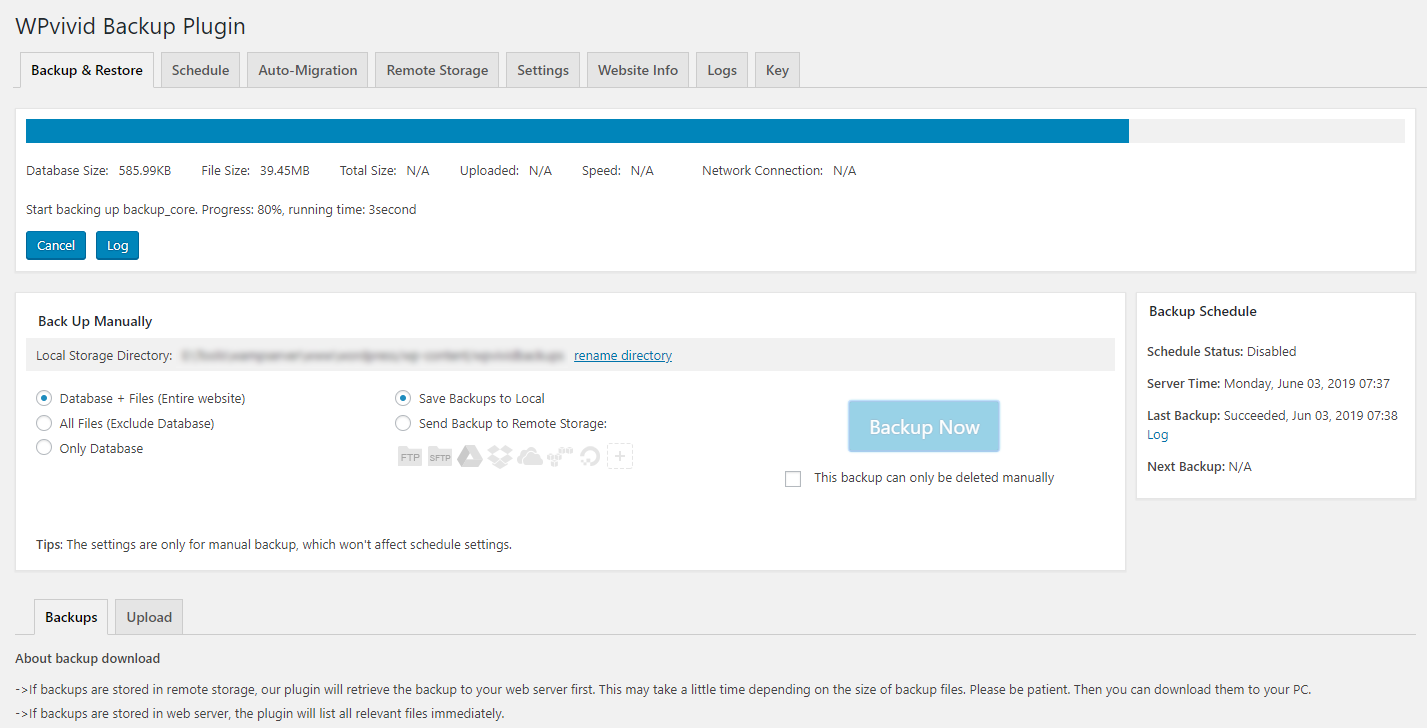
Backing up a site
-
Backup list
-
WPvivid Backup & Migration plugin Dashboard
-
Configure remote backups
-
Migrate a WordPress site to a new domain
-
Upload a backup to restore or migrate
About this plugin
WPvivid Backup & Migration Plugin offers backup, migration, and staging (create a staging site on a subdirectory to safely test WordPress, plugins, themes and website changes) as basic features.
WPvivid Backup & Migration for MainWP
WPvivid Backup & Migration for MainWP is now available to download.
WPvivid Backup & Migration for MainWP allows you to set up and control WPvivid Backup & Migration plugins for all child sites directly from your MainWP dashboard.
WPvivid Backup & Migration Pro is Now Available
- Customize everything to backup
- Create staging sites and push staging sites to live
- Incremental backups
- Database backup encryption
- Auto backup WordPress, themes, and plugins
- WordPress multisite backup
- WordPress multisite staging
- Create a fresh WP install
- Advanced remote backups
- Advanced backup schedules
- Restore remote backups
- Migrate a site via remote storage
- Migrate a childsite (MU) to a single WordPress install
- White label WPvivid Backup & Migration Pro
- Control user access to WPvivid Backup & Migration Pro
- More amazing features
See a review video on WPvivid Backup & Migration Pro:
Get WPvivid Backup & Migration Pro
Core Features
1. Easy Backups
Easily create a backup of your WordPress site. You can choose to backup the entire site(database+files), all files, or database only.
2. Auto Migration
Clone and migrate your WordPress site to a new domain with a single click. WPvivid Backup & Migration Plugin supports site migration from dev environment to a new server, from dev environment to a new domain or from a live server to another.
3. Create A Staging Site
Create a staging site on a subdirectory of your production site to safely test WordPress, plugins, themes and website changes. You can choose what to copy from the the live site to the staging site.
4. Scheduled Backups
Set a schedule to run backups automatically on your website. You can set the backups to run every 12 hours, daily, weekly, fortnightly, monthly, choose backup items and destination.
5. Offsite Backup to Remote Storage
Send your backups offsite to a remote location. WPvivid Backup & Migration Plugin supports the leading cloud storage providers: Dropbox, Google Drive, Amazon S3, Microsoft OneDrive, DigitalOcean Spaces, FTP and SFTP.
6. One-Click Restore
Restore your WordPress site from a backup with a single click.
7. Cloud Storage Supported
WPvivid Backup & Migration plugin supports Dropbox, Google Drive, Microsoft OneDrive, Amazon S3, DigitalOcean Spaces, SFTP, FTP. WPvivid Backup & Migration Pro also supports Wasabi, pCloud, Backblaze, WebDav and more.
Minimum Requirements to use WPvivid Backup & Migration plugin
- Character Encoding UTF-8
- PHP version 5.3
- MySQL version 4.1
- WordPress 4.5
External Services
This plugin can optionally connect to third-party storage providers — Google Drive, Dropbox, Microsoft OneDrive, Amazon S3, DigitalOcean Spaces, and FTP/SFTP servers — to store backup files. When remote storage is enabled, backup archives and required authentication tokens are sent to the selected service’s API. Use of these services is subject to their own terms and privacy policies.
Questions
- What does WPvivid Backup & Migration Plugin do?
As the name says, WPvivid Backup & Migration Plugin is an all in one free WP backup & migration plugin that enables you to easily clone and migrate a WordPress site to a new domain, to perform manual backups and schedule automatic backups of your WordPress site, to backup to cloud storage and restore backups directly from your sites admin dashboard.
- Does WPvivid Backup & Migration Plugin also migrate my site? Is it a free feature?
Yes, WPvivid Backup & Migration Plugin supports migration of a WordPress site.
Yes, the migration feature is completely free.- How many cloud options does WPvivid Backup & Migration Plugin support? Are they free to access?
Out of the box WPvivid Backup & Migration Plugin supports Dropbox, Google Drive, Amazon S3, Microsoft OneDrive, DigitalOcean Spaces, FTP, and SFTP.
Yes, all the cloud access is free.- Can I use WPvivid Backup & Migration Plugin to restore my site?
Yes, you can use WPvivid Backup & Migration Plugin to restore a WordPress site from a backup. With no limits, no strings attached.
- Do you provide support for WPvivid Backup & Migration Plugin? Where?
Yes, absolutely. Whenever you need help, start a thread on the support forum for WPvivid Backup & Migration Plugin, or contact us.
- Do you have any get-started guides/docs?
Yes, we do. Here are the guides for migrating your site to a new host, creating a manual backup, restoring your site from a backup, and more on our docs page.
sandywp / also on the shelf
Try another plugin

All-in-One WP Migration and Backup
4.5 · 5M+ installs
Trusted by 60M+ sites: The gold standard for WordPress migration and backup. Migrate, backup, and restore your WordPress site…

UpdraftPlus: WP Backup & Migration Plugin
4.8 · 3M+ installs
Backup, restore or migrate your WordPress website to another host or domain. Schedule backups or run manually. Migrate in minutes.

Jetpack – WP Security, Backup, Speed, & Growth
3.7 · 3M+ installs
Improve your WP security with powerful one-click tools like backup, WAF, and malware scan. Includes free tools like stats, CDN…
Spin up a real WordPress site in seconds.
Test plugins, build a demo, hand a client a link — then squash it and start again. No local setup, no Docker.