sandywp / plugins / jetpack

Jetpack – AI Agents & MCP, Security, Backup & Analytics
Connect ChatGPT, Claude, or another AI agent to your site. Plus backup, malware scan, firewall, stats, CDN, and SEO tools in one plugin.
Ready in seconds.
v16.4 3,000,000+ installs WP 7.0+ PHP 7.4+
What you get inside
7 screens-
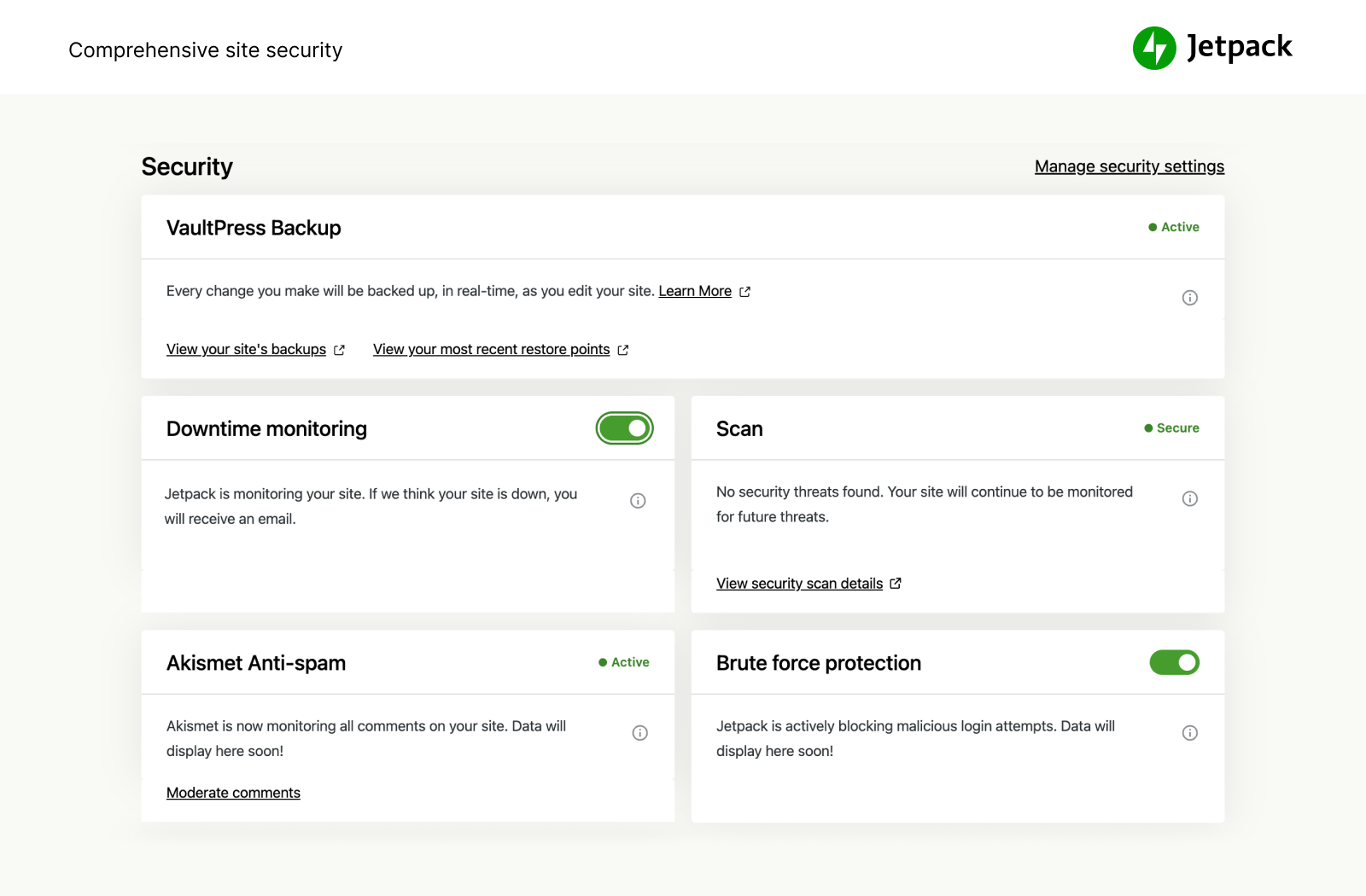
Jetpack Pro and Complete provide easy-to-use, comprehensive WordPress site security including backups, malware scanning, and spam protection.
-
Save every change with real-time backups and get back online quickly with one-click restores.
-
Automated malware scanning and one-click fixes keep your site one step ahead of security threats.
-
Promote your newest posts, pages, and products across your social media channels.
-
Incredibly powerful and customizable, help your visitors instantly find the right content – right when they need it.
-
See what’s working with content performance metrics. Simple, yet powerful stats to grow your site.
-
Stunning‑quality video with none of the hassle. Drag and drop videos through the WordPress editor and keep the focus on your content, not the ads.
About this plugin
Your WordPress site, now in the conversation
Jetpack connects your WordPress site to ChatGPT, Claude, and the other AI agents you already use. Ask in plain language to draft a post, see which pages got the most views, check your backups, or run a security scan, and your agent takes care of it on your site. There’s no MCP server to set up or host.
That works because Jetpack plugs your site into WordPress.com’s cloud, the same infrastructure that runs millions of sites. The heavy lifting happens there instead of on your host: backups stored off-site with one-click restores and full site migration, malware scanning, brute force protection, downtime monitoring, site analytics with Jetpack Stats, spam filtering, an image CDN, and ad-free video hosting. Plus a firewall, SEO tools, newsletters, social sharing, and forms.
“All these years later, Jetpack is the iCloud for my WordPress.” Matt Mullenweg, co-founder of WordPress (review)
How to get started with Jetpack
Installation is free, quick, and easy. From your WordPress dashboard, add a new plugin, search for Jetpack, and install it. Activate it and connect your WordPress.com account, then open Jetpack AI in your Jetpack menu to connect your AI agent. Unlock real-time backups, one-click malware fixes, and advanced stats by upgrading to a paid plan.
Need expert support?
We have a global team of Happiness Engineers ready to provide incredible support. Ask your questions in the support forum or contact support.
Why use Jetpack on your site
Connect ChatGPT, Claude, and other AI agents
Manage your site from the AI tools you already use. Connect ChatGPT or Claude in a few clicks, then ask for what you need in plain language. Your agent can work with more than your posts and pages: Jetpack also gives it your stats, backups, security scans, and newsletter, so one conversation covers your whole site.
- Use the AI tools you prefer. Jetpack works with ChatGPT, Codex, Claude, Claude Code, Cursor, VS Code, Continue, and any other MCP client.
- Ask which posts got the most views, check your backups and activity log, run a security scan, change newsletter settings, or turn on downtime monitoring.
- Draft posts, build a page from a single prompt, organize your Media Library, and optimize your site.
- Choose what your agent can read and what it can change, and turn individual tools on or off whenever you like.
- Your agent acts on your behalf through your WordPress.com account connection, so there’s nothing extra to host.
Security, backup, and migration
Jetpack Protect watches your site around the clock, and VaultPress Backup keeps a copy of everything off-site so you can undo any mistake. Login protection and basic downtime monitoring are free.
- Back up your site automatically in real time and restore to any point with one click. Storage starts at 10GB, with more available if you need it. Great for WooCommerce and other ecommerce stores, where every order counts.
- Migrate your site to a new host, clone it, or set up a test site from any backup.
- Scan for malware and vulnerabilities automatically, with one-click fixes.
- Block malicious traffic with a web application firewall (WAF), especially while attackers exploit unpatched plugins.
- Stop brute force attacks on your login page, and add two-factor authentication (2FA) with secure WordPress.com login.
- Monitor your site’s uptime and get an email alert the moment it goes down.
- See every change and who made it in the activity log.
- Block spam comments and form responses with Akismet Anti-spam.
- Auto-update individual plugins.
Get every security feature in Jetpack Pro or Complete, or buy VaultPress Backup, Scan, and Akismet Anti-spam on their own.
Site analytics with Jetpack Stats
Get clear site statistics without being a data scientist.
- Watch visitors, views, likes, and comments in real time.
- Find your top posts and pages, and the referrers and countries that send you traffic.
- Measure link clicks, video plays, and file downloads.
- See which authors on your team write the most popular content, and where your posts get shared.
- Spot trends with 7-day highlights and Year in Review.
Grow your audience
- Turn your posts into a newsletter, and offer paid subscriptions.
- Auto-share posts to Facebook, Instagram, LinkedIn, Threads, Bluesky, Tumblr, Mastodon, and Nextdoor.
- Grow traffic with SEO tools for Google, Bing, Facebook, and WordPress.com, plus an automatic XML sitemap.
- Collect payments and donations, or sell products, services, and memberships, with Stripe and PayPal.
- Build contact forms with no code and get an email for every response.
- Promote your posts across millions of sites in the WordPress.com and Tumblr ad network with Blaze, for a few dollars.
- Earn money by showing high-quality ads on your site.
- Keep visitors reading with related posts, and add image galleries and slideshows.
- Manage your site on the go with the Jetpack mobile app for iOS and Android.
Write with Jetpack AI
Jetpack AI works right in the WordPress editor. Give it a prompt and it drafts posts, pages, lists, and tables, then helps you edit and translate them.
- Write a first draft from a prompt without leaving the editor.
- Change the tone, fix spelling and grammar, or make text shorter or longer.
- Translate your content into many languages.
Speed and performance
- Serve images and static files like CSS and JavaScript from our global CDN instead of your server, which saves bandwidth and speeds up your site on mobile.
- Host video with no ads and no recommendations that lead visitors off your site.
- Help visitors find what they need with fast, customizable site search, including product filters for WooCommerce stores.
- Pair Jetpack with Jetpack Boost for page caching and better Core Web Vitals.
Integrations
Jetpack is updated monthly to work with the plugins and services you already use.
- WooCommerce: Jetpack and WooCommerce are both made by Automattic, so Backup, Scan, Stats, and Anti-spam work with your store out of the box.
- Social networks: Facebook, Instagram, LinkedIn, Threads, Bluesky, Tumblr, Mastodon, and Nextdoor.
- Payments: Stripe and PayPal.
- Email marketing: Mailchimp.
- Anti-spam (powered by Akismet) for Jetpack Forms, Contact Form 7, Ninja Forms, Gravity Forms, Formidable Forms, and more.
- Caching: works with WP Super Cache and Cloudflare.
- Blocks for Calendly, Pinterest, WhatsApp, Eventbrite, OpenTable, podcasts, maps, and GIFs.
Plans and products
- Jetpack Complete – Everything Jetpack offers: real-time security, top performance, and growth tools in one plan.
- Jetpack Pro – Security, performance, and growth tools in one plan, including real-time backups, malware scanning, and spam protection.
- VaultPress Backup – Save every change and get back online quickly with one-click restores.
- Jetpack Scan – Automated malware scanning and a web application firewall, with one-click fixes.
- Jetpack AI – Write, edit, and translate in the editor.
- Jetpack Stats – Track visits, popular posts, newsletter subscribers, and more.
- Jetpack Social – Share your posts to every major social network from one place.
- Jetpack Newsletter – Turn posts into newsletters and earn from paid subscriptions.
- Jetpack Search – Instant, relevant results for your visitors, with no ads and no tracking.
- Jetpack VideoPress – Ad-free video, uploaded right from the editor.
- Jetpack Boost – Make your site faster, no developer required.
- Jetpack CRM – Manage customers, leads, and invoices in WordPress.
- Akismet Anti-spam – Clear spam from comments and forms automatically.
- Blaze – Promote your posts across millions of sites.
- Jetpack Manage – Monitor security, performance, and traffic across all your sites from one dashboard.
Install only what you need
Each of these is also available as its own plugin:
Questions
- Is Jetpack free?
Yes. Jetpack’s core features are free for non-commercial sites, including site stats, an image CDN, related posts, downtime monitoring, brute force protection, automatic sharing to social networks, SEO tools, and more.
- Can I connect ChatGPT, Claude, or another AI agent to my site?
Yes, and there’s nothing extra to install or host. Once you’ve connected your WordPress.com account, go to Jetpack AI in your Jetpack menu, enable MCP access, and choose your agent. Jetpack works with ChatGPT, Claude, Cursor, VS Code, and other MCP clients, and most of them connect in a few clicks. Your agent can then work with your content and with Jetpack features like Stats, Backup, Scan, and Newsletter. You choose which tools it can use to read or change your site. You can also start from ChatGPT or Claude by adding the WordPress app there.
- What is MCP?
MCP (Model Context Protocol) is the open standard that AI apps like ChatGPT and Claude use to connect to other tools. Jetpack provides the MCP connection for your WordPress site through WordPress.com, so you don’t have to install or run an MCP server yourself.
- Is it safe to let an AI agent work on my site?
You stay in control. MCP access is off until you turn it on, and you choose which tools your agent can use to read your site and which it can use to make changes. You can turn individual tools off, or turn off MCP access entirely, at any time. With VaultPress Backup, you can also restore your site to an earlier point if a change doesn’t work out.
- Should I purchase a paid plan?
It depends on your site and what kind of protection, performance, and design you need. If you make money from your site, the answer is “yes.” Jetpack’s paid services include real-time backups, security scanning, spam filtering, video hosting, site monetization, search, priority support, and more.
To learn more about the essential security and WordPress services we provide and see how we can improve your site, visit our plans page.
- Why do I need a WordPress.com account?
Jetpack’s services run on WordPress.com’s cloud: backups, stats, the image CDN, spam filtering, and the connection to your AI agent. A free WordPress.com account links your site to them.
- I already have a WordPress account, but Jetpack isn’t working. What’s going on?
A WordPress.com account is different from the account you use to log into your self-hosted WordPress. If you can log into WordPress.com, then you already have a WordPress.com account. If you can’t, you can create one for free when you connect Jetpack.
- Can Jetpack move my site to a new host?
Yes. VaultPress Backup can migrate your full site to a new host, including your theme, plugins, and database. You can also clone your site, set up a test copy, or repair a broken site by restoring an earlier backup.
sandywp / also on the shelf
Try another plugin

Elementor Agent Ready Website Builder
4.5 · 10M+ installs
The Elementor Website Builder has it all: drag and drop page builder, Atomic Editor, pixel perfect design, global and reusable…

All in One SEO – AI SEO Plugin to Boost SEO Rankings & Traffic (Schema,…
4.7 · 2M+ installs
AIOSEO is the WordPress SEO plugin. Boost SEO rankings with AI SEO tools, schema, meta descriptions, XML sitemaps & rank…

1.7 · 1M+ installs
Manage all your WordPress sites from one AI chat. Create content, run your WooCommerce store, and handle admin tasks, wherever…
Spin up a real WordPress site in seconds.
Test plugins, build a demo, hand a client a link — then squash it and start again. No local setup, no Docker.