sandywp / plugins / wp-sitemap-page

WP Sitemap Page
Add a sitemap on any of your page using the simple shortcode [wp_sitemap_page]. Improve the SEO and navigation of your website.
Ready in seconds.
v1.9.6 200,000+ installs WP 3.0+
What you get inside
2 screens-
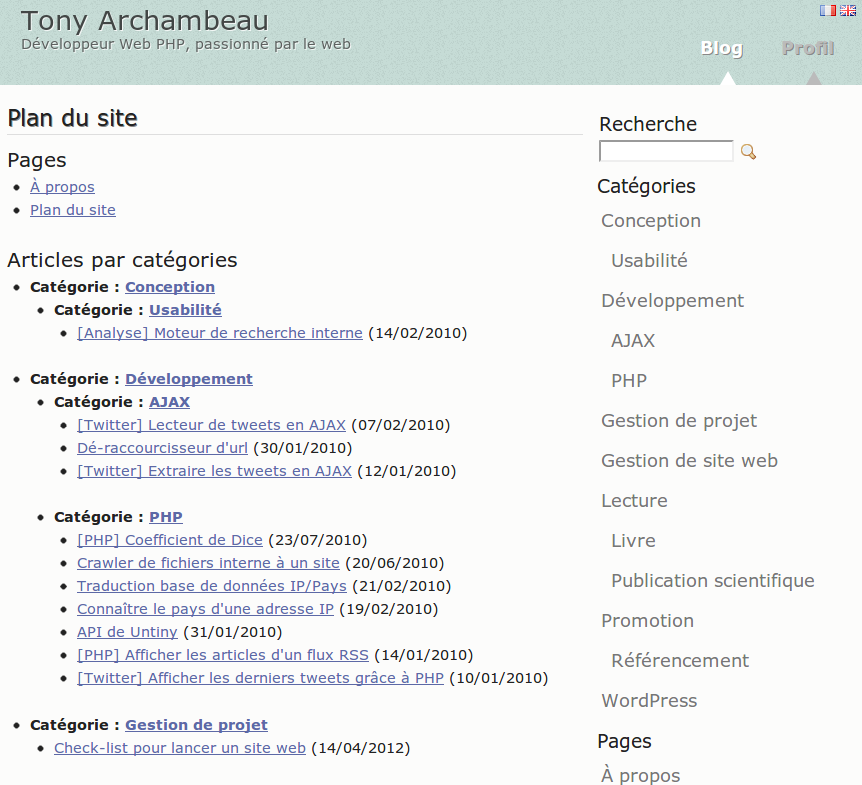
Example of a sitemap on a French blog
-
Settings page
About this plugin
An easy way to add a sitemap on one of your pages becomes reality thanks to this WordPress plugin. Just use the shortcode [wp_sitemap_page] on any of your pages. This will automatically generate a sitemap of all your pages and posts.
Be carefull, this plugin do not generate an XML sitemap. It only allow you to list all your pages and posts on a single page. This is a sitemap for human not for search engines bots.
Why this plugin is useful?
Such a sitemap is useful for many reasons:
- Easy navigation for the users. They can find easily pages or previous posts
- Improve the SEO of a website
Current features
- Display all pages, posts and categories
- Display the Custom Post Type (such as: “event”, “book” …)
- Display the taxonomies
- Display only one kind of content using the attribute “only”, like
[wp_sitemap_page only="page"] - Easy to use
- Possibility to customize the way it will be displayed through the admin panel
- Possibility to exclude some pages or some Custom Post Type (CPT)
- Posts and categories displayed hierarchically
- Has CSS class to customize it if you want
- Available in multi-languages (cf. English, French, Russian, Italian, Spanish, Dutch, Czech, Persian …). You can add your own translation if you want
Want a WordPress developer? Want to add a translation? Feel free to contact me.
How to uninstall WP Sitemap Page
To uninstall WP Sitemap Page, you just have to de-activate the plugin from the plugins list.
Questions
- Does this plugin works for a huge website?
No. The sitemap is dynamically generated without using any cache. Trying to generate a huge sitemap will be very slow.
- Does it generate an XML sitemap?
No. The purpose of this plugin is to generate a sitemap on one of your pages. This is simply a list of all your pages and posts.
- Does it work with Custom Post Type?
Yes. It works fine with the Custom Post Type since version 1.0.4
- Is it possible to get only the pages, the posts or a Custom Post Type?
Yes, it is. You only have to use one of these shortcode:
[wp_sitemap_page only="page"]to display only the pages[wp_sitemap_page only="post"]to display only the posts[wp_sitemap_page only="category"]to display only the categories[wp_sitemap_page only="tag"]to display only the tags[wp_sitemap_page only="archive"]to display only the archives[wp_sitemap_page only="author"]to display only the authors- You can display any kind of Custom Post Type, using the keyword of the post type inside the “only” attribute. For example:
[wp_sitemap_page only="event"]or[wp_sitemap_page only="book"]
- Which languages does WP Sitemap Page support?
This plugin is available through the following languages :
- English (default language)
- French (
fr_FR,fr_CA,fr_BE,fr_CH,fr_LU) by Tony Archambeau - Russian (
ru_RU) by skesov.ru - Dutch (
nl_NL) by EvertRuisch - Farsi/Persian (
fa_IR) by Seyyed Mostafa Ahadzadeh - Italian (
it_IT) by Nima - Spanish (
es_ES) by Raul - Czech (
cs_CZ) by Roman Opet - Polish (
pl_PL) by Mariusz - Deutsch (
de_DE) by Arno - Swedish (
sv_SE) - Portuguese and Brazilian Portuguese (
pt_BR,pt_PT) by Miguel Müller - Finnish (
fi_FI) by pokis.fi - Hungarian (
hu_HU) - Hebrew (
he_IL) by Ahrale - Bokmål (
nb_NO) by Øystein - Romanian (
ro_RO) - Indonesian (
id_ID) - Japanese (
ja) - Ukranian (
ru) - Chinese (
zh_CN)
If you want to add another language, feel free to contact me in order to send the file with the correct translation files (.mo and .po). Thanks a lot!
sandywp / also on the shelf
Try another plugin

4.4 · 10K+ installs
Create unlimited custom sidebars and widget areas. Display different sidebars on specific pages, posts, or custom post types with…

4.9 · 10K+ installs
FakerPress is a clean way to generate fake and dummy content to your WordPress, great for developers who need testing

4.9 · 10K+ installs
Creates a child theme from any installed parent theme with just one click.
Spin up a real WordPress site in seconds.
Test plugins, build a demo, hand a client a link — then squash it and start again. No local setup, no Docker.