sandywp / plugins / smk-sidebar-generator

SMK Sidebar Generator
Create unlimited custom sidebars and widget areas. Display different sidebars on specific pages, posts, or custom post types with conditional logic.
Ready in seconds.
v3.6.0 10,000+ installs WP 4.0+ PHP 5.3+
What you get inside
3 screens-
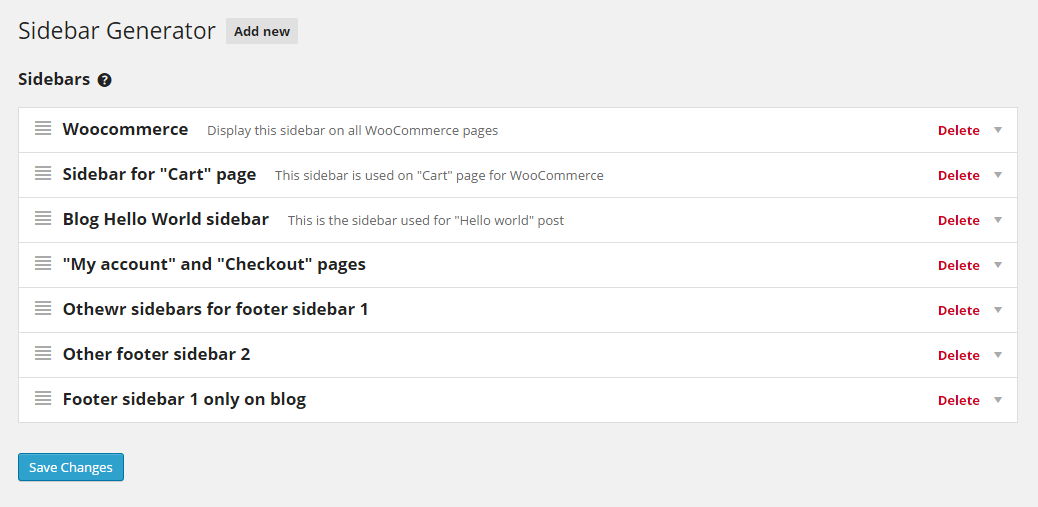
Main Admin Interface - Clean, modern dashboard showing all your custom sidebars with drag-and-drop reordering
-
Conditional Settings - Set up rules to display sidebars on specific pages, posts, or post types
-
Sidebar Removal - Safely delete sidebars with a time-limited restore option to prevent accidents
About this plugin
SMK Sidebar Generator is a powerful yet easy-to-use WordPress plugin that lets you create unlimited custom sidebars and conditionally display them anywhere on your website – without writing a single line of code.
Whether you need different sidebars for your blog, shop, landing pages, or specific posts, this plugin gives you complete control over your widget areas.
Why Choose SMK Sidebar Generator?
- 100% Free – All features included, no premium version upsells
- No Coding Required – Create and manage sidebars entirely from the WordPress admin
- Lightweight – Clean code that won’t slow down your site
- Works With Any Theme – Sidebars automatically inherit your theme’s styling
- Actively Maintained – Regular updates and WordPress compatibility
Key Features
Unlimited Sidebars
Create as many sidebars as you need. Perfect for blogs, business sites, WooCommerce stores, or any WordPress website.
Replace Theme Sidebars
Seamlessly replace your theme’s default sidebars with custom ones. No theme file editing required.
Conditional Display
Show different sidebars based on:
- Specific pages
- Specific posts
- Custom post types
- Post type archives
- Taxonomy archives
Drag and Drop Management
Reorder your sidebars with an intuitive drag-and-drop interface. Easily organize and prioritize your widget areas.
Responsive Admin Interface
Modern, clean admin UI that works great on any device – desktop, tablet, or mobile.
Shortcode Support
Display any sidebar anywhere using a simple shortcode: [smk_sidebar id="your-sidebar-id"]
Developer Friendly
Use PHP functions in your theme templates:
<?php
// Display sidebar by ID
if ( function_exists( 'smk_sidebar' ) ) {
    smk_sidebar( 'your-sidebar-id' );
}

// Or use WordPress native function
dynamic_sidebar( 'your-sidebar-id' );

// Get all registered sidebars
$sidebars = smk_get_all_sidebars();
?>
Perfect For
- Bloggers – Different sidebars for categories, tags, or specific posts
- Business Sites – Unique widget areas for services, about, contact pages
- WooCommerce Stores – Shop-specific sidebars separate from blog sidebars
- Membership Sites – Conditional sidebars for different content areas
- Developers – Template functions and shortcodes for theme integration
Support and Documentation
- GitHub Repository – Report bugs and contribute
- Support Forum – Get help from the community
Questions
- How do I create a new sidebar?
- Go to Appearance > SMK Sidebars in your WordPress admin
- Click the “Add New Sidebar” button
- Enter a name and optional description
- Save your changes
- Go to Appearance > Widgets to add widgets to your new sidebar
- How do I display a sidebar on a specific page?
- Create or edit a sidebar in Appearance > SMK Sidebars
- Select which theme sidebar to replace in the “Sidebars to replace” dropdown
- Check “Enable conditions”
- Click “Add condition” and select the page(s) where you want this sidebar to appear
- Save changes
- Can I use the sidebar in page builders like Elementor or Beaver Builder?
Yes! Use the shortcode
[smk_sidebar id="your-sidebar-id"]in any text widget or shortcode module. You can find each sidebar’s shortcode displayed in its settings panel.- Will this plugin slow down my website?
No. SMK Sidebar Generator is lightweight and only loads its assets on the admin pages where needed. On the frontend, it simply filters which sidebar to display with minimal overhead.
- Does it work with my theme?
Yes! The plugin works with any properly coded WordPress theme. Your generated sidebars will automatically inherit your theme’s sidebar styling.
- Can I display a sidebar using PHP in my theme?
Yes, use either method in your theme template files:
<?php smk_sidebar( 'your-sidebar-id' ); ?>Or the native WordPress function:
<?php dynamic_sidebar( 'your-sidebar-id' ); ?>- How do I find my sidebar ID?
The sidebar ID is displayed in each sidebar’s settings panel, along with the shortcode. You can also use
smk_get_all_sidebars()to get an array of all sidebar IDs and names.- Can I show different sidebars for different categories?
Yes! When adding conditions, select the post type archive or use taxonomy conditions to target specific categories, tags, or custom taxonomies.
sandywp / also on the shelf
Try another plugin

Custom Sidebars – Dynamic Sidebar Classic Widget Area Manager
4.7 · 100K+ installs
Flexible sidebars for custom classic widget configurations on any page or post. Create custom sidebars with ease!

4.2 · 80K+ installs
Create new sidebar areas and display them conditionally on certain pages. Works with all themes.

4.2 · 3K+ installs
Drop widgets in page or post content area. Widgetized pages. Build your custom Responsive page layout in no time. No coding, easy…
Spin up a real WordPress site in seconds.
Test plugins, build a demo, hand a client a link — then squash it and start again. No local setup, no Docker.