sandywp / plugins / wp-editor

WP Editor
WP Editor is a plugin for WordPress that replaces the default plugin and theme editors as well as the page/post editor.
Ready in seconds.
v1.2.9.3 20,000+ installs WP 3.9+
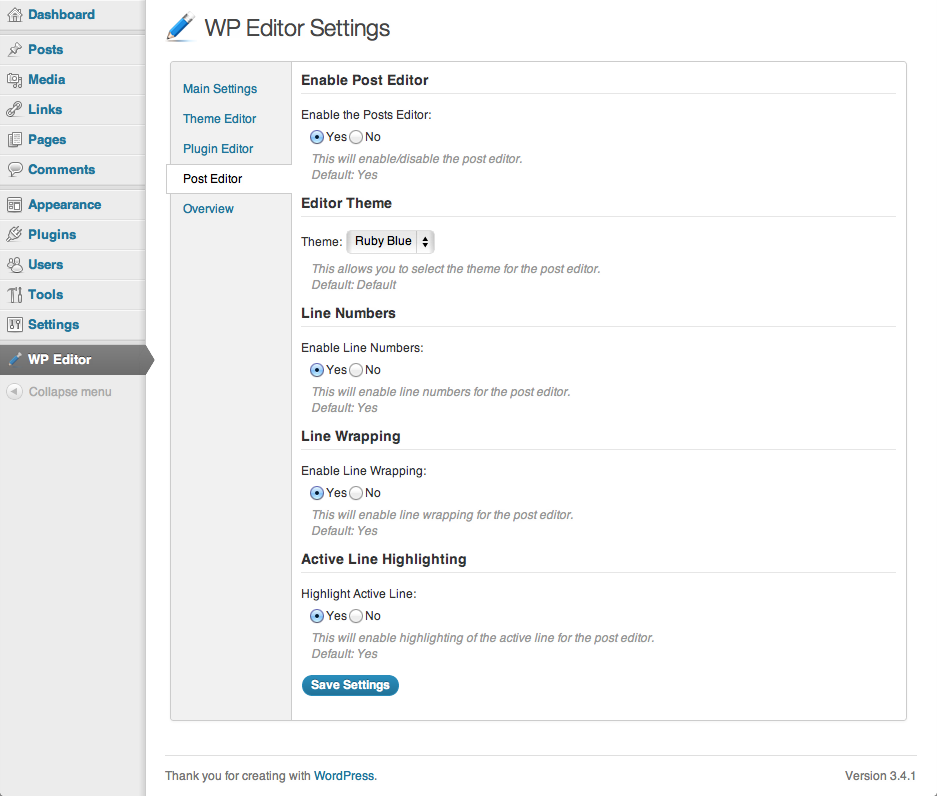
What you get inside
5 screens-
Settings page for WP Editor
-
Syntax highlighting in Page/Post editor
-
Updated plugin editor with Ajax file browser
-
Updated theme editor with file upload enabled
-
Fancybox integration
About this plugin
WP Editor is a plugin for WordPress that replaces the default plugin and theme editors as well as the page/post editor. Using integrations with CodeMirror and FancyBox to create a feature rich environment, WP Editor completely reworks the default WordPress file editing capabilities. Using Asynchronous Javascript and XML (AJAX) to retrieve files and folders, WP Editor sets a new standard for speed and reliability in a web-based editing atmosphere.
Features:
- CodeMirror
- Active Line Highlighting
- Line Numbers
- Line Wrapping
- Eight Editor Themes with Syntax Highlighting
- Fullscreen Editing (ESC, F11)
- Text Search (CMD + F, CTRL + F)
- Individual Settings for Each Editor
- FancyBox for image viewing
- AJAX File Browser
- Allowed Extensions List
- Easy to use Settings Section
Questions
- Does WP Editor provide syntax highlighting for the page/post editor?
Yes! This feature was added in version 1.1 of WP Editor. If it’s not enabled by default, visit the settings page, click on the “Post Editor” section and enable it there.
- Can I search for text within a file?
Yes! Just use the key combination, CTRL + F or CMD + F and it will open up a search dialog box that will allow you to type in a search string.
- Does WP Editor have a fullscreen mode?
Yes! Just hit the Esc key or click on the fullscreen button on the post editor and it will take the editor to the full size of the browser.
- I don’t like the active line highlighting in the editor, can I disable this?
Yes! Just visit the settings page and you can disable the active line highlighting there.
- A file type that my theme uses is not supported by WP Editor, how can I get it added?
If there is a filetype that is not supported by WP Editor, just visit the WP Editor support page and fill out the support form. We will do our best to include it by the next release.
- My custom quicktags don’t work with WP Editor, why not?
WP Editor uses a custom method for creating quicktags to get them to work with the update. If you use a specific quicktag that is not supported, fill out our support form and we will try to implement it as soon as possible.
- Is WP Editor better than the competition?
Yes! Well, we like to think so. If there is a feature that another plugin has that you think WP Editor should include, let us know. We will do our best to add it in to the plugin!
- I love WP Editor! Can I help somehow?
Yes! While we don’t have a need for further developers at this time, any financial contributions are welcome! Just visit the WP Editor website and click on the donate link, and thank you!
sandywp / also on the shelf
Try another plugin

WPIDE – File Manager & Code Editor
4.8 · 40K+ installs
WPIDE is a powerful file manager and code editor for WordPress with tabs, code completion, and full access to the entire…

HTML Editor for Contact Form 7
5.0 · 1K+ installs
Add HTML editor to Contact Form 7 with code highlighter and extended form options.

10+ installs
A TinyMCE code editor with Prism syntax highlighting.
Spin up a real WordPress site in seconds.
Test plugins, build a demo, hand a client a link — then squash it and start again. No local setup, no Docker.