sandywp / plugins / wp-carousel-free

Carousel, Slider, Photo Gallery with Lightbox, Video Slider, by WP Carousel
Carousel, Slider, and Photo Gallery with Lightbox plugin. Create Image Carousel, Video Slider, Post Carousel, Post Grid, Product Carousel, and more.
Ready in seconds.
v2.7.13 70,000+ installs WP 5.0+ PHP 7.0.0+
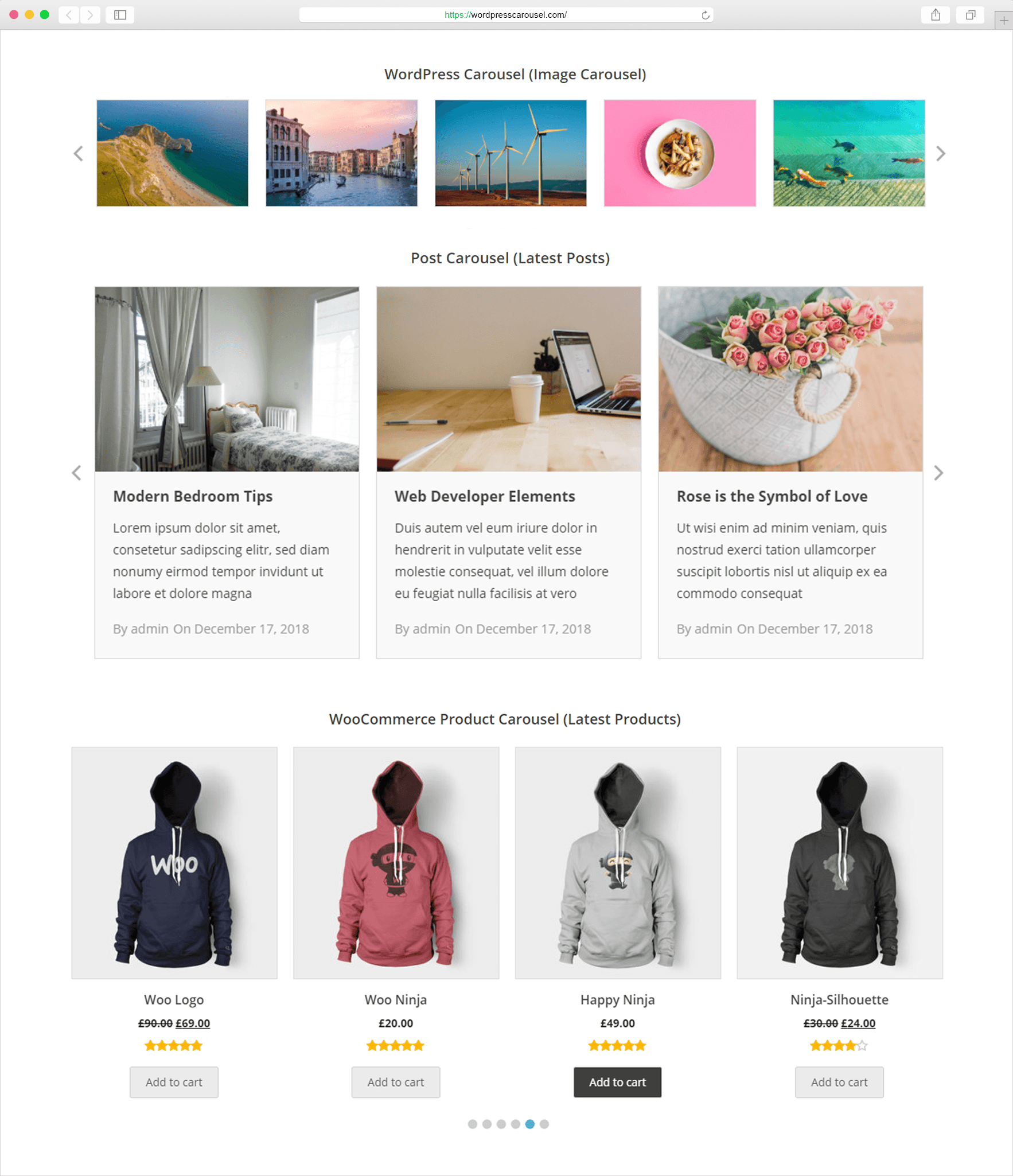
What you get inside
8 screens-
Live Demo.
-
Carousel Settings.
-
General Settings (Image Carousel).
-
Style Settings.
-
Post Carousel.
-
Product Carousel.
-
All Carousels.
-
Advanced Settings.
About this plugin
WP Carousel is a responsive plugin for creating Carousel, Slider, Photo Gallery, and Video Slider in WordPress. It supports images, posts, WooCommerce products, and YouTube videos. Images can be selected directly from the WordPress media library and arranged with drag-and-drop. The plugin is lightweight, responsive, and works across all major devices and browsers.
Live Demo | Video Tutorials | Documentation | Support
You’ll be ble to display
Image Carousel & Slider: Create Carousels and Sliders by uploading images from the WordPress media library.
Photo Gallery: Build image galleries with lightbox support and customizable layouts.
Post Carousel: Display recent posts in a carousel with title, image, excerpt, date, and author.
Post Grid: Show posts in a grid format with title, image, excerpt, date, and author.
WooCommerce Product Carousel: Display WooCommerce products in a carousel with options to show or hide product name, image, price, rating, and add-to-cart button.
Product Grid Gallery: Show WooCommerce products in a grid gallery with product details such as name, image, price, reviews, and add-to-cart button.
Video Slider & Gallery: Create sliders and galleries with multiple YouTube videos.
Features you’ll love
Drag & Drop Responsive Builder: Easily upload and reorder slides with the responsive drag-and-drop builder. Supports images and videos, letting you organize carousels and galleries in any order.
Multiple Carousels and Galleries: Add and display multiple carousels or galleries on the same page without conflict.
Carousel Controls: Enable or disable autoplay, set speed, stop on hover, and loop infinitely. Show or hide navigation and pagination dots with custom colors. Touch swipe and mouse drag are also supported.
Responsive and Mobile Ready: WP Carousel sliders and galleries are fully responsive. You can set the number of columns and spacing individually for small, medium, and large devices.
Lightbox Open images or videos in a popup overlay for viewing larger versions without leaving the page. Works across devices and is easy to navigate.
Color & Styling Options: The plugin lets you customize colors and styles for carousels and galleries to match your site’s design.
Multisite Support: The plugin can be used across WordPress multisite networks, allowing you to create and manage carousels on multiple sites from a single installation.
Theme & Plugin Compatibility: The plugin is compatible with most WordPress themes and plugins, ensuring smooth integration without conflicts.
Page Builders Ready
- Gutenberg Editor
- WPBakery
- Elementor
- BeaverBuilder
- SiteOrgin
- DiviBuilder
- LayersWP
- MotoPress
- CornerStone
- Themify Builder etc.
Multilingual Ready
For fast support, features request, and bug reporting
Ask us at Support.
WP Carousel Pro
WP Carousel is the free version of WP Carousel Pro. The Pro version includes additional features such as support for posts, WooCommerce products, custom content (text, HTML, shortcodes), and extended video options. It also supports WordPress pages, custom post types, taxonomies, and custom taxonomies. Video sources include YouTube, Vimeo, TikTok, Twitch, Wistia, Dailymotion, MP4, WebM, and self-hosted videos with lightbox support. See Documentation.
Author
Designed and Developed by ShapedPlugin
Questions
- Who should use WP Carousel?
WP Carousel is perfect for photographers, designers, bloggers, different organizations, and small to large businesses. Basically, if you want to create beautiful carousels like, Image Carousel, Post Carousel, and Product Carousel, then you need to use WP Carousel.
- Do I need to have coding skills to use WP Carousel?
No. You don’t need any coding skill. No more pain writing any shortcode attributes to display carousel in your site. With just a few clicks, you can amazingly create unlimited Image, Post, and Product Carousels.
- Is WP Carousel responsive?
Yes, WP Carousel is fully responsive, mobile and touch-friendly.
- Can I add WP Carousel anywhere on my website?
Yes, you can add WP Carousel inside your blog posts, pages, widgets, and anywhere else on your WordPress website with a shortcode or PHP function.
- Can I have multiple carousels with the separate setting?
Yes. You can have an unlimited carousel with each separate setting in the page, post, template, widget or anywhere you like.
- Will WP Carousel work with my theme?
WP Carousel works with any WordPress theme if themes are developed according to WordPress standard.
- How can I get support if the plugin is not working?
If you face any problem with our plugin or something is not working as it should, first follow the preliminary steps:
Test the plugin with a WordPress default theme, to be sure that the error is not caused by the theme you are currently using.Deactivate all plugins you are using and check if the problem is still occurring.
If none of the previously listed actions helps you solve the problem, then, submit a ticket in the forum and describe your problem accurately, specify WordPress and plugin versions you are using and any other information that might help us solve your problem as quickly as possible.
- Where can I report bugs?
If you find a bug, please report it in our active support. You will be replied once the issue is resolved.
sandywp / also on the shelf
Try another plugin

Shortcodes Ultimate – Content Elements
4.9 · 400K+ installs
Add 50+ shortcodes with live preview for tabs, accordions, buttons, FAQs, sliders and boxes. Works in Block Editor and Classic…

Carousel Slider Block for Gutenberg
4.8 · 50K+ installs
A responsive modern carousel slider for the Gutenberg block editor that lets you add any blocks to your slides. Easily create…

4.3 · 30K+ installs
Create SEO friendly Image, Logo, Video, Post, WooCommerce Product Carousel, and Slider.
Spin up a real WordPress site in seconds.
Test plugins, build a demo, hand a client a link — then squash it and start again. No local setup, no Docker.