sandywp / plugins / carousel-slider

Carousel Slider
Create SEO friendly Image, Logo, Video, Post, WooCommerce Product Carousel, and Slider.
Ready in seconds.
v2.2.18 30,000+ installs WP 6.7+ PHP 7.0+
What you get inside
8 screens-
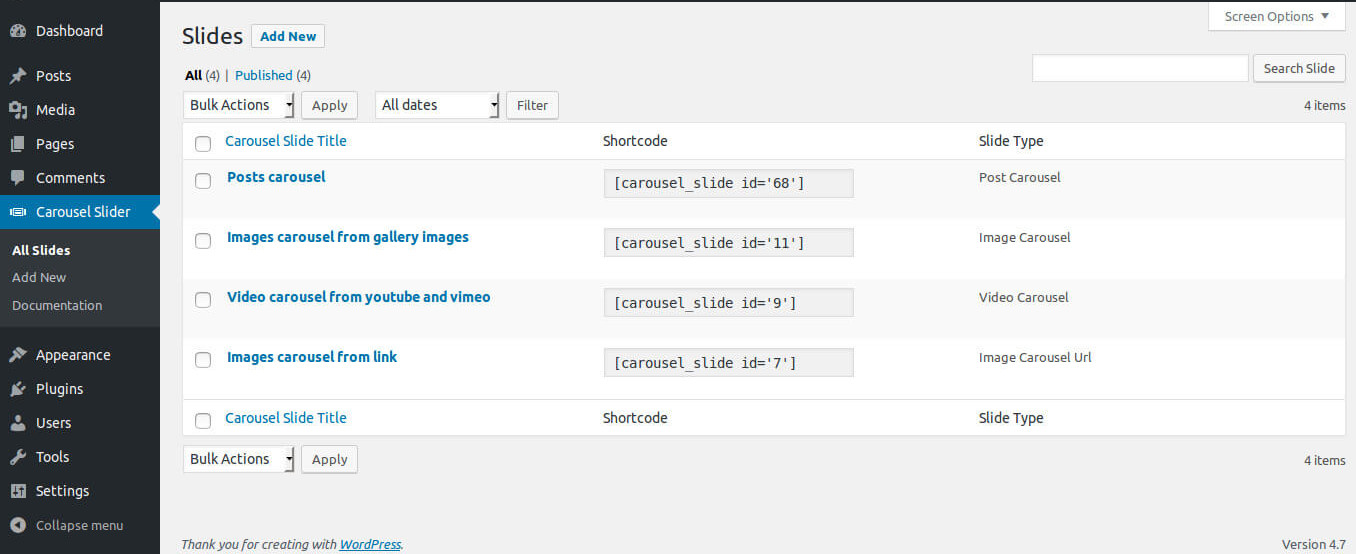
Carousel slider admin page
-
Front-end example of a post-carousel slider.
-
Front-end example of a video carousel slider.
-
Front-end example of an image carousel slider.
-
Front-end example of a product carousel slider.
-
Front-end example of products Quick View.
-
Front-end example of image lightbox.
-
Carousel slider admin live preview.
About this plugin
Create SEO friendly Image, Logo, Video, Post, WooCommerce Product Carousel, and Slider.
Carousel Slider is a touch-enabled WordPress plugin that lets you create a highly customizable,
stylish responsive carousel slider. With Carousel Slider, you can create an image carousel using a media gallery or
custom url, post carousel, video carousel.
If you like this plugin, please give us 5 star to encourage for future improvement.
Key Features List
- Support major website/page builder, including Gutenberg (WordPress core), Elementor, Visual Composer, SiteOrigin, Divi Builder
- Multiple types carousel, images from media gallery, images from URL, videos from youtube and vimeo, posts, and WooCommerce products carousel slider
- Hero slider with background image, title, description, call to action buttons and more
- Posts carousel, support Specific posts, Post Categories, Post Tags, Posts per page, Date range query and ordering
- Video carousel, support custom height and width (Currently only support video from Youtube and Vimeo)
- WooCommerce Product carousel, support Product Categories, Product Tags, Specific Products, Featured Products, Recent Products, Sale Products, Best-Selling Products, Top Rated Products
- Options to hide/show product Title, Rating, Price, Cart Button, Sale Tag, Wishlist Button, Quick View button and options to change color for Title, Button Background, Button text
- Fully responsive, configure the number of items to display for desktop, small desktop, tablet and mobile devices
- Lightweight, only loads stuff when carousel is used
- Navigation and pagination, choose what type of navigation is displayed for your carousel with unlimited colors option
- Works great in touch devices, Touch and Grab enabled
- Supported in all major browsers
- CSS3 3D Acceleration
- Multiple carousel on same page
- Lazy load images
- Support image title, caption, link url
- and more options
Questions
- Will Carousel Slider work with my theme?
Carousel Slider works with any WordPress theme if themes are developed according to WordPress standard.
- Is Carousel Slider responsive?
Yes, Carousel Slider is fully responsive, mobile, and touch-friendly.
- Can I add Carousel Slider anywhere on my website?
Yes, you can add a carousel inside your blog posts, pages, widgets, and anywhere else on your WordPress website with a shortcode.
- Can I have multiple carousels on the same post / page?
Yes. You can add multiple carousels on the same post / page.
- How to use Carousel Slider in Gutenberg Block Editor (WordPress 5.0 or later)
Carousel Slider is a first-class citizen in Gutenberg Block Editor. Search ‘carousel slider’ There is
a dedicated ‘carousel slider’ block with a live preview for Gutenberg Block Editor.
sandywp / also on the shelf
Try another plugin

Shortcodes Ultimate – Content Elements
4.9 · 400K+ installs
Add 50+ shortcodes with live preview for tabs, accordions, buttons, FAQs, sliders and boxes. Works in Block Editor and Classic…

Carousel, Slider, Photo Gallery with Lightbox, Video Slider, by WP Carousel
4.7 · 70K+ installs
Carousel, Slider, and Photo Gallery with Lightbox plugin. Create Image Carousel, Video Slider, Post Carousel, Post Grid, Product…

Carousel Slider Block for Gutenberg
4.8 · 50K+ installs
A responsive modern carousel slider for the Gutenberg block editor that lets you add any blocks to your slides. Easily create…
Spin up a real WordPress site in seconds.
Test plugins, build a demo, hand a client a link — then squash it and start again. No local setup, no Docker.