sandywp / plugins / worker

ManageWP Worker
A better way to manage dozens of WordPress websites.
Ready in seconds.
v4.9.38 1,000,000+ installs WP 3.1+
What you get inside
8 screens-
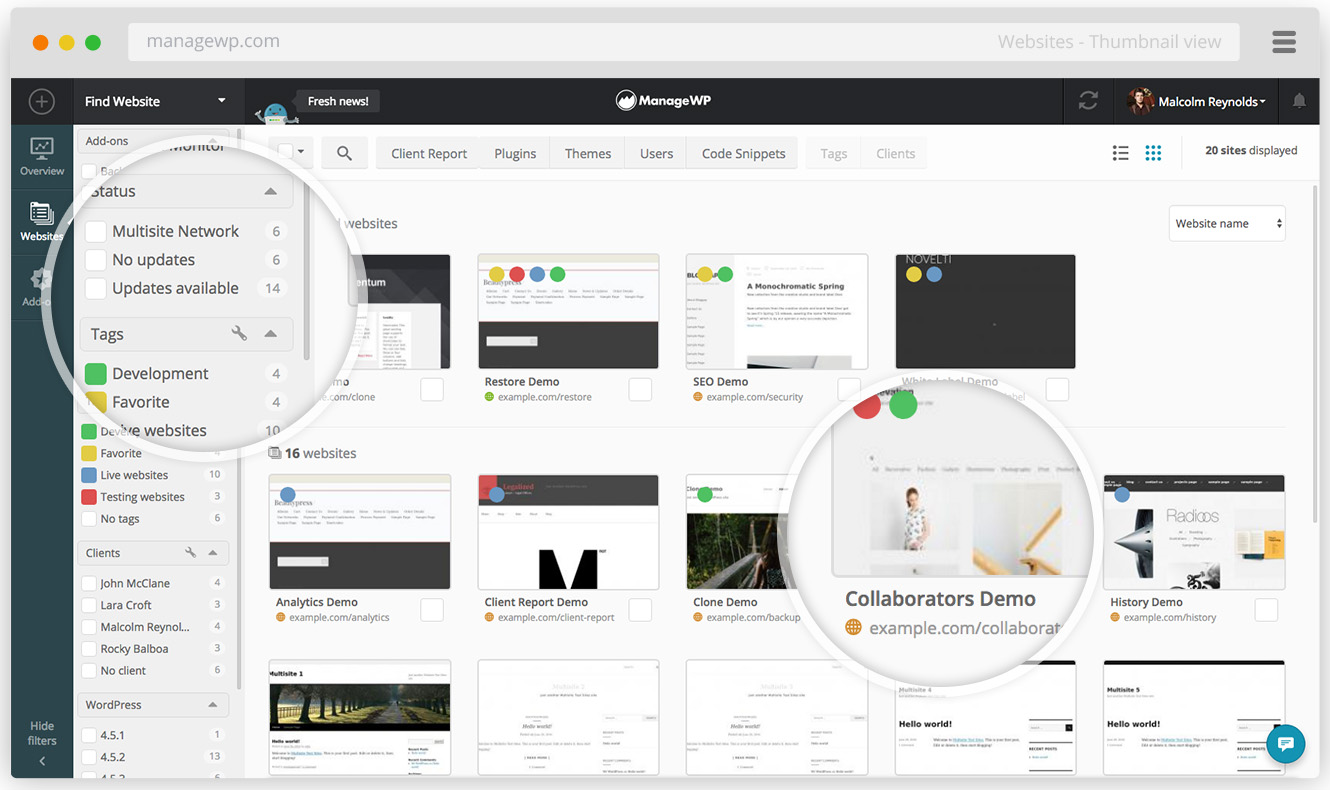
ManageWP dashboard with a thumbnail view of 20 websites
-
Tags and stars help you organize your websites
-
A summary of available updates and health of all your websites
-
Track your website performance regularly, so you could know right away if something goes wrong
-
Managing plugins and themes is just as easy with 100 websites as with 3 websites
-
Client Report is an executive summary of everything you've done for your client
-
Cloud backups with detailed information about each restore point
-
Uptime Monitor logs up and down events, and notifies you via email and SMS
About this plugin
So you’re looking for a better way to manage WordPress websites? We have you covered! ManageWP is a dashboard that helps you save time and nerves by automating your workflow, so you could focus on things that matter. It is fast, secure and free for an unlimited number of websites.
Everything in One Place
Just the hassle of logging into each of your websites is enough to ruin your day. ManageWP compiles the data from all of your sites on one dashboard, so you can check up on your websites in a single glance. And if you need to take a better look at a particular website, you’re just a click away. Read more
Bulk actions
57 updates on 12 sites? Update them all with a single click. And it’s not just updates. Clean spam, database overhead, run security checks and more – with just one click you can do these things on all your websites at once. Read more
Cloud Backup that just works
A reliable backup is the backbone of any business. And we have a free monthly backup for all of your websites. It’s, incremental, reliable, and works where other backup solutions fail. The free Backup includes monthly scheduled backup, off-site storage, 1-click restore, US/EU storage choice and the option to exclude files and folders. The premium Backup gives you on-demand backups, weekly/daily/hourly backup cycles & more.
Safe updates
Updating plugins & themes is a huge pain, so we came with this: a backup is automatically created before each update. After the update, the system checks the website and rolls back automatically if something’s wrong. And the best part is that you can set these updates to run at 3am, when the website traffic as its lowest.
Read more.
Client Report
Summarize your hard work in a professional looking report and send it to your clients to showcase your work. The free Client Report includes basic customization and on-demand reports. The premium Client Report lets you white label and automate your reports. Read more
Performance and Security Checks
Slow or infected websites are bad for business. Luckily, you can now keep tabs on your websites with regular performance & security checks. The free Security Check & Performance Check come with fully functional checks and logging. Premium versions let you fully automate the checks, and get an SMS or an email if something’s wrong.
Google Analytics integration
Connect multiple Google Analytics accounts, and keep track of all the important metrics from one place. Read more
Uptime Monitor (premium add-on)
Be the first to know when your website is down with both email and SMS notifications, and get your website back online before anyone else notices. Read more
Cloning & Migration (bundled with premium Backup add-on)
What used to take you hours of work and nerves of steel is now a one-click operation. Pick a source website, pick a destination website, click Go. Within minutes, your website will be alive and kicking on a new server. Yeah, it’s that easy. Read more
SEO Ranking (premium add-on)
Be on top of your website rankings and figure out which keywords work best for you, as well as keeping on eye on your competitors. This way you will know how well you stack up against them. Read more
White Label (premium add-on)
Rename or completely hide the ManageWP Worker plugin. Clients don’t need to know what you are using to manage their websites. Read more
Is This All?
No way! We’ve got a bunch of other awesome features, both free and premium, you can check out on our ManageWP features page
Check out the ManageWP promo video.
License
This file is part of ManageWP Worker.
ManageWP Worker is free software: you can redistribute it and/or modify it under the terms of the GNU General Public License as published by the Free Software Foundation, either version 3 of the License, or (at your option) any later version.
ManageWP Worker is distributed in the hope that it will be useful, but WITHOUT ANY WARRANTY; without even the implied warranty of MERCHANTABILITY or FITNESS FOR A PARTICULAR PURPOSE. See the GNU General Public License for more details.
You should have received a copy of the GNU General Public License along with ManageWP Worker. If not, see https://www.gnu.org/licenses/.
Questions
- Is ManageWP free?
ManageWP is using the freemium model. All the core features are free for an unlimited number of websites. And for those of you who need more, we have a set of premium features to help you out.
- Do you offer support for free users?
Yes. No matter if you’re free or premium user, we are here for you 24/7. Expect a 1h average response time and a 65% answer resolution in the first reply.
- How much do premium ManageWP features cost?
Our pricing is highly flexible, we don’t charge anything upfront. The usage is calculated on a per-website, per-addon basis, like Amazon Web Services. Check out our pricing page for more info.
- Is ManageWP secure?
Yes. All of our code is developed in-house and we have a top notch security team. With half a million websites managed since 2012 we did not have a single security incident. We’ve accomplished this through high standards, vigilance and the help of security researchers, through our white hat security program.
- I have websites on several different hosts. Will ManageWP work all of them?
Yes. ManageWP plays nice with all major hosts, and 99% of the small ones.
- Does ManageWP work with multisites?
Yes, multisite networks are fully supported, including the ability to backup and clone a multisite network.
- Does ManageWP work with WordPress.com sites?
No. ManageWP works only with self-hosted WordPress sites.
- Worker plugin can connect to ManageWP and Pro Sites. What is the difference between the two?
ManageWP is focused on the hosting-agnostic WordPress website management. Pro Sites is the GoDaddy version of the service. It’s part of the GoDaddy Pro program, which incorporates different tools for website & client management, lead generation, and tighter integration with other GoDaddy products.
sandywp / also on the shelf
Try another plugin

All-in-One WP Migration and Backup
4.5 · 5M+ installs
Trusted by 60M+ sites: The gold standard for WordPress migration and backup. Migrate, backup, and restore your WordPress site…

UpdraftPlus: WP Backup & Migration Plugin
4.8 · 3M+ installs
Backup, restore or migrate your WordPress website to another host or domain. Schedule backups or run manually. Migrate in minutes.

Jetpack – WP Security, Backup, Speed, & Growth
3.7 · 3M+ installs
Improve your WP security with powerful one-click tools like backup, WAF, and malware scan. Includes free tools like stats, CDN…
Spin up a real WordPress site in seconds.
Test plugins, build a demo, hand a client a link — then squash it and start again. No local setup, no Docker.