sandywp / plugins / woocommerce-gateway-stripe

WooCommerce Stripe Payment Gateway
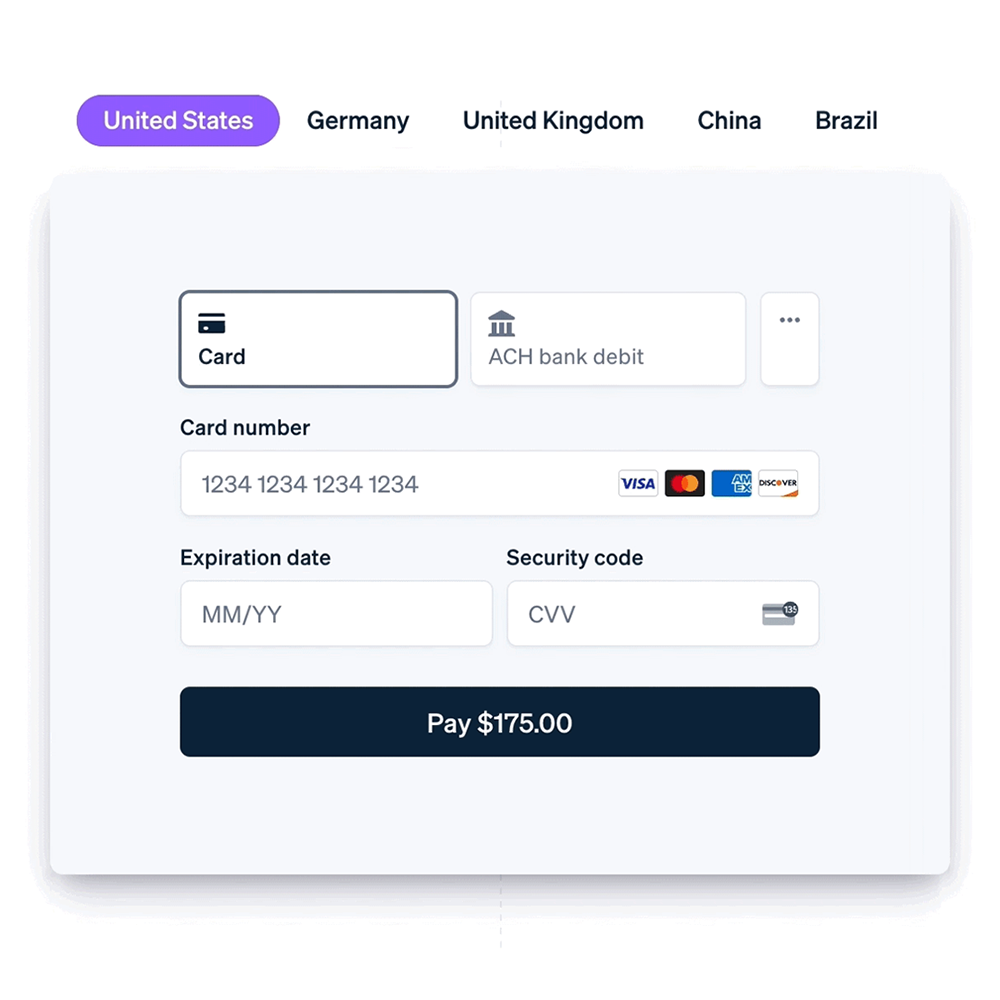
Accept debit and credit cards in 135+ currencies, many local methods like Alipay, ACH, and SEPA, and express checkout with Apple Pay and Google Pay.
Ready in seconds.
v10.9.1 700,000+ installs WP 6.8+ PHP 7.4+
What you get inside
6 screens-
With the enhanced checkout from Stripe, you can surface 23 payment methods including buy now, pay later methods; and Link, an accelerated checkout experience.
-
Link autofills your customers’ payment information to create an easy and secure checkout experience.
-
Convert customers who would usually abandon their cart and increase average order value with buy now, pay later options like Klarna, Afterpay, and Affirm.…
-
Stripe Radar offers seamlessly integrated, powerful fraud-detection tools that use machine learning to detect and flag potentially fraudulent transactions.
-
Accept in-person payments for products and services using the Stripe Terminal M2 card reader.
-
Get started with no additional hardware using Tap to Pay on iPhone, or Tap to Pay on Android.
About this plugin
Changing consumer behavior has resulted in an explosion of payment methods and experiences, which are great for increasing conversion and lowering costs—but can be difficult for businesses to maintain. Give customers a best-in-class checkout experience while you remain focused on your core business. This is the official plugin created by Stripe and WooCommerce.
Drive 11.9% in revenue with an optimized checkout experience from Stripe
The enhanced checkout experience from Stripe can help customers:
- Boost conversion: Provide an optimal experience across mobile, tablet, and desktop with a responsive checkout, and offer 23 payment methods, including Link, Apple Pay, and Google Pay, out of the box.
- Expand your customer base: Convert customers who might otherwise abandon their cart with buy now, pay later methods like Klarna, Affirm, and Afterpay/Clearpay, wallets like Apple Pay, Google Pay, Alipay, and WeChat Pay, and local payment methods such as Bancontact in Europe and Alipay in Asia Pacific. Deliver a localized payment experience with out-of-the-box support for localized error messages, right-to-left languages, and automatic adjustment of input fields based on payment method and country.
- Meet existing customer demand and localize the experience: Offer local payment methods, such as ACH Direct Debit, Bacs Direct Debit, Bancontact, BECS Direct Debit, BLIK, Boleto, Cash App Pay, EPS, iDEAL, Multibanco, OXXO, Pre-authorized debit payments, Przelewy 24, and SEPA Direct Debit, and let customers pay in their local currency across 150+ countries with Adaptive Pricing.
- Fight fraud: Detect and prevent fraud with Stripe Radar, which offers seamlessly integrated, powerful fraud-detection tools that use machine learning to detect and flag potentially fraudulent transactions.
- Accept in-person payments for products and services: Use the Stripe Terminal M2 card reader or get started with no additional hardware using Tap to Pay on iPhone, or Tap to Pay on Android.
- Support subscriptions: Support recurring payments with various payment methods via WooCommerce Subscriptions.
- Manage cash flow: Get paid within minutes with Stripe Instant Payouts, if eligible.
- Achieve PCI-DSS compliance with Stripe Elements hosted input fields.
- Support Strong Customer Authentication (SCA).
Stripe is available for store owners and merchants in 46 countries worldwide, with more to come.
Compatibility Notes
The following items note specific versions that include important changes, features, or deprecations.
- 10.9.1
- Some express checkout helpers now require the caller to specify whether they are in the WooCommerce Cart context
- 10.9.0
- Express checkout processes classic checkout custom fields by default (opt out via the wc_stripe_express_checkout_enable_classic_checkout_custom_fields filter)
- 10.8.0
- Optimized Checkout Suite enabled by default for eligible existing stores
- Adaptive Pricing enabled by default for eligible existing stores
- Removed deprecated code and constants from 10.2.0 and before – Full list – PR #5294
- 10.7.0
- Optimized Checkout Suite re-enabled by default for new installs
- Adaptive Pricing enabled by default for new installs
- Removed deprecated backend methods that called wc_deprecated_function – Full list – PR #5066
- 10.6.0
- Adaptive Pricing available
- 10.4.0
- Optimized Checkout Suite no longer enabled by default for new installs
- Removed the main Payment Request Buttons backend class, WC_Stripe_Payment_Request, which was deprecated in 10.2.0
- Removed the deprecated WC_Stripe_Apple_Pay class
- 10.3.0
- Removed legacy checkout payment method classes and settings retrieval methods
- 10.2.0
- Optimized Checkout Suite enabled by default for all new installations
- Add minimum transaction amounts for BRL, INR, NZD, THB, CZK, HUF, AED, MYR, PLN, RON
- 10.1.0
- Improved express checkout address handling for countries without state/postal codes
- 10.0.0
- Payment Request Buttons are fully replaced by Express Checkout
- Legacy Checkout is fully deprecated and no longer available
- 9.8.0
- Optimized Checkout Suite available via a configuration setting
- We will disable the Affirm or Klarna payment methods if the respective official plugin is enabled
- 9.7.0
- Improved express checkout support for custom checkout fields
- Validate customer details against required billing fields from checkout before sending to Stripe
- 9.6.0
- Legacy checkout deprecated by default
- Voucher payment methods can be used for subscription purchases when manual renewals are available
- Include extension data from block checkout for express checkout orders
- Add hooks to support custom checkout fields for classic checkout
- 9.5.0
- Synchronize payment methods with Stripe
- Support Pre-Authorized Debit (PAD) in Canada and the US
- Support BLIK in Poland and from other EU countries
- Support BECS Direct Debit payments in Australia
Questions
- In which specific countries is Stripe available?
Stripe is available in the following countries, with more to come:
- Australia
- Austria
- Belgium
- Brazil
- Bulgaria
- Canada
- Croatia
- Cyprus
- Czech Republic
- Denmark
- Estonia
- Finland
- France
- Germany
- Gibraltar
- Greece
- Hong Kong
- Hungary
- India
- Ireland
- Italy
- Japan
- Latvia
- Liechtenstein
- Lithuania
- Luxembourg
- Malaysia
- Malta
- Mexico
- Netherlands
- New Zealand
- Norway
- Poland
- Portugal
- Romania
- Singapore
- Slovakia
- Slovenia
- Spain
- Sweden
- Switzerland
- Thailand
- United Arab Emirates
- United Kingdom
- United States
- Does this require an SSL certificate?
Yes. In Live Mode, an SSL certificate must be installed on your site to use Stripe. In addition to SSL encryption, Stripe provides an extra JavaScript method to secure card data using Stripe Elements.
- Does this support both production mode and sandbox mode for testing?
Yes, it does. Both production and test (sandbox) modes are driven by the API keys you use with a checkbox in the admin settings to toggle between both.
- Where can I find documentation?
Refer to the Stripe WooCommerce Extension documentation for more information, including how to set up and configure the extension.
- Where can I get support or talk to other users?
If you get stuck, you can ask for help in the Plugin Forum.
sandywp / also on the shelf
Try another plugin

WooPayments: Integrated WooCommerce Payments
3.4 · 800K+ installs
Securely accept credit and debit cards on your WooCommerce store. Manage payments without leaving your WordPress dashboard. Only…

2.8 · 800K+ installs
PayPal's latest payment processing solution. Accept PayPal, Pay Later, credit/debit cards, alternative digital wallets and bank…

Payment Plugins for Stripe WooCommerce
4.8 · 100K+ installs
Accept Credit Cards, Google Pay, ApplePay, Afterpay, Affirm, ACH, Klarna, iDEAL and more all in one plugin for free!
Spin up a real WordPress site in seconds.
Test plugins, build a demo, hand a client a link — then squash it and start again. No local setup, no Docker.