sandywp / plugins / woocommerce-delivery-notes

Print Invoice & Delivery Notes for WooCommerce
Create and print PDF invoices, delivery notes, receipts, credit notes, and packing slips for your WooCommerce orders.
Ready in seconds.
v7.3.0 30,000+ installs WP 6.0+ PHP 7.4+
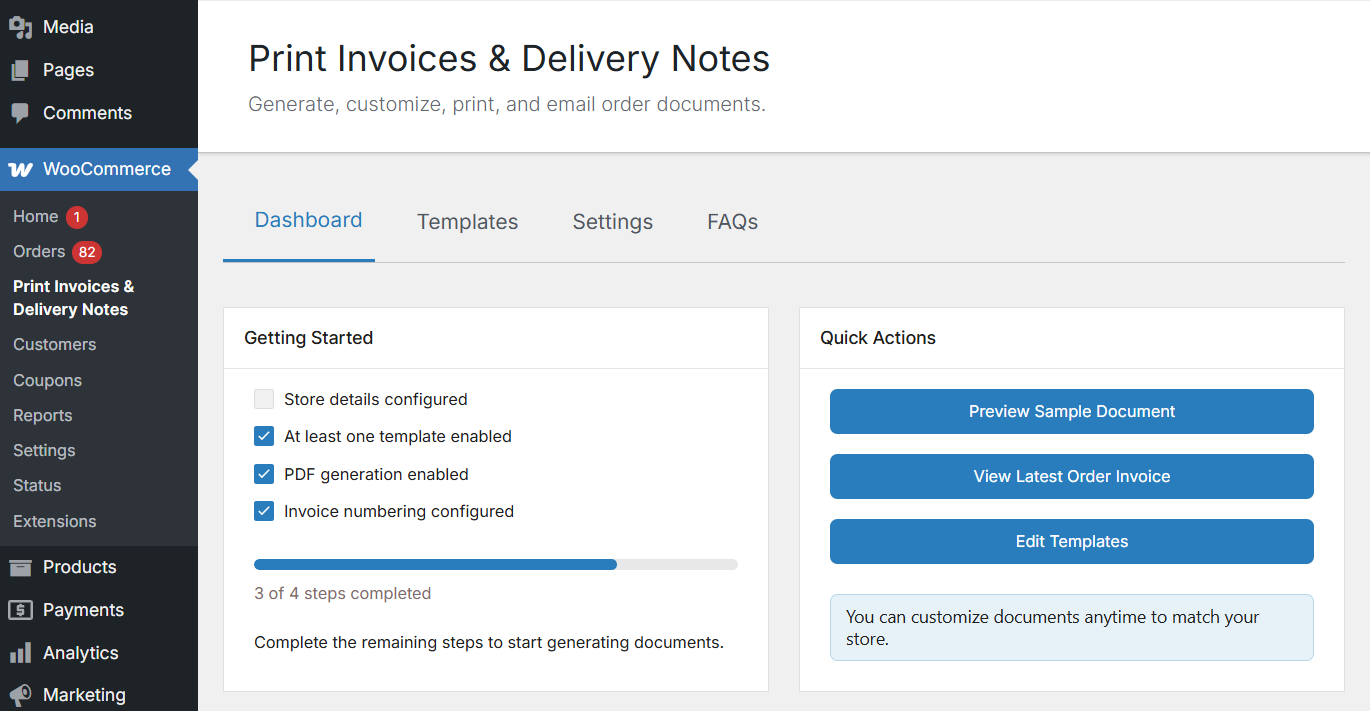
What you get inside
6 screens-
Dashboard – setup checklist and quick actions
-
Templates – list of all five document types with enable/disable toggles
-
Template Editor – customise sections, fonts, colours, and layout with live preview
-
Watermark Settings – configure watermark text, opacity, angle, and repeat style
-
Invoice Numbering – sequential numbering with format placeholders and yearly reset
-
PDF Settings – enable PDF storage, set expiration, and configure filename format
About this plugin
Print Invoice & Delivery Notes for WooCommerce helps store owners generate printable PDF invoices, delivery notes, receipts, credit notes, and packing slips directly from WooCommerce orders.
Store admins can print order documents individually or in bulk, attach invoice PDFs to WooCommerce emails, and customize invoice templates with company branding, invoice numbering, billing details, and footer content.
Customers can access and download invoices from the WooCommerce My Account page and order emails, making it easier to manage order records without contacting store support.
Ideal for WooCommerce stores that need a simple solution for invoice management, order fulfilment, customer records, and accounting workflows.
Key Features
Generate and Print WooCommerce Invoices
Generate printable invoices, delivery notes, receipts, credit notes, and packing slips directly from WooCommerce orders.
The plugin adds:
- An Order Printing panel to the Edit Order page
- Print actions on the WooCommerce Orders screen
- Quick access to print order documents while managing orders
This helps streamline WooCommerce order processing and fulfillment workflows.
Send Invoice PDFs in WooCommerce Emails
Add invoice and delivery note print links to WooCommerce order emails sent to customers and store admins.
Choose which order statuses — such as Processing or Completed — should include invoice print links in emails.
Customers and admins can open, print, or download invoice PDFs directly from WooCommerce emails.
Customize Invoice and Delivery Note Templates
Customize invoice, receipt, and delivery note templates to match your WooCommerce store branding and business requirements.
Available customization options include:
- Company logo, name, and address
- Invoice titles and invoice numbering formats
- Billing and shipping details
- Payment information
- Footer text and store policies
- Customer notes and contact details
The plugin includes two built-in invoice layouts and a live preview option to review changes before saving.
Bulk Print WooCommerce Invoices
Bulk print invoices, receipts, delivery notes, and packing slips directly from the WooCommerce Orders page.
Select multiple orders and generate printable order documents using WooCommerce Bulk Actions without opening each order individually.
Useful for WooCommerce stores managing high order volumes, warehouse operations, and fulfillment workflows.
Allow Customers to Download WooCommerce Invoices
Customers can access invoices and receipts from:
- My Account → Orders page
- WooCommerce order confirmation emails
- Order-related email notifications
This improves the post-purchase experience and reduces customer support requests related to invoice downloads and order records.
Additional Features
- Live preview – see changes in real-time before saving
- Adjust logo size – set custom length and height for your company logo
- Company logo, name, and address added to invoices
- Customize invoice numbering with prefix and suffix
- Display print links in emails based on order status
- Store PDF files for a configurable duration
- Supports Sequential & Custom Invoice Numbers
- Keeps invoices accurate when orders are refunded in WooCommerce
- Offers advanced customization support via hooks and filters
Developer Support and Extensibility
The plugin includes hooks and filters for developers who want to customize templates and invoice numbers.
Need Help?
- Visit the WordPress support forums
- Check the documentation for common answers
If you find the plugin useful, a ⭐⭐⭐⭐⭐ rating is always appreciated — it helps other store owners discover the plugin.
Contributing
If you have a patch, or stumbled upon an issue with the source code that isn’t a WooCommerce issue, you can contribute this back on GitHub.
Translating
When your language is missing you can contribute a translation to the GitHub repository.
Some of our Pro plugins:
Some of our other free plugins:
External Services
This plugin communicates with our tracking server to send usage data only if the user has explicitly opted in to usage tracking. For detailed information about what is tracked, please refer to our usage tracking documentation.
Questions
- Can invoices be generated and downloaded as PDFs?
Yes. When you print an invoice, delivery note, or receipt, it opens in PDF format in the browser. You can print it directly or save it as a PDF on your device.
- Are invoices automatically sent to customers after an order is placed?
The plugin can automatically include a print invoice link in WooCommerce order emails sent to customers after an order is placed or when the order status changes. Customers can open the link to view and print the invoice.
- Can customers download invoices from the My Account page?
Yes. Customers can access and print their invoices and receipts from My Account → Orders. You can show print buttons on both the My Account page and the individual View Order page.
- Can admins print invoices directly from the WooCommerce Orders page?
Yes. Admins can print invoices, delivery notes, and receipts directly from the WooCommerce Orders page using the Print buttons or from inside the individual edit order page.
- Can I bulk print invoices or delivery notes for multiple orders?
Yes. The plugin supports printing order invoices in bulk. You can select multiple orders from the WooCommerce Orders page and use Bulk Actions to print invoices, delivery notes, or receipts for all selected orders at once.
- Can I customize invoice, receipt, and delivery note templates?
Yes. You can customize the design and content of your invoices, receipts, and delivery notes using the plugin settings. You can also see a live preview of your changes before saving them.
- Can I customize invoice fields, labels, and layout?
Yes. You can control document titles, text alignment, font size, colors, and choose which fields appear on invoices.
- Can I add my brand details, such as logo, company name, and address to invoices?
Yes. You can include your company logo, name, address, footer content, policies, and closing text on all documents to ensure they match your store’s branding and business requirements.
sandywp / also on the shelf
Try another plugin

PDF Invoices and Packing Slips For WooCommerce
5.0 · 1K+ installs
Generate professional PDF invoices, packing slips, shipping labels, and delivery notes for WooCommerce orders with customizable…
Order Invoices & Shipping for Woocommerce
4.9 · 40+ installs
Generate PDF Invoices, Shipping Labels, Packing Slips, Delivery Notes and Credit notes for your WooCommerce store.
Spin up a real WordPress site in seconds.
Test plugins, build a demo, hand a client a link — then squash it and start again. No local setup, no Docker.