sandywp / plugins / vk-blocks

VK Blocks
This is a plugin that extends Gutenberg's blocks.
Ready in seconds.
v1.132.0 100,000+ installs WP 6.6+ PHP 7.4+
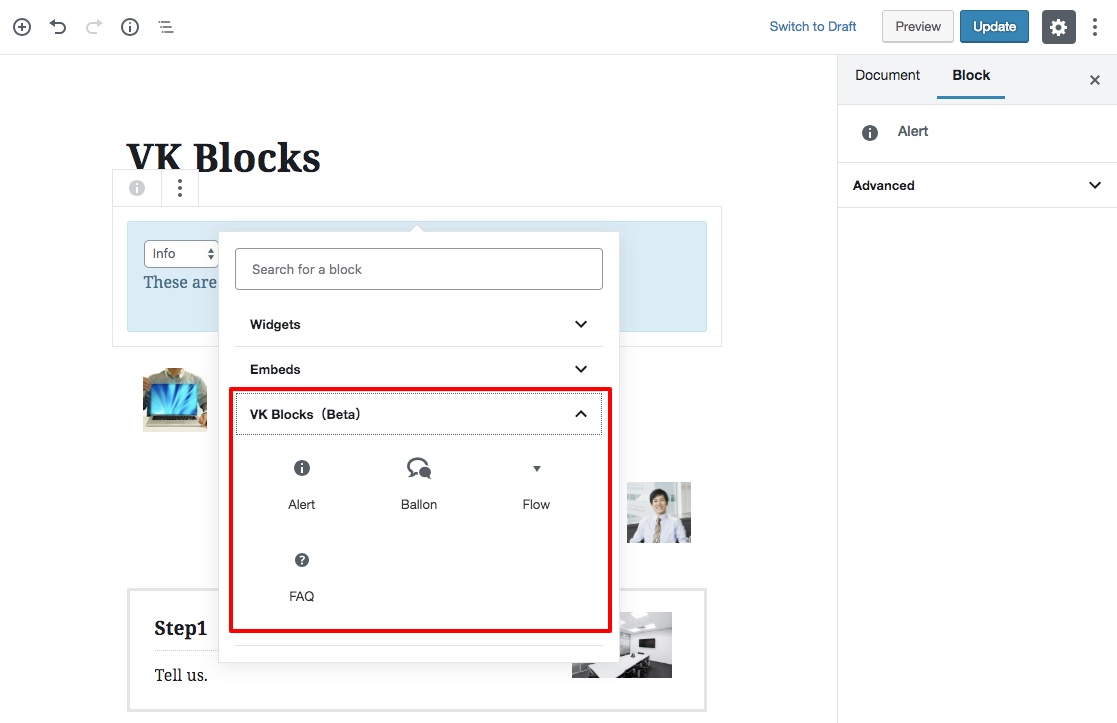
What you get inside
2 screens-
VK Blocks can be selected from the VK Blocks Panel.
-
VK Blocks examples.
About this plugin
This is a plugin that extends Gutenberg’s blocks.
[Blocks]
* Alert
* Balloon
* Border Box
* Button
* Classic FAQ
* New FAQ
* Flow
* Heading (not recommended)
* Icon
* Icon Outer
* Page Content
* PR Blocks (not recommended)
* PR Content (not recommended)
* Responsive Spacer
* Staff (not recommended)
* Page list from ancestor
* Slider
* Visual Embed
* Accordion [ Pro ]
* Animation [ Pro ]
* Archive list [ Pro ]
* Blog Card [ Pro ]
* Breadcrumb [ Pro ]
* Button Outer [ Pro ]
* Card [ Pro ] (not recommended)
* Category Badge [ Pro ]
* Child page list [ Pro ]
* Dynamic Text ( Post Type name / Ancestor Page name ) [ Pro ]
* Fixed Display [ Pro ]
* Icon Card [ Pro ] (not recommended)
* Post list [ Pro ]
* Post list Slider [ Pro ]
* New Badge [ Pro ]
* Selected Post List [ Pro ]
* Step [ Pro ]
* Tab [ Pro ]
* Table of Contents [ Pro ]
* Taxonomy [ Pro ]
* Timeline [ Pro ]
* Grid Column [ Pro ]
* Grid Column Card [ Pro ]
* Outer [ Pro ]
[Extensions]
* Hidden extension
* Highlighter
* Inline Font Size
* Margin extension
* Nowrap
* Responsive BR
* Columns direction
* Custom CSS [ Pro ]
* Link toolbar
[ Settings ]
* Balloon
* Custom Format [ Pro ]
* Custom Block Style [ Pro ]
* Common Margin
* Load Separate
* FAQ Block [ Pro ]
* Custom CSS [ Pro ]
* Block Manager
* Block Style Manager
[ Tools ]
* Import Export
[ Editing and correction ]
The source code of this plugin is below.
https://github.com/vektor-inc/vk-blocks
Questions
- What should I know about Post List / Post List Slider filters (Pro)?
The search keyword is a fixed filter; it does not add a search field to the site.
A keyword makes WordPress treat the block query as a search (is_search()), so themes or search plugins may affect its results.
Once a keyword is saved, the post containing the block may appear in its own results, because block settings are saved in the post content and WordPress searches it (the same as the core Query Loop block). In that case, turn on “Ignore this post”.
The parent filter displays only direct children of one hierarchical post type exposed through REST. To sort child pages by Page Order (menu_order), use the existing Child page list block.
sandywp / also on the shelf
Try another plugin

Customize WordPress Emails and Alerts – Better Notifications for WP
4.8 · 30K+ installs
Supercharge your WordPress email notifications using a WYSIWYG editor and shortcodes. Default and new notifications available.…

3.7 · 10K+ installs
Create custom notification and alert bar for marketing promotions, alerts, increasing click throughs to other pages and so much…

Notification – Custom Notifications and Alerts for WordPress
4.6 · 10K+ installs
Take full control of WordPress notifications. Replace default messages, add custom triggers, and send alerts via email, webhook,…
Spin up a real WordPress site in seconds.
Test plugins, build a demo, hand a client a link — then squash it and start again. No local setup, no Docker.