sandywp / plugins / bnfw

Customize WordPress Emails and Alerts
Better Notifications for WP
Supercharge your WordPress email notifications using a WYSIWYG editor and shortcodes. Default and new notifications available. Add-ons available.
Ready in seconds.
v1.9.9.2 30,000+ installs WP 4.8+ PHP 7.4+
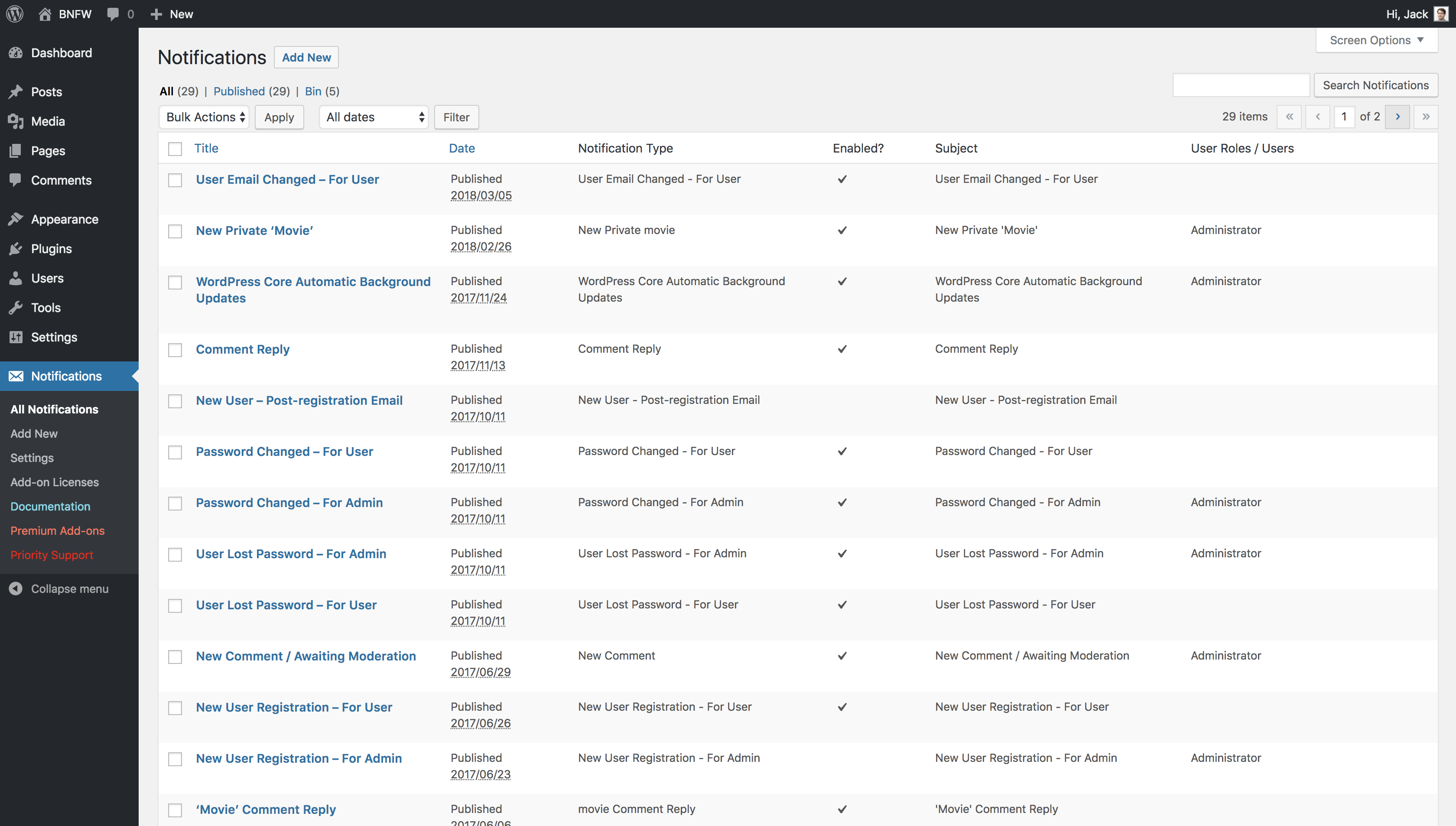
What you get inside
3 screens-
All Notifications
-
Add New / Edit Notification
About this plugin
Better Notifications for WP is a simple but powerful plugin for that allows you to customise the email notifications that WordPress sends using a WYSIWYG editor and shortcodes. All of the default WordPress email notifications are available to customise as well as lots of new ones. You can choose to send notifications to individual users, multiple users, all users in a user role, multiple roles – you name it! You can also power-up your notifications with Premium Add-ons. Emails are sent out via your WordPress website (using wp_mail) but can be sent via SMTP using a 3rd party plugin should you wish.
If you want to let users create their own email notifications/subscriptions/alerts, check out my other plugin: Content Notify.
Here’s a quick walkthrough of the plugin in action:
An Example:
You want all the users in the Editor role to be notified via email when a new post is published and you’d like to customise it to include your logo along with the author’s name and date / time it was published – with this plugin, that’s easy.
A handy list of shortcodes you can use is available here.
Premium Add-ons
Power-up your notifications using add-ons:
Notification Add-on Bundles – Everything you need for your WordPress notifications. Save big when you buy an add-on bundle. Instant access.
Subscriptions (GDPR) – Allow users to manage their subscriptions for BNFW notifications.
If you want to let users create their own email notifications/subscriptions/alerts, check out my other plugin: Content Notify.
Conditional Notifications – Limit certain notifications depending on which categories, tags, post formats, or terms you choose.
Custom Fields – Provides a number of new shortcodes allowing you to include data from custom fields and custom user fields created using ACF.
Send to Any Email – Send notifications to non-WordPress Users.
Digest – Group multiple notifications into a single digest notification.
Global Override – Override some of the settings of notifications directly when editing a post, page, or custom post type.
Reminders – Send a reminder to your users and/or user roles when a post, page, or custom post type hasn’t been updated after a set amount of time. Also send a notification when a user hasn’t logged in for a set amount of time.
Multisite – Adds new notifications and shortcodes for WordPress Multisite to Better Notifications for WP.
Profile Builder – Adds compatibility and new notifications and shortcodes for Profile Builder Free, Hobbyist, and Pro plugins to Better Notifications for WP.
…and more coming soon!
Notifications
The notifications that are currently available to use are:
Admin
- New User Registration – For Admin
- User Lost Password – For Admin
- Password Changed – For Admin
- User Email Changed – For Admin
- User Role Changed – For Admin
- User Logged In – For Admin
- WordPress Core Automatic Background Updates
- Privacy – Confirm Action: Export Data Request – For Admin
- Privacy – Confirm Action: Erase Data Request – For Admin
Transactional
- New User Registration – For User
- New User – Post-registration Email
- User Lost Password – For User
- Password Changed – For User
- User Email Changed Confirmation – For User
- User Email Changed – For User
- User Role Changed – For User
- User Logged In – For User
- Comment Reply
- Privacy – Confirm Action: Export Data Request – For User
- Privacy – Confirm Action: Erase Data Request – For User
- Privacy – Data Export – For User
- Privacy – Data Erased – For User
- Profile Builder – Approval Request for Admin (Profile Builder Add-on)
- Profile Builder – Email Confirmation (Profile Builder Add-on)
- Profile Builder – Account Approved (Profile Builder Add-on)
- Profile Builder – Account Unapproved (Profile Builder Add-on)
- User Login Reminder (Reminders Add-on)
Posts / Custom Post Types
- New Post Published
- Post Updated
- Post Pending Review
- New Private Post
- Post Scheduled
- Published Post Moved to Trash
- New Comment
- New Comment Awaiting Moderation
- Post – Comment Approved
- Post – Custom Field Updated (Custom Fields Add-on)
- Post – Update Reminder (Reminders Add-on)
- New Trackback
- New Pingback
Pages
- New Page Published
- Page Updated
- Page Pending Review
- New Private Page
- Page Scheduled
- Page – New Comment
- Page – New Comment Awaiting Moderation
- Page – Comment Approved
- Page – Comment Reply
- Page – Custom Field Updated (Custom Fields Add-on)
- Page – Update Reminder (Reminders Add-on)
Media
- New Media Published
- Media Updated
- Media – New Comment
- Media – New Comment Awaiting Moderation
- Media – Comment Approved
- Media – Comment Reply
Posts
- New Category
- New Tag
Custom Post Types
- New Term
Multisite (Multisite Add-on)
- New Site Activated or Created – For Network Admin
- New User Created – For Network Admin
- Network Admin Email Change Attempted – For New Network Admin
- Network Admin Email Changed – For Old Network Admin
- New Site Activated or Created – For Site Admin
- Site Deleted – For Site Admin
- Site Admin Email Change Attempted – For New Site Admin
- Site Admin Email Changed – For Old Site Admin
- New Site Activated – For User
- New User Created – For User
- New User Invited to Site – For User
If you’d like to see a notification in the list above, please drop me a line in the forum and I’ll see what I can do to add it.
If you want to let users create their own email notifications/subscriptions/alerts, check out my other plugin: Content Notify.
Like this plugin? Please leave it a great review! Don’t think the plugin is worthy of 5 stars? Having problems? Let me know in the forum and I’ll do my best to help.
DISCLAIMER
This is an incredibly useful and highly rated plugin however, it’s possible that overuse or abuse of this plugin could upset your users by sending them too many notifications. By downloading / installing / using this plugin, you take full responsibility of the management / quantity / types of notifications that are sent out from it including abiding by any SPAM laws in your country / operating areas, dealing with / responding to subscription / unsubscription requests, complaints, and so on. I accept no liability or responsibility for SPAM or abuse of this plugin from the user(s) of or anyone that may receive notifications as a result of the use of this plugin. I’m trusting you, please don’t abuse your users.
Questions
- Is this plugin compatible with the new Block Editor (Gutenberg) in WordPress 5?
Yes and no. Most notifications work but full support can’t be guaranteed for all notifications at the moment. Full support is on the roadmap but for the time being, I’d recommend using the Classic Editor plugin with BNFW.
- What are shortcodes? Where can I use them in this plugin?
Shortcodes are text in square brackets that output content of some kind. For example, if you want to add the content of a post to a notification for ‘New Post Published’, you can use the
[post_content]shortcode to display this in the email that is sent out.Shortcodes can be used in the ‘Subject’ and ‘Message Body’ of your notifications, except for a select few (due to a restriction in WordPress).
A handy list of shortcodes you can use is available here.
- What are some scenarios this plugin could be used for?
- Outreach: A blog/news site with hundreds of subscribers and want to use it to alert them of new blog posts.
- Communication: A small, internal WordPress site and use it to alert staff of new posts or comments.
- Monitor: A website for an awesome new product or service and use it for notifications of pingbacks and trackbacks.
- Security: To receive alerts of password reset requests and their corresponding user.
The possibilities are endless!
- Does this plugin work with anti-spam plugins, such as Akismet?
Yes! There is an option for suppressing comments marked as SPAM in the plugin settings.
- Does this plugin and the add-ons work with Multisite?
Yes! Full support for WordPress Multisite was added in 1.6.13, alongside the release of the Multisite Add-on.
- Can users create their own email notifications?
Not using BNFW. If you want to let users create their own email notifications/subscriptions/alerts, check out my other plugin: Content Notify.
- Notifications aren’t coming through!
First of all, follow this article about how to find out what might be causing the problem. Additionally, please take a look at this help document to see how you might improve email delivery when using Better Notifications for WP.
Many hosts place a limit on the number of emails that can be sent out within an hour so this may also cause some delay in emails arriving. This article has a fairly extensive list of hosts and their corresponding email rate limits that’s worth checking out. Alternatively, please check with your host directly to find out what your limit is.
If you’re still having problems, please drop me a line in the Free Support Forums and I’ll do my best to help.
- Some of my shortcodes aren’t working!
It’s possible you’re inserting a shortcode into a notification that cannot use it. For example: the ‘New Category’ email notification cannot use any of the author or time shortcodes as WordPress only stores the category name, category slug and category description in the database by default. It’s also worth checking the spelling and underscores in any shortcodes as well as if they are wrapped in square brackets
[].
sandywp / also on the shelf
Try another plugin

4.8 · 100K+ installs
This is a plugin that extends Gutenberg's blocks.

3.7 · 10K+ installs
Create custom notification and alert bar for marketing promotions, alerts, increasing click throughs to other pages and so much…

Notification – Custom Notifications and Alerts for WordPress
4.6 · 10K+ installs
Take full control of WordPress emails and notifications. Replace default messages, add custom triggers, and send alerts via…
Spin up a real WordPress site in seconds.
Test plugins, build a demo, hand a client a link — then squash it and start again. No local setup, no Docker.