sandywp / plugins / ultimate-social-media-icons

Social Media Share Buttons & Social Sharing Icons
Share buttons and pop up share icons for social media sharing
Ready in seconds.
v3.0.1 100,000+ installs WP 3.5+
What you get inside
8 screens-
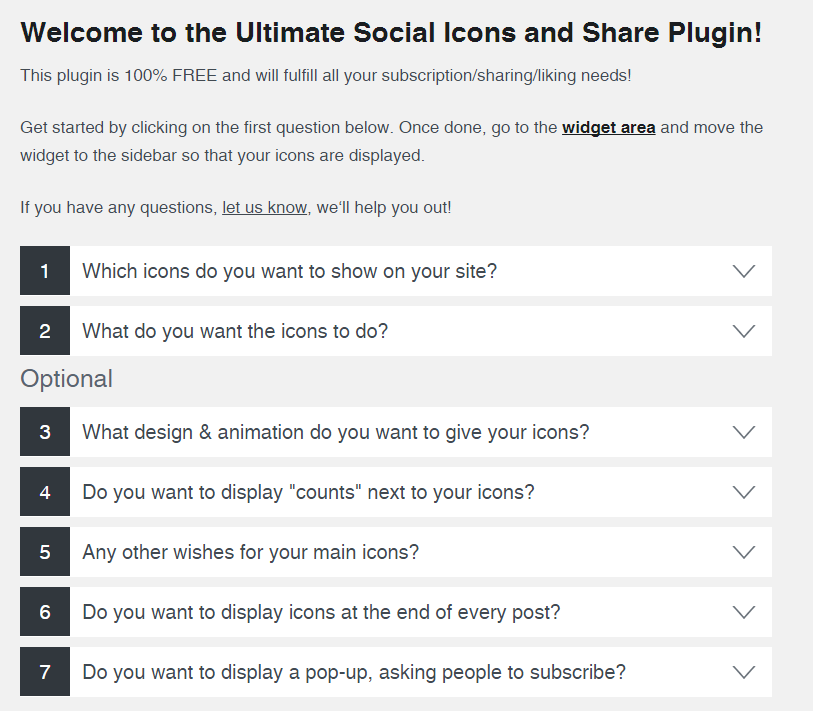
After installing the plugin, you'll see this overview. You'll be taken through the easy-to-understand steps to configure your plugin
-
As a first step you select which share icons you want to display on your website
-
Then you'll define what the share icons should do (they can perform several actions, e.g. lead users to your facebook page, or allow them to share your content…
-
You can pick from a wide range of share icon designs
-
Here you can animate your social share icons (automatic shuffling, mouse-over effects etc.), to make visitors of your site aware that they can share, follow…
-
You can choose to display counts next to your social share icons (e.g. number of Twitter-followers)
-
There are many more options to choose from
-
You can also add social share icons at the end of every post
About this plugin
Try it out on your free dummy site: Click here => https://tastewp.com/plugins/ultimate-social-media-icons
(this trick works for all plugins – just replace “wordpress” with “tastewp” in the plugin’s WP repo URL)
Social media plugin which let’s you add share icons for RSS, Email, Facebook, Twitter, LinkedIn, Pinterest, Instagram, Youtube, ‘Share’ (covering 200+ other social media platforms) and upload custom share icons of your choice.
This free plugin has a lot to offer. Even more can be found in the Premium Plugin, please watch this short video:
See all features of the Premium plugin.
The free social media plugin includes the following features:
- Pick from 16 different designs for your social media share icons
- Give several actions to one social media share icon (e.g. your facebook share icon can lead visitors to your Facebook page, and also give visitors the opportunity to like your page)
- Decide to give your social media icons an animation (e.g. automatic shuffling, mouse-over effects) to make your visitors aware of the share icons, increasing the chance that they follow/share your blog
- Make your social media icons ‘float’ or ‘sticky’
- Allow visitors to subscribe to your blog by Email
- Add ‘counts’ to your social media buttons
- Decide to display a pop-up (on all or only on selected pages) asking people to follow/share you via your social media icons
- Decide to display sharing-buttons and social media icons at the end of every post
- Select from many other customization features for your socialmedia icons!
For GDPR compliance, please have a look at our Social Media GDPR Compliance page.
The social media plugin is very easy to use as it takes you through all the steps:
- Step 1: Choose which social media icons you want to display
- Step 2: Define what actions your social media icons should perform
- Step 3: Pick design & animation options for your social media icons
- Step 4: Add counts to your social media icons (optional)
- Step 5: Select from various other social share options, e.g. make your social media icons ‘float’
- Step 6: Add sharing/linking icons next to each blog post (optional)
- Step 7: Add a customized pop-up asking people to follow or share (optional)
- Step 8: Add a subscription form on your site (optional)
In case of issues or questions please ask in the Support forum.
We hope you enjoy the free social media plugin!
New premium social share plugin
We released a premium social share plugin with many more exciting features:
- Many more social networks supported, including Snapchat share buttons, Whatsapp share buttons, Yummly share buttons, Phone button, Yelp share buttons, Soundcloud share buttons, Skype share buttons Flickr share buttons, Blogger share buttons, Reddit share buttons, Vimeo share buttons, Tumblr share buttons, Xing share buttons, Xhenta, Vkontakte share buttons (VK), Telegram share buttons, Amazon share buttons, Goodreads share buttons, Angies list share buttons, Steam share buttons, Twitch share buttons, Spotify share buttons, Odnoklassniki share buttons (OK), Buffer share buttons, Weibo share buttons, Pocket share buttons, Meneame share buttons, Frype share buttons, LiveJournal share buttons, Patreon share buttons, Dloky share buttons, Discord share buttons, Github share buttons, WordPress buttons, Etsy share buttons, Better Business Bureau share buttons, Digg share buttons, Delicious share buttons, Print share buttons, and many other share buttons!
- More design styles to make your social share icons look really cool & matching the design of your website
- Themed design styles, e.g. if you have a website about cats you can pick from social media logos which look like cats etc.
- Better social sharing and following features, e.g. you can define the Tweet-texts better (e.g. pull the post titles into your Tweets automatically), let people follow you on Facebook directly without leaving your site etc.
- Place the social icons on specific pages, i.e. you can define on which pages the icons to the social media sites should not show
- Position the social icons by anchor and margins, i.e. you can define the margins where your share icons should be displayed (from top/bottom/left/right), and then have them floating, or stick, still visible when user scrolls down or not etc.
- Optimized for mobile – you can define separate selections for your social network icons for mobile
- More functions for email icon, such as Share (by email), Contact you, Link to a certain page etc.
- Social media counters optimized to encourage more social media sharing from your visitors
- More pop up options which contain your social media buttons, e.g. define a limit to how often the pop-up is shown to the same user, show pop-up only when people try to leave your website etc.
- Friendly support in case you’re stuck
- Many more settings and options for your social media network icons
Have a look at the Premium Plugin features
Questions
- Please also check the more comprehensive FAQ on http://ultimatelysocial.com/faq
.
- I face fundamental issues (the plugin doesn’t load etc.)
Please ensure that:
- You’re using the latest version of the plugin(s)
- Your site is running on PHP 5.4 or above
- You have CURL activated (should be activated by default)
If you’re not familiar with those please contact your hosting company or server admin.
Please check if you have browser extensions activated which may conflict with the plugin. Known culprits include:
- Open SEO Stats (Formerly: PageRank Status) in Chrome
- Adblock Plus in Chrome
- Vine in Chrome
Either de-activate those extensions or try it in a different browser.
If the plugin setting’s area looks ‘funny’ after an upgrade then please clear your cache with String+F5 (PC) or Command+R (Mac).
If you get the error message “Are you sure you want to do this? / Please try again” when uploading the socialsharing plugin: Some servers may have a low limits with respect to permitted upload times. Please set the values in the “php.ini” file to:
max_execution_time 90
post_max_size 48MIf you don’t know how to do it, please contact your server support / hosting company for that. Tell them you need it for a social sharing plugin on WordPress which may take longer to upload.
If your issue is still not fixed after you’ve followed the steps above, we can provide support as part of our share to social Premium Plugin: https://www.ultimatelysocial.com/usm-premium/.
- I get error messages ‘Error : 7’, ‘Error : 56’, ‘Error : 6’ etc.
Those point to a CURL-issue on your site. Please contact your server admin or your hosting company to resolve it.
The plugin requires CURL for the social share counts and other features.
- Social share icons don’t show
Please ensure you actually placed the social share buttons either as social widget (in your widget area) or as floating icons under question 5). The Premium Plugin makes placing the social icons especially easy and also allows you to place sticky social share icons on your site, define the placement of the social share icons by margins and many other options, see https://www.ultimatelysocial.com/usm-premium/.
If only some social share icons show, but not all, then please clear your cache, and check if you may have conflicting browser extensions (e.g. ‘Disconnect’-app in Chrome). Also Ad-Blockers are known culprits, please switch them off temporarily to see if that is the reason.
If the social share icons still don’t show then there’s an issue with your template. Please contact the creator of your template for that.
If you are referring to specific social share icons not showing in the plugin itself (e.g. you’re looking for a Whatsapp share icon, but it doesnt exist) please note that our Premium Plugin has many more social media share icons, see https://www.ultimatelysocial.com/usm-premium/
- Twitter social share counts are not displaying (anymore)
Unfortunately, Twitter stopped providing any social share count. God knows why.
- Changes don’t get saved / Deleted plugin but the social share icons still show
Most likely you have the WP Cache plugin installed. Please de-activate and then re-activate it, then the social share icons should display again.
- Links when clicking on the social share icons don’t work
Please ensure you’ve entered the ‘http://’ at the beginning of the url (for all social networks). If the social share icons are not clickable at all there is most likely an issue with your template. This is especially the case if you’ve given your social share buttons several features, which should show a pop-up (tooltip) when you move over the social share icons.
- I cannot upload custom social share icons
Most likely that’s because you’ve set ‘allow_url_fopen’ to ‘off’. Please turn it to ‘on’ (or ask your server admin to do so, he’ll know what to do. Tell them you need it to upload custom share icons for a social media buttons plugin).
sandywp / also on the shelf
Try another plugin

4.7 · 300K+ installs
Share buttons for WordPress including the AddToAny button, Facebook, Bluesky, Mastodon, WhatsApp, Pinterest, Reddit, many more,…

4.5 · 60K+ installs
Website: https://oceanwp.org/ Support: https://oceanwp.org/support/ Documentation: https://docs.oceanwp.org/ Extensions:…

Buttonizer – Social Media Share Buttons, Social Icons, & Social Feeds
4.8 · 40K+ installs
Floating Social Media Icons, Sticky Share Buttons, Facebook Feeds, & Popup builder. Also, create Call, Email, SMS, &…
Spin up a real WordPress site in seconds.
Test plugins, build a demo, hand a client a link — then squash it and start again. No local setup, no Docker.