sandywp / plugins / tiny-compress-images

TinyPNG – JPEG, PNG & WebP image compression
Speed up your website. Optimize your JPEG, PNG, and WebP images automatically with TinyPNG.
Ready in seconds.
v3.8.0 100,000+ installs WP 4.0+
What you get inside
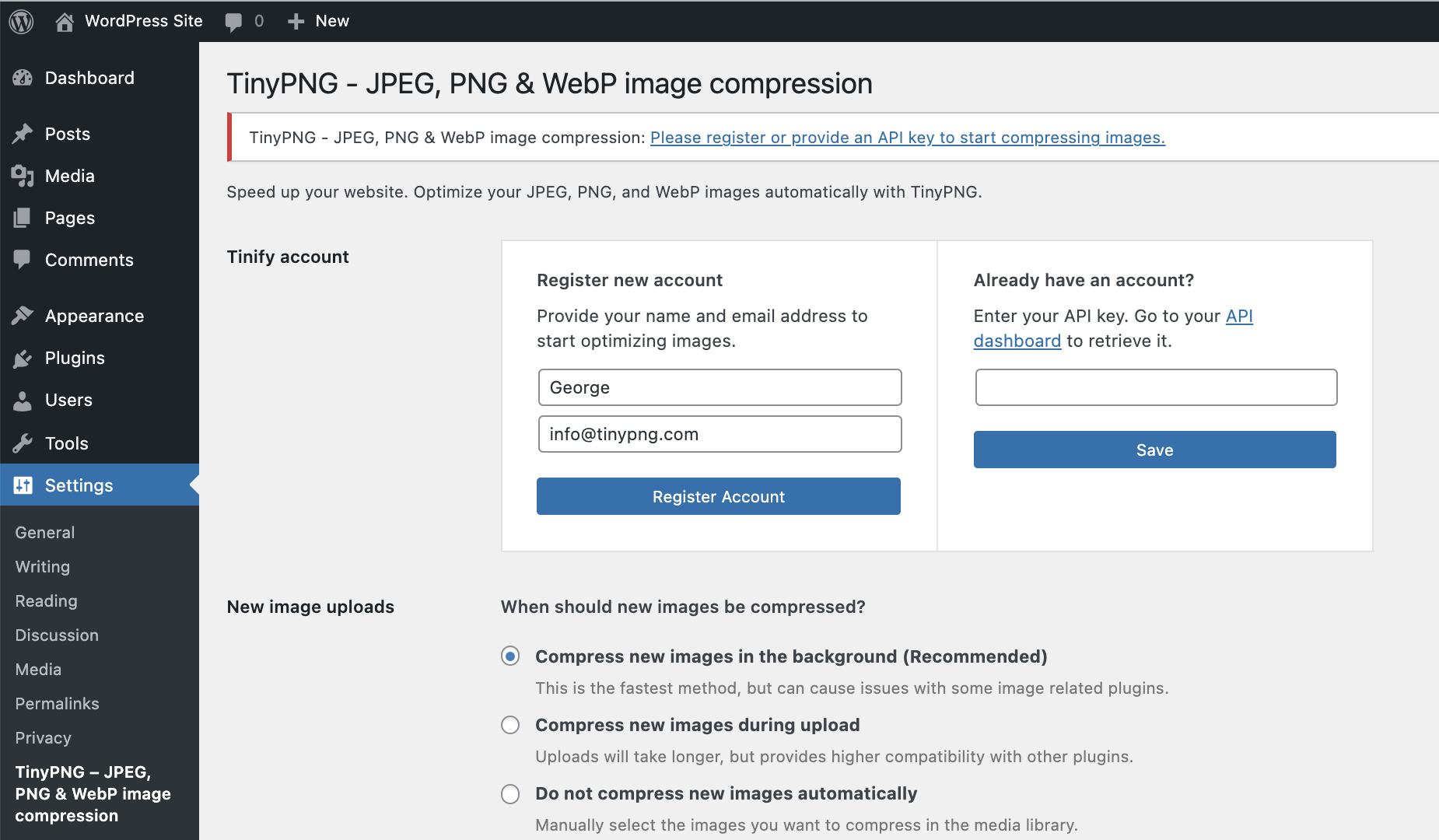
4 screens-
Register a new account or enter your existing API key. Then choose the image sizes to optimize and any other options like resizing and preserving metadata in…
-
In the Media Library list view you can see the savings on your images.
-
From the Media Library you can compress individual images and use the Bulk Actions drop-down to quickly optimize multiple images at once.
-
Last but not least you can also use Bulk TinyPNG to optimize your entire WordPress site.
About this plugin
The best & easiest image compression plugin for WordPress. Speed up your website by compressing and converting your images with TinyPNG for WordPress. Improve your websites’ performance by significantly reducing file sizes without noticeable quality loss. Support for WebP, AVIF, JPG and PNG formats.
Start optimizing your images today to boost SEO, improve your PageSpeed scores, save bandwidth and enhance your website’s user experience.
Why TinyPNG?
- Next-gen format conversion, convert images to WebP and AVIF for even smaller files (NEW)
- Smart compression algorithm, reduce image file sizes without visible quality loss
- Broad format support, supports AVIF, WebP, PNG, animated PNG (APNG) and JPG.
- Automatic image compression, compresses new images on upload.
- Bulk optimization, optimize your full media library in just one click.
- Individual image control, optimize a single image straight from your media library.
- Preserve meta-data, choose to retain copyright metadata, creation date and GPS location in your original images.
- Resize large images, automatically resize huge image uploads by setting a maximum width and/or height for more reasonable browser display.
- Custom thumbnail optimization, choose which image size should be processed.
- Advanced background processing, optimization run quietly in the background to speed up your workflow.
- Multisite support, use one API key across all sites.
- Detailed statistics, see how much file size you have saved by compressing your Media Library
- George the Panda, our lovely mascot brings joy and hugs.
- and much more…
Convert to next-gen formats like AVIF and WebP
With the TinyPNG WordPress plugin, you can easily convert your images to next-gen formats like AVIF and WebP. AVIF and WebP are modern image formats designed for the web. They are often smaller in size than older formats like JPEG and PNG, while keeping excellent image quality.
- WebP images are 25–34% smaller than JPEG (lossy) according to Google.
- AVIF can reduce image size by up to 50% compared to JPEG, often even beating WebP in compression.
Google’s PageSpeed Insights and other tools strongly recommend serving images in AVIF or WebP. Most modern browsers (like Chrome, Firefox, Edge, and Safari) now fully support WebP and AVIF. That means you can safely serve these formats to most of your visitors.
With the TinyPNG WordPress plugin, your images can be automatically converted to AVIF or WebP when you upload them. No extra steps are required.
Optimizing all your images
You can bulk optimize your existing JPEG, PNG, and WebP images all at once by going to Media > Bulk TinyPNG. Clicking on the big button will start compressing and converting, when needed, all unoptimized images in your media library.
If you have more images than your free credits allow, the tool will show you an estimated cost to optimize your entire library. If you are interested, you can upgrade your account to the paid plan and optimize the full library all in one go. Prefer to stay on the free plan? No problem! The bulk optimization tool will simply process images until your free limit is reached.
Compress for performance
The Tinify optimization engine is more than just compression. It is built to deliver the best image performance for the web, without sacrificing visual quality. Here’s how it helps:
- Display JPEG images more quickly with progressive JPEG encoding.
- Color profiles are automatically translated to standard RGB color.
- Convert CMYK to RGB to save more space and add compatibility.
Compatibility
The TinyPNG plugin is fully compatible with WordPress Multisite. Next to this, TinyPNG for WordPress works smoothly with most themes and plugins. Here is a list of the popular plugins that have been tested to work smoothly with TinyPNG.
- WPML
- WooCommerce
- WP Retina 2x
- WP Offload
Getting Started
Install this plugin and follow the instructions to set up your account. No payment details are required.
Learn more about the plugin with these step-by-step tutorials:
- How to set up the TinyPNG WordPress plugin?
- How to compress existing images with the WordPress plugin?
Pricing
You get 500 credits per month at no cost.
With a regular WordPress installation, you can compress roughly 100 images per month. Please note that converting images to AVIF or WebP uses an additional credit per image size. This means with the conversion feature enabled, you can roughly compress and convert 50 images per month for free.
The exact number depends on how many thumbnail sizes are generated by your theme or plugins. You can choose which of the generated thumbnail sizes should be optimized by going to Settings > TinyPNG page. You can upgrade to a paid plan to remove the limit and compress as many images as you like.
Need more?
Upgrade to a paid plan to remove the limit and compress as many images as you want. To view the pricing details, visit: tinify.com/developers/pricing
Privacy
At Tinify, we take your privacy seriously. Only you have access to the uploaded images. All images are stored for a maximum of 48 hours, after which they will be deleted forever.
Contact us
Got questions or feedback? Let us know! Contact us at [email protected] or find us on X: @tinypng.
Contributors
Want to contribute? Check out the Tinify WordPress plugin on GitHub.
Questions
- Q: How many images can I optimize for free?
A: In a default WordPress installation you can optimize around 100 images for free each month. WordPress creates different thumbnails of your images which all have to be compressed. Some plugins even add more sizes, so take a look at the Settings > TinyPNG – JPEG, PNG & WebP image compression page before you start optimization.
- Q: How much does it cost to use the plugin?
A: The plugin is free to use, you receive 500 free compressions each calendar month.
If you need to compress more, you can upgrade to the pay-per-compression pricing. You can view the current pricing at tinify.com.
When you use the bulk optimization tool, the plugin will first scan your media library and show you an estimated number of credits needed to optimize all uncompressed images. You can decide whether you want to upgrade your plan or stay within the free limit.- Q: How can I remove the 500 limit?
A: Just add your Payment details on your account dashboard to remove the limit. For a small fee the additional compressions above 500 will then be charged to your account at the end of each month.
- Q: What happens to the optimized images when I uninstall the plugin?
A: When you remove the plugin all your optimized images will remain optimized.
- Q: I don’t recall uploading 500 photos this month but my limit is already reached. How is this number calculated?
A: When you upload an image to your website, WordPress will create different sized versions of it (see Settings > TinyPNG). The plugin will compress each of these sizes, so when you have 100 images and 5 different sizes you will do 500 compressions.
- Q: Is there a file size limit?
A: Yes, but they are very generous! The maximum file size is 500MB and the maximum canvas size is 256MP (16000px by 16000px in any ratio).
- Q: Can I use the same API key on all my websites?
A: Yes, there are no limitations. You can add the same key everywhere.
- Q: Can I hide my API key from the admin?
A: Yes, you can hide your API key from the admin so other admin users will not be able to see it. To do this you should define the API key in your wp-config.php file. See the installation instructions for more information.
sandywp / also on the shelf
Try another plugin

Smush – Image Optimization, Compression, Lazy Load, WebP & CDN
4.8 · 1M+ installs
Compress and optimize images, enable lazy load, serve WebP & AVIF, and speed up your site with a global image CDN.

Imagify Image Optimization: Optimize Images | Compress & Convert to…
4.3 · 1M+ installs
Image optimization in 1‑click: compress, resize & convert to WebP/AVIF – free up to 20MB/month. Enjoy the easiest WordPress…

Converter for Media – Optimize images | Convert WebP & AVIF
4.9 · 500K+ installs
Speed up your website by using our WebP & AVIF Converter. Optimize images and serve WebP and AVIF images instead of standard…
Spin up a real WordPress site in seconds.
Test plugins, build a demo, hand a client a link — then squash it and start again. No local setup, no Docker.