sandywp / plugins / styleguide

Styleguide
Custom Fonts and Colors
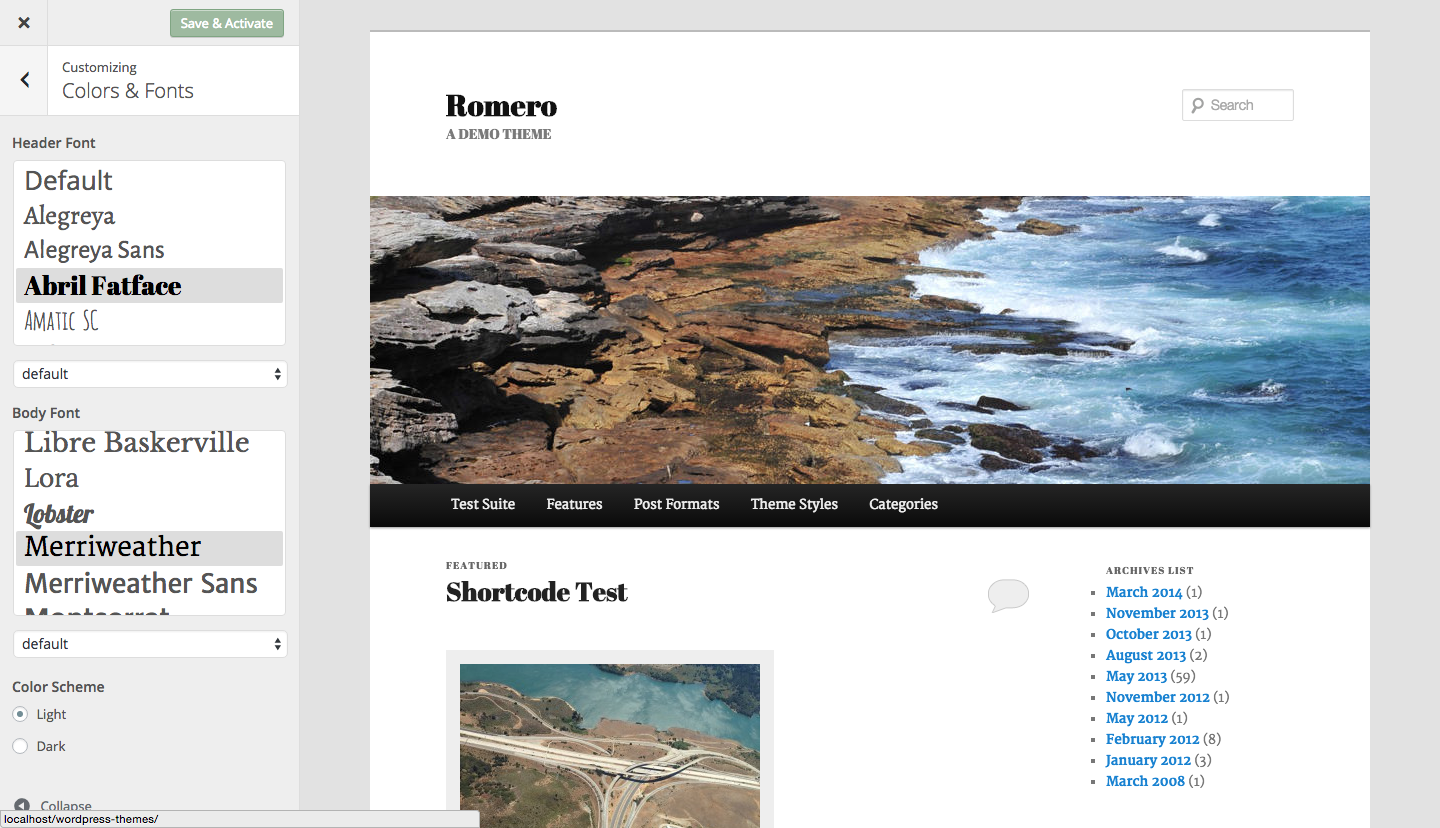
Styleguide allows you to customize fonts and colors in WordPress themes through the Customizer - no need to touch any code!
Ready in seconds.
v1.8.1 2,000+ installs WP 4.5+
What you get inside
2 screens-
An example of Twenty Eleven having it's fonts changed
-
Twenty Thirteen with some alternate colors
About this plugin
Quickly and easily edit fonts and colors in your WordPress themes using the WordPress Customizer so that you can get live previews before saving the new settings.
Perfect for giving your website a unique look without having to hire a designer or make code changes yourself.
All default WordPress themes are fully supported and support for more themes will be added in the future. All other themes can customize fonts.
Styleguide uses a carefully chosen selection of the top 45 Google Fonts to give you a lot of options for personalising your site.
Features
- Choose from a varied selection of the top Google fonts in any theme
- Additional themes (listed below) support editing colors
- Filter fonts based on character set – great for non latin languages such as Russian
- Developer functionality for adding support to other themes, and for adding additional fonts.
Supported Character Sets
Styleguide supports fonts that have a variety of different character sets. This makes selecting a font for your language super easy. The supported character sets are:
- Cyrillic
- Devanagari
- Greek
- Hebrew
- Latin
- Vietnamese
By default Styleguide uses Latin. To limit the font choice to those supporting your character set you should go to Settings → General → Character Set and select your set there.
Supported Themes
- Kent
- Bromley
- Romero
- Puzzle
- Chronicle
- Broadsheet
- Lens
- Monet
- Mimbo Pro
- Opti
- Adaline
- Twenty Ten
- Twenty Eleven
- Twenty Twelve
- Twenty Thirteen
- Twenty Fourteen
- Twenty Fifteen
- Twenty Sixteen
Developers can add support for their themes quite easily – see the ‘Other Notes’ tab for more info.
If you’re in the market for a WordPress theme then you could check out my Premium GPL WordPress themes site here: https://prothemedesign.com/
How To
After downloading and installing the plugin you can go to the Customizer (Appearance > Customizer) and edit fonts and colors in the ‘Colors & Fonts’ panel.
Adding Theme Support
Styleguide allows any theme to add support through the add_theme_support command. For examples check out the theme-styles directory.
I have added an example of a basic implementation below. This code would be placed in your themes functions.php
function prefix_add_styleguide_support() {

  // for properties check out the included theme styles as seen here:
  // https://github.com/BinaryMoon/styleguide/tree/master/theme-styles
  $properties = array(
    ...
  );
  add_theme_support( 'styleguide', $properties );

}

add_filter( 'after_setup_theme', 'prefix_add_styleguide_support' );
Extra Fonts
Styleguide currently offers developers a filter for adding additional fonts. You can use it as shown below
function my_fonts( $font_list ) {
    $font_list['Cormorant Infant'] = array(
        'name' => 'Cormorant Infant',
        'family' => '"Cormorant Infant", serif',
        'weight' => '400,700',
        'sets' => array( 'latin' ),
    );
    $font_list['Poppins'] = array(
        'name' => 'Poppins',
        'family' => 'Poppins, sans-serif',
        'weight' => '400,700',
        'sets' => array( 'latin' ),
    );
    return $font_list;
}
add_filter( 'styleguide_get_fonts', 'my_fonts' );
sandywp / also on the shelf
Try another plugin
4.9 · 10K+ installs
Manage a site-wide central color palette for a uniform look'n'feel! Supports the new block editor, Theme Customizer and many…

5.0 · 6K+ installs
A RGBA-Color-Picker field for Advanced Custom Fields

The Events Calendar: Category Colors
5.0 · 4K+ installs
Add event category background colors to The Events Calendar events.
Spin up a real WordPress site in seconds.
Test plugins, build a demo, hand a client a link — then squash it and start again. No local setup, no Docker.