sandywp / plugins / real-time-find-and-replace

Real-Time Find and Replace
Set up find and replace rules that are executed AFTER a page is generated by WordPress, but BEFORE it is sent to a user's browser.
Ready in seconds.
v4.3 70,000+ installs WP 5.0+
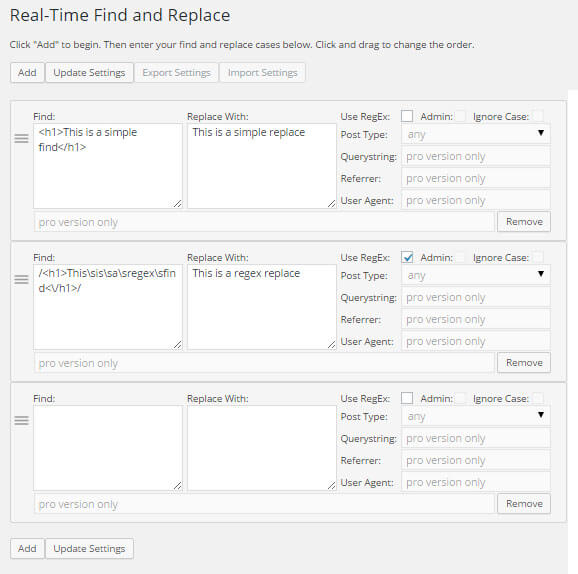
What you get inside
1 screen-
Interface for specifying the find and replace rules you'd like to use. Some elements are enabled in the pro version.
About this plugin
This plugin allows you to dynamically (i.e. at the time when a page is generated) replace code and text from themes and other plugins with code and text of your choosing before a page is delivered to a user’s browser.
Because the find and replace happens in real-time no changes are needed to plugins or themes which means upgrades remain easy!
A pro version (a lifetime license is less than $15) with additional filtering options, setting export/import functionality, and the ability to modify admin pages is available.
Here are some common uses:
- Want to selectively translate text that is being output by another plugin? You can do that.
- Trying to tweak the text on a product or shopping cart page? No problem.
- Hoping to remove footer text from a theme without modifying the theme? That’s easy.
Here are some more examples.
And some tips for those interested in on-page SEO.
Remember, all of the above can be done WITHOUT modifying themes or plugin files so you’ll always be able to upgrade them without having to worry about losing custom edits.
Questions
- Where is data stored?
In an array in the wp_options table. Just one record regardless of the number of find and replace rules.
- Will the find and replace slow my site?
Unless you’re using 50+ rules, you shouldn’t notice any performance impact. And if you’re using a caching plugin, even more rules won’t slow your site.
- What does the regex checkbox do?
You can do a straight up find and replace where the plugin will look for an exact match of what you specified. You can also used advanced pattern matching that is available through regular expressions by checking the regex checkbox.
- My web site is showing a blank page. What do I do?
This will happen if you are using a rule with regex enabled and the rule has an error. Regex is tricky so I recommend starting with a simple rule and adding to it to perform the replace you want.
sandywp / also on the shelf
Try another plugin

Easy Search Replace – Find & Replace Text/HTML/URLs, Remove Footer Credit
4.5 · 600+ installs
Real-time search & replace for text, HTML, and URLs. Target by post type, ID, or URL. Safely remove footer credit — no…

Text Replace – Find and Replace WordPress Strings
5.0 · 200+ installs
Find and replace any WordPress text without coding. Change WooCommerce buttons, form labels, and theme text. Update-safe and…

5.0 · 100+ installs
Easily Replace text, footer credits, jQuery/Ajax loaded text or anything in real-time.
Spin up a real WordPress site in seconds.
Test plugins, build a demo, hand a client a link — then squash it and start again. No local setup, no Docker.