sandywp / plugins / lead-call-buttons

Lead Call Buttons
Make it easy for website visitors to reach you. When enabled adds customizable buttons to the mobile view of the website, i.e. Call, Map, Schedule.
Ready in seconds.
v1.0.7 5,000+ installs WP 4.0+
What you get inside
4 screens-
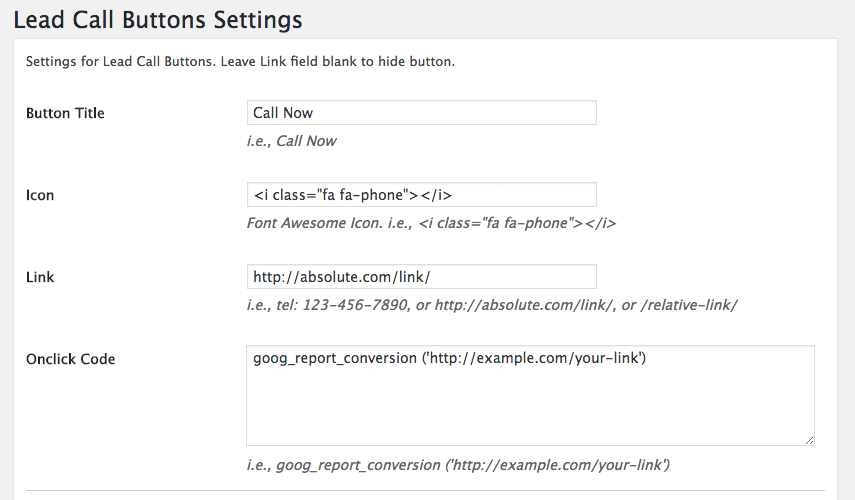
Admin Panel Button Settings
-
Admin Panel Color Settings
-
Plugin Preview
-
Hide Buttons From Specific Page or Post
About this plugin
Make it easy for website visitors to reach you. When enabled adds customizable buttons to the mobile view of the website, i.e. Call, Map, Schedule.
Special features:
- Generate more leads and calls from every page of your website
- Great for marketers, agencies and designers
- Improve website Customer Support
- Dramatically improve your website with just a few clicks (for free)
- Works with any theme
- Add up to 3 Lead Call buttons, i.e. Call, Make an Appointment, Get Directions, etc.
- Font Awesome Support
- Icon, text, and link is customizable
- Track links with Onclick option
- Hide buttons from specific page or post
- Background and text color is customizable
- Easy setup through admin setting panel
- Compatible with small devices
- Very lightweight
Language
Only available in english.
Questions
- Onclick Tracking Code – how do I add my tracking code?
Check Here
sandywp / also on the shelf
Try another plugin

4.0 · 40K+ installs
Take complete control over the WordPress content editor.

4.5 · 10K+ installs
Flexible button creator allowing you to stick floating buttons to the side of your site.

Qty Increment Buttons for WooCommerce
5.0 · 9K+ installs
Adds professionally looking "-" and "+" quantity increment buttons around product quantity field on WooCommerce pages.
Spin up a real WordPress site in seconds.
Test plugins, build a demo, hand a client a link — then squash it and start again. No local setup, no Docker.