sandywp / plugins / instawp-connect

InstaWP Connect
1-click WP Staging & Migration
Create a staging WordPress site from production (live site). Ideal for testing updates, version change or re-write. Sync back only the changes.
Ready in seconds.
v0.1.3.8 40,000+ installs WP 5.6+ PHP 7.0+
What you get inside
6 screens-
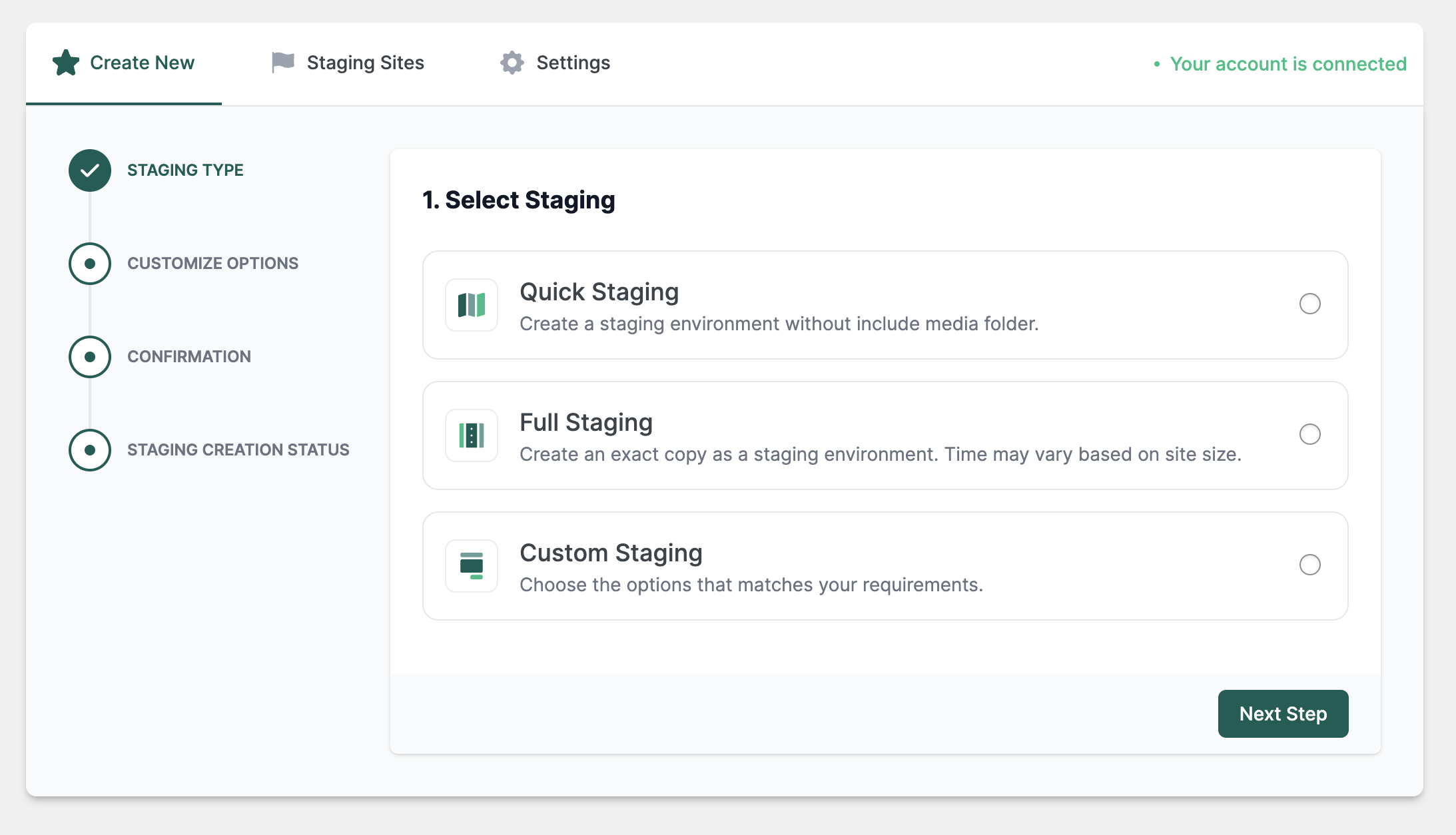
Staging Process - Select Staging Type.
-
Staging Process - Select Options.
-
Staging Process - Confirm Selection.
-
Staging Process - Monitor Progress.
-
All Staging Sites
-
Update API Key and Settings.
About this plugin
InstaWP Connect is a WordPress staging and migration plugin developed by the InstaWP team. It works as a companion tool for InstaWP – a famous tool for creating WordPress websites to test plugin or theme, product demo creation, client project delivery, and everything that can improve your WordPress workflows.
The aim of this plugin is to speed up your WordPress staging process and complete it in seconds without you putting in any effort.
Once you activate InstaWP Connect, you can click Create Site and connect your site to your InstaWP account. Once it’s connected, you can select to:
- Create quick staging [media folder will not be copied over].
- Create custom staging [skip plugins, themes, media, or any specific files or folders]
- Create full staging [everything from your live site will be added to the staging site]
One-click, and the staging creation process will begin!
Once the process is complete (it takes a few minutes depending on the site’s size), you will be able to find the staging of your live site in the InstaWP dashboard. Now, it’s possible to test, develop, edit, clone, migrate, or log in to your staging site in seconds.
PLUGIN FEATURES
Using this companion plugin, you can connect your existing WordPress sites anywhere on the internet to your InstaWP. After your site is connected, you can create 1-click staging websites from within the WP admin panel.
- Create full, custom, or quick staging websites in your InstaWP dashboard
- Auto-login to your Connected sites from InstaWP (https://app.instawp.io/connects)
- 2-way sync (push from staging to production and production to staging)
- Check the status of actions performed during 2-way sync
- Connect and disconnect your WordPress live site
- Keep all info about your site’s health.
- Do everything related to Remote Management securely (File Manager, Database Manager, Plugin / Themes Installer) – Beta
- Utilize dozens of InstaWP features by connecting your site to it.
BENEFITS OF USING INSTAWP CONNECT
- Staging in seconds
- Zero mess in your hosting account
- Comes with a FREE Staging Environment
- Simplified migration and WordPress website backup
- Connect multiple staging sites to your live site.
WHAT IS INSTAWP?
InstaWP is an online WordPress development environment to get you started with a new WP site within seconds. It allows you to create WordPress websites for testing, development, and staging in seconds.
You can get a free account here – https://app.instawp.io/onboard.
Key features include:
- Instant site creation
- Code Editor, DB Editor, and Logs viewer.
- Magic login to the WP admin panel.
- Migrate to any hosting provider that hosts your server (e.g., RunCloud, CloudWays, ServerAvatar, Pressable, SpinupWP, and WP Bolt)
- Access SFTP/SSH (pro).
- Drag-and-drop plugin installation
- Bulk theme/plugin installation from WP Repo using slugs
- Map a custom domain (pro) and host your site with InstaWP.
- Save your site as a template (snapshot of the site that can be reused).
- Shared templates for a public sandbox.
- Invite team members (pro).
- Git integration and GitHub actions support.
- Preset configurations.
- 3rd party services integrations (e.g., Mailchimp, active Campaign, Atarim, etc.)
- Core Faker
Useful Resources
- Visit Website
- Read the InstaWP Documentation
- Know more about our API
- Read on How To Setup WordPress Staging Site
Need support or want to partner with us? Go to our website and use the live chat feature. You can also email us at [email protected]. We will be happy to assist.
Questions
- How can I report security issues?
You can report security bugs through the Patchstack Vulnerability Disclosure Program. The Patchstack team helps validate, triage, and handle any security vulnerabilities. Report a security vulnerability.
sandywp / also on the shelf
Try another plugin

All-in-One WP Migration and Backup
4.5 · 5M+ installs
Trusted by 60M+ sites: The gold standard for WordPress migration and backup. Migrate, backup, and restore your WordPress site…

UpdraftPlus: WP Backup & Migration Plugin
4.8 · 3M+ installs
Backup, restore or migrate your WordPress website to another host or domain. Schedule backups or run manually. Migrate in minutes.

Jetpack – WP Security, Backup, Speed, & Growth
3.7 · 3M+ installs
Improve your WP security with powerful one-click tools like backup, WAF, and malware scan. Includes free tools like stats, CDN…
Spin up a real WordPress site in seconds.
Test plugins, build a demo, hand a client a link — then squash it and start again. No local setup, no Docker.