sandywp / plugins / inhale-mcp-abilities

Inhale: MCP Abilities by Respira
A small settings page that lets WordPress site administrators choose which registered abilities are exposed to the default MCP server.
Ready in seconds.
v0.5.1 100+ installs WP 6.8+ PHP 7.4+
What you get inside
4 screens-
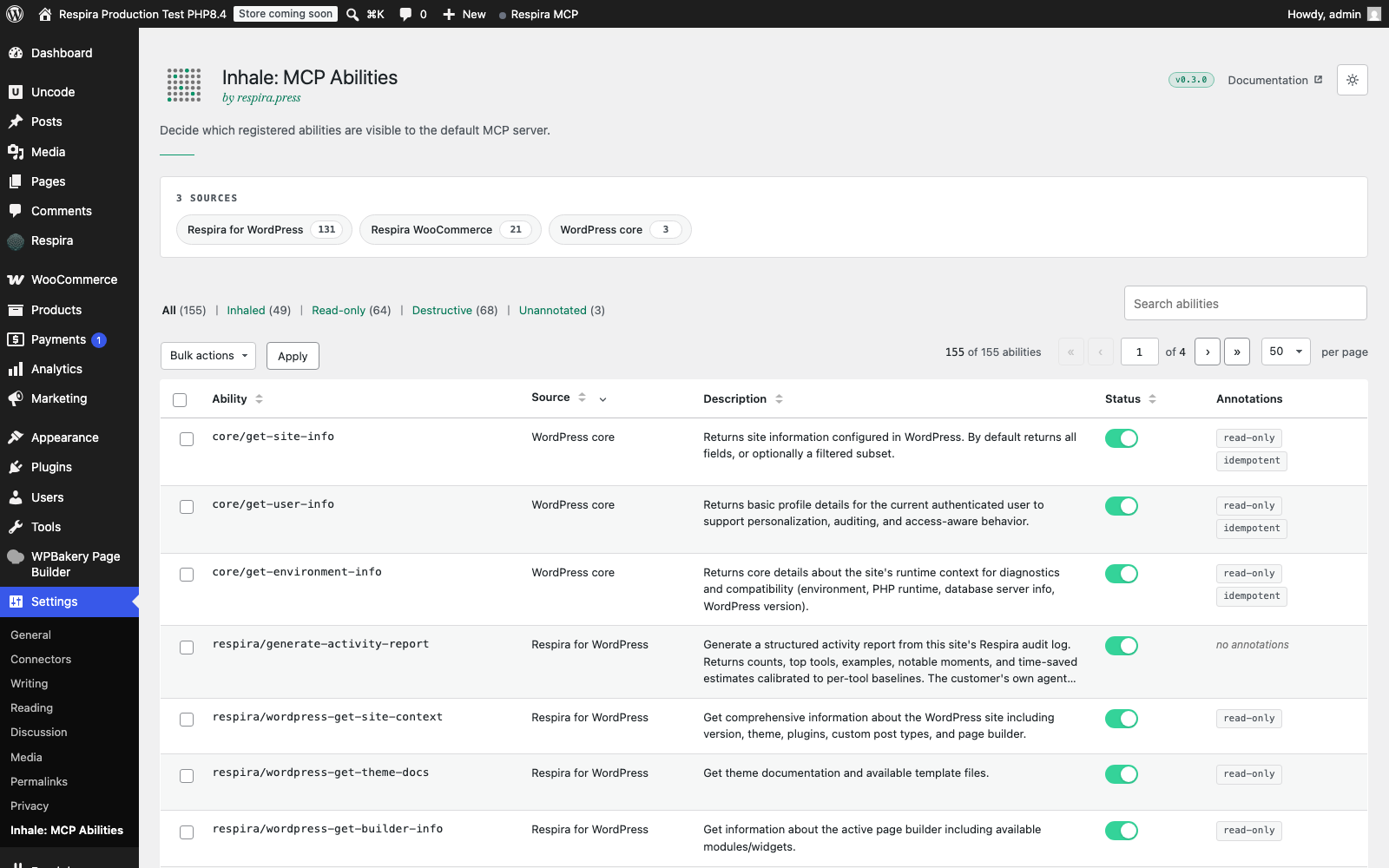
The Inhale: MCP Abilities settings page in light mode: page header with the "by respira.press" subtitle, sources card listing every plugin that registers…
-
The abilities list table close-up: row checkboxes for bulk selection, toggles per row (green when inhaled, grey when not), Source column showing the…
-
The Connection section showing the default MCP server endpoint with copy-to-clipboard, expandable client configuration guides for WP-CLI STDIO and HTTP…
-
Dark mode view: the entire wp-admin content column paints dark together with the Inhale page, the wordmark and subtitle render with brand-spec emerald…
About this plugin
Inhale: MCP Abilities is a small, focused utility that solves one problem: the default WordPress MCP server (provided by the official MCP Adapter plugin) does not expose any registered abilities by default. Site administrators have to write PHP filters to opt each ability into the public MCP surface.
This is the workaround pattern documented in WordPress contributor blog posts and developer guides since the MCP Adapter shipped. Inhale: MCP Abilities replaces the PHP-filter workaround with a simple settings page.
Once installed and activated, you’ll find a new page at Settings > Inhale: MCP Abilities where you can check off the abilities you want exposed to your default MCP server.
What the Inhale: MCP Abilities plugin does
- Lists every registered WordPress ability across all active plugins and themes
- Lets you select which abilities are exposed to the default MCP server with simple checkboxes
- Shows annotation metadata (read-only, destructive, idempotent) on each ability so you can make informed decisions
- Requires explicit confirmation when you inhale an ability marked as destructive
- Provides connection info for popular MCP clients (Claude Desktop, Cursor, Claude Code)
- Respects each ability’s own permission_callback. The Inhale: MCP Abilities plugin controls visibility, not authorization.
- Offers Respira for WordPress as the easiest connection path in the Connection section, and points WooCommerce stores at Respira ARC (free). Both are plain links: nothing loads from respira.press and nothing is sent unless you click.
What the Inhale: MCP Abilities plugin doesn’t do
- Inhale: MCP Abilities does not run any MCP servers, transports, or authentication. Those are handled by the official MCP Adapter plugin, which the Inhale: MCP Abilities plugin extends.
- Inhale: MCP Abilities does not register any abilities of its own. It only toggles visibility of abilities other plugins have registered.
- Inhale: MCP Abilities does not phone home, collect telemetry, or make external network requests.
Requirements
- WordPress 6.8 or later (Abilities API in core since 6.9; 6.8 requires the Abilities API plugin)
- PHP 7.4 or later
- The official WordPress MCP Adapter plugin installed and active
Browse the abilities directory
Respira maintains a public, regularly-refreshed directory of WordPress plugins that register abilities through the Abilities API, including Respira’s own and the Respira WooCommerce add-on. Browse it at respira.press/abilities to see what each plugin exposes to AI agents before you decide which abilities to inhale.
About MCP
Model Context Protocol (MCP) is an open specification originally developed by Anthropic. Inhale: MCP Abilities is a third-party plugin and is not affiliated with, endorsed by, or sponsored by Anthropic. Respira is an independent company.
About Respira
The Inhale: MCP Abilities plugin is built and maintained by Respira, which ships AI infrastructure for WordPress. The main product is Respira for WordPress, a safety layer that registers 130+ abilities across 16 page builders (Elementor, Bricks, Divi, Beaver Builder, Oxygen, Breakdance and 10 more) with snapshot-before-write protection, render validation and one-click rollback. Inhale: MCP Abilities is a free utility offered to the WordPress community. Learn more at respira.press/inhale.
Questions
- Do I need to write any code to use the Inhale: MCP Abilities plugin?
No. Inhale: MCP Abilities is a settings-only utility. The whole point is to replace the PHP-filter workaround with a UI.
- Does Inhale: MCP Abilities work with the WordPress AI plugin?
Inhale: MCP Abilities works alongside the WordPress AI plugin without conflicts. The WordPress AI plugin handles AI-powered editor features inside wp-admin. The Inhale: MCP Abilities plugin handles which abilities are exposed to external MCP clients via the MCP Adapter.
- Is the Inhale: MCP Abilities plugin safe to use on production sites?
The Inhale: MCP Abilities plugin is conservative by default: no abilities are exposed until you explicitly check them, and destructive abilities require additional confirmation. Inhale: MCP Abilities doesn’t change how WordPress abilities work; it only controls their visibility to the default MCP server. Each ability still runs its own permission checks before execution.
- What’s the relationship between Inhale: MCP Abilities and Respira?
Inhale: MCP Abilities is a free utility built and maintained by Respira. Respira’s main product is Respira for WordPress, a safety layer for AI-driven edits across 16 page builders. The two products are separate. You can use the Inhale: MCP Abilities plugin without ever using Respira for WordPress.
- Will write operations work through MCP?
Yes, if you inhale abilities that perform writes. Whether a particular ability performs writes is determined by the plugin that registered the ability, not by Inhale: MCP Abilities. The Inhale: MCP Abilities plugin surfaces annotation metadata (destructive, idempotent) where the registering plugin has provided it, so you can make informed decisions.
sandywp / also on the shelf
Try another plugin

4.6 · 50K+ installs
AI features, experiments and capabilities for WordPress.
5.0 · 80+ installs
MCP server for WordPress. Connect Claude AI or OpenAI to execute WordPress Abilities with configurable permissions.

Agent Toolbelt – Safe Site Operations for AI Agents
20+ installs
Safe hands for your site's AI agent: guarded maintenance operations with dry-run, confirm tokens, a full audit log, and automatic…
Spin up a real WordPress site in seconds.
Test plugins, build a demo, hand a client a link — then squash it and start again. No local setup, no Docker.