sandywp / plugins / abilities-bridge
Abilities Bridge
MCP server for WordPress. Connect Claude AI or OpenAI to execute WordPress Abilities with configurable permissions.
Ready in seconds.
v1.4.0 80+ installs WP 6.2+ PHP 7.4+
What you get inside
6 screens-
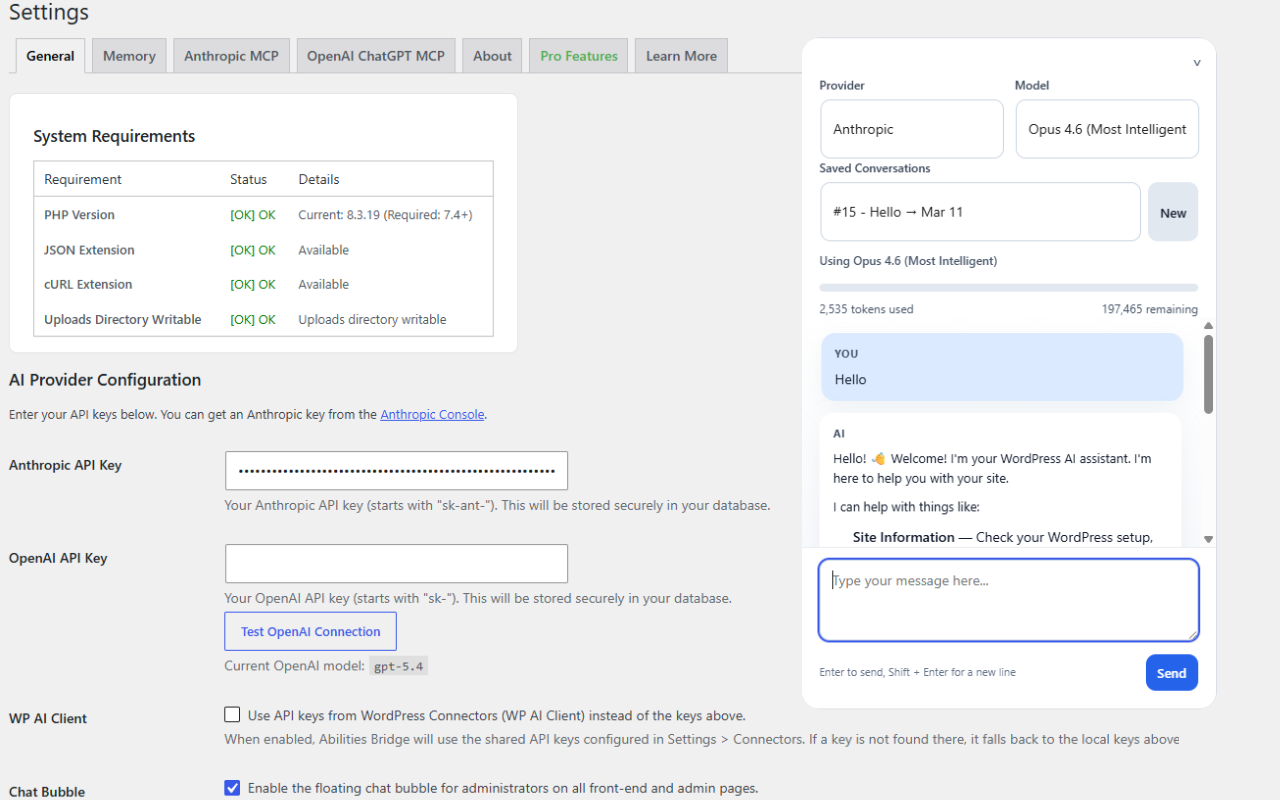
Built-in Chat settings with API-billing labels, API key configuration, and WP AI Client integration
-
Connect ChatGPT account setup with endpoint URL and 9-step connection guide
-
Connect ChatGPT account setup before configuration
-
Admin chat with model selection, conversation management, and AI response
-
Authorize Ability form with 7-gate permission controls
-
Ability permissions list with core read-only abilities and authorized abilities
About this plugin
Making Connections Possible | Now with the Claude 5 family (Opus 5, Sonnet 5, Fable 5) and durable background chat: long AI conversations survive page reloads, closed tabs, and slow hosts
Abilities Bridge connects AI to your WordPress site. Use the built-in admin chat, connect via MCP to Claude Desktop, or integrate with other MCP-compatible applications. Supports both Anthropic (Claude) and OpenAI models.
Key Features
- Admin chat interface for direct AI interaction
- Image attachments in chat — upload images or capture a browser-approved screenshot (can be disabled in settings)
- MCP server for Claude Desktop, ChatGPT, and other MCP clients
- Persistent memory storage across conversations
- Abilities execution with 7-gate permission controls
- Integrated Connected Plugins — discover and approve AI abilities that other plugins register, with per-ability permission controls
- Claude and OpenAI model support
- OAuth 2.0 authentication for MCP connections
Four Ways to Connect
- Built-in Chat – API Billing – Uses the Anthropic or OpenAI API key stored on this site and is billed directly by that API provider
- Claude Account Connection – Connect Claude Desktop through MCP and OAuth using your Claude account; it does not use the built-in chat’s Anthropic API key
- ChatGPT Account Connection – Connect ChatGPT developer mode through MCP and OAuth using your ChatGPT account; it does not use the built-in chat’s OpenAI API key
- Other MCP Clients – Connect Claude Code and compatible apps using the WordPress MCP credentials shown in setup
Requirements
- WordPress 6.2+, PHP 7.4+
- An Anthropic or OpenAI API key for the built-in chat, or the corresponding Claude/ChatGPT account for an MCP account connection
- HTTPS required for MCP OAuth 2.0 connections
External Services
This plugin connects to external API services.
This plugin communicates with Anthropic’s Claude API (https://api.anthropic.com) and/or OpenAI’s API (https://api.openai.com) to provide AI functionality. Data is only sent when you actively use the chat interface or MCP tools. No background data collection or telemetry occurs.
Durable OpenAI chat jobs use Responses API background mode with response storage enabled so the plugin can poll and recover an answer after the browser closes. Under OpenAI’s standard data controls, stored Responses application state is retained for at least 30 days. For OpenAI organizations approved for Zero Data Retention, OpenAI treats storage as disabled and temporarily stores background response data for roughly 10 minutes to support polling.
Data Sent
- Chat messages and prompts
- Memory contents
- Abilities execution requests and results
Legal & Privacy
- Anthropic Privacy Policy: https://www.anthropic.com/legal/privacy
- Anthropic Terms: https://www.anthropic.com/legal/consumer-terms
- OpenAI Privacy Policy: https://openai.com/policies/privacy-policy
- OpenAI Terms: https://openai.com/policies/terms-of-use
- Abilities Bridge Privacy Policy: https://aisystemadmin.com/privacy-policy
- Abilities Bridge Terms: https://aisystemadmin.com/terms-and-conditions/
By using this plugin, you acknowledge that data will be transmitted to your selected AI provider for processing.
Privacy & Security
Data Transmission
This plugin sends data to Anthropic’s API (https://api.anthropic.com) or OpenAI’s API (https://api.openai.com) when you interact with the AI. This includes chat messages, memory contents, and abilities execution requests. You control what data is sent – the AI only accesses data when you use it.
Security
- Permission controls with explicit consent for all write capabilities
- 7-gate ability authorization system
- Isolated memory storage with size limits (50MB total)
- Full activity logging and audit trails
- OAuth tokens encrypted with AES-256-CBC
- MCP access requires authentication for every method, including discovery (initialize, tools/list, ping); unauthenticated requests receive an HTTP 401 OAuth challenge
- All admin actions protected with nonce verification and capability checks
Data Retention
Conversations and logs are stored in your WordPress database until manually deleted. Background chat jobs also store status, timing, provider/model, tool-checkpoint, and error metadata; terminal job metadata is automatically removed after 30 days. Durable OpenAI jobs enable Responses API storage for polling and recovery; OpenAI normally retains that application state for at least 30 days, while approved Zero Data Retention organizations use temporary background storage instead. Refer to your provider’s privacy policy and account data controls for current retention practices.
No Telemetry
This plugin does NOT send usage statistics, telemetry, or analytics to the plugin developer.
Support
For support, visit https://aisystemadmin.com
License
This plugin is licensed under the GPL v2 or later.
Questions
- Do I need an API key?
For the built-in chat, yes – an Anthropic or OpenAI API key is required and API usage is billed to that provider account. Connecting Claude uses your Claude account instead and does not use the Anthropic API key. Connecting ChatGPT uses your ChatGPT account with developer mode and does not use the OpenAI API key.
- Where do I get an API key?
- Anthropic: https://console.anthropic.com/
- OpenAI: https://platform.openai.com/
- Do I need the Abilities API?
Yes. The Abilities API is the official WordPress API for AI. It comes standard with WordPress 6.9 and is also available as a plugin.
- Is this safe to use?
All capabilities require explicit consent. Abilities use a 7-gate permission system with rate limits, risk levels, and admin approval. All actions are logged.
- What data is sent to external services?
Chat messages, memory contents, and abilities execution requests are sent to your selected AI provider. Data is only sent when you actively use the plugin. No telemetry or usage statistics are collected.
- What is the Memory Tool?
An optional feature that lets AI store persistent notes in the WordPress database across conversations. Limited to 1MB per entry, 50MB total. Enable in Settings > Memory.
- What are Abilities?
AI-callable WordPress functions (creating posts, managing users, etc.) that must be individually authorized. Each ability is controlled by rate limits, risk levels, and approval requirements.
- What is Beacon Campaign Sender?
Beacon Campaign Sender is a separate plugin that connects to Abilities Bridge as an Integrated Connected Plugin. When it is installed and active, it registers its tools with Abilities Bridge and they appear on the Integrations page. Approve them with one click to let AI agents use Beacon’s tools, with the same per-ability permission controls as every other ability. Nothing is enabled until you approve it.
sandywp / also on the shelf
Try another plugin

4.6 · 50K+ installs
AI features, experiments and capabilities for WordPress.

Inhale: MCP Abilities by Respira
100+ installs
A small settings page that lets WordPress site administrators choose which registered abilities are exposed to the default MCP…

Agent Toolbelt – Safe Site Operations for AI Agents
20+ installs
Safe hands for your site's AI agent: guarded maintenance operations with dry-run, confirm tokens, a full audit log, and automatic…
Spin up a real WordPress site in seconds.
Test plugins, build a demo, hand a client a link — then squash it and start again. No local setup, no Docker.