sandywp / plugins / if-menu

If Menu
Visibility control for Menus
Display tailored menu items to each visitor with visibility rules
Ready in seconds.
v0.19.2 50,000+ installs PHP 6.0+
What you get inside
3 screens-
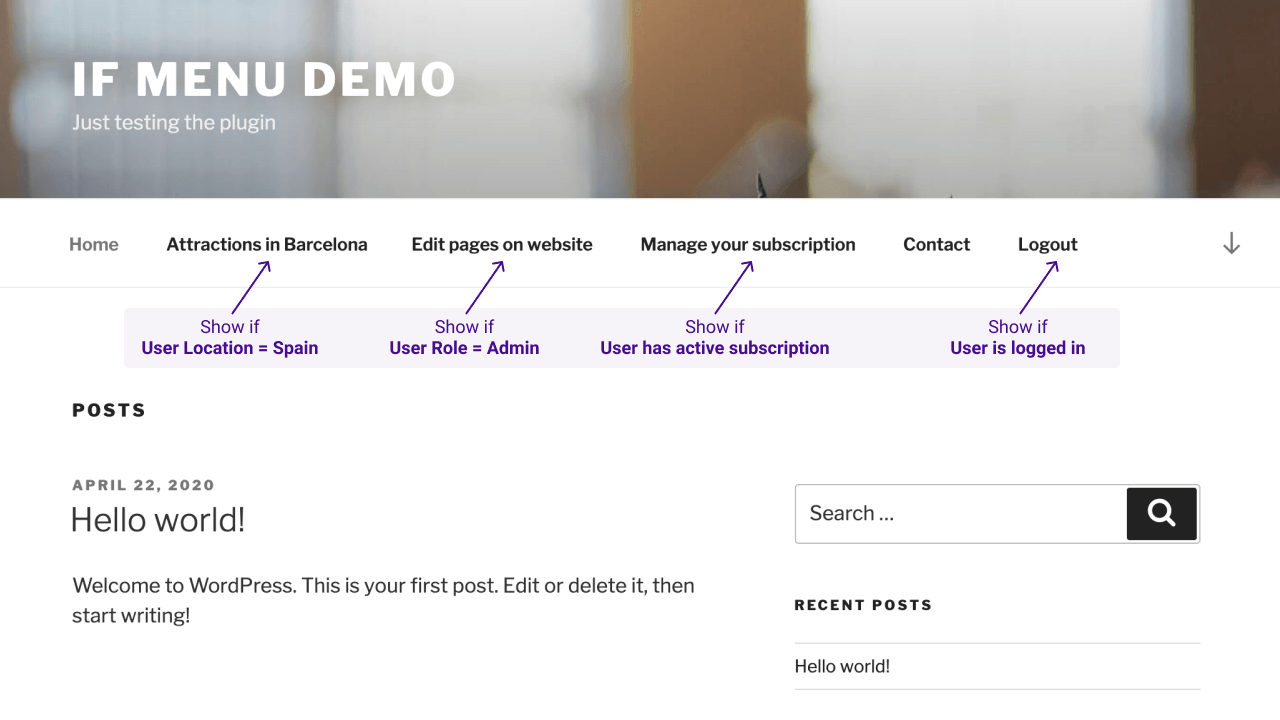
If Menu website demo
-
Enable visibility rules for Menu Items
-
Example of visibility rules
About this plugin
Control what menu items your site’s visitors see, with visibility rules. Here are a few examples:
- Display a menu item only if
User is logged in - Hide menus if
Device is mobile - Display menus only for
Admins and Editors - Hide Login or Register links for
Logged in Users - Display menus for
Users from US or UK - Display menus only for
Customers with active membership - Display menus for visitors browsing with
Language English or Spanish
After the plugin is enabled, each menu item will have a new option “Change menu item visibility” which will enable the selection of visibility rules.
Check the examples in screenshots or try it here → demos.layered.store
Features
- Basic set of visibility rules
- User state
User is logged in - User roles
AdminEditorAuthoretc - Page type
Front pageSingle pageSingle post - Is Archive page (year, category, search results, etc)
- Visitor device
Is Mobile
- User state
- Advanced visibility rules – requires More Visibility Rules Add-on
- Visitor location – detect visitor’s Country
- Visitor language – detect visitor’s selected Language
- WooCommerce Subscriptions – Display menus for users with active subscription
- WooCommerce Memberships – Display menus for customers with active membership plans
- Groups – Detect if users are in specific groups
- WishList Member – Detect the users’ membership level
- Restrict Content Pro – Detect the users’ subscription level
- Multiple rules – mix multiple rules for a menu item visibility
- show if
User is logged inANDDevice is mobile - show if
User is AdminANDIs front page
- show if
- Support for adding your custom rules
Questions
- Show or hide menus if user is logged in
One of the most popular uses of the plugin is to show the “Register/Login” menu for non-logged-in users, and “Your account” for logged-in users.
To enable this for “Register/Login” menu, follow these steps:
1. Go to WordPress Admin on your website -> Appearance -> Menus
2. Expand the menu item for “Register” or “Login” page
3. Enable the option “Enable visibility rules”
4. Choose the rule “Hide if user logged in”For showing the “Your account page”, follow these steps:
1. Go to WordPress Admin on your website -> Appearance -> Menus
2. Expand the menu item for “Your account page” page
3. Enable the option “Enable visibility rules”
4. Choose the rule “Show if user logged in”- Mix multiple visibility rules
Multiple visibility rules can be used at once, like so:
For showing a menu item only for admins on desktop:
1. Go to WordPress Admin on your website -> Appearance -> Menus
2. Expand the menu item you want
3. Enable the option “Enable visibility rules”
4. Choose the rule “Show if user is Administrator”
5. Click the “+” button at the end of the visibility rule, and change to “AND”
6. On the newly added row, choose “Hide if device is mobile”For showing a menu item for Admins or users with an active subscription:
1. Go to WordPress Admin on your website -> Appearance -> Menus
2. Expand the menu item you want
3. Enable the option “Enable visibility rules”
4. Choose the rule “Show if user is Administrator”
5. Click the “+” button at the end of the visibility rule, and change to “OR”
6. On the newly added row, choose “Show if Has active subscription __”To remove an extra visibility rule:
1. Go to WordPress Admin on your website -> Appearance -> Menus
2. Expand the menu item with multiple visibility rules
3. Click on the “AND” / “OR” buttons at end of visibility option
4. Change to “+”- If Menu is broken, no visibility rules are available
There’s a known limitation with adding functionality for menu items in WordPress, and conflicts may happen between some plugins and themes.
If there are multiple plugins that extend Menu Items, for example If Menu and a plugin for Menu Icons, only one of them can add the needed functionality and the other one won’t work as expected.
This is an ongoing issue with WordPress which hopefully will be fixed in a future release.
If the “Menus” page is blank or options for visibility rules are not displaying, there is a way to test which plugin/theme causes this conflict.
Please disable other plugins or themes until you find the one that causes the problem, and contact the respective developers.
In the message include the link to WordPress ticket about menu items https://core.trac.wordpress.org/ticket/18584 where they can see detailed info on how to fix the problem.- Changes to menus are not saved
This problem may happen on sites with a large number of menu items.
In most cases, this is not a limitation or problem caused by plugins or WordPress, but by the hosting server.Your hosting provider or server limits the amount of data that can be sent to WordPress for saving in database.
The setting is named “PHP max_input_vars” and it’s value should be increased, ex:max_input_vars = 200tomax_input_vars = 500.
Contact your hosting provider or make the change yourself if you have access. More details can be found here https://core.trac.wordpress.org/ticket/14134- How can I add a custom visibility rule for menu items?
New rules can be added by any other plugin or theme.
Example of adding a new custom rule for displaying/hiding a menu item when current page is a custom-post-type.
// theme's functions.php or plugin file add_filter('if_menu_conditions', 'my_new_menu_conditions'); function my_new_menu_conditions($conditions) { $conditions[] = array( 'id' => 'single-my-custom-post-type', // unique ID for the rule 'name' => __('Single my-custom-post-type', 'i18n-domain'), // name of the rule 'condition' => function($item) { // callback - must return Boolean return is_singular('my-custom-post-type'); } ); return $conditions; }- Where can I find conditional functions?
WordPress provides a lot of functions which can be used to create custom rules for almost any combination that a theme/plugin developer can think of.
sandywp / also on the shelf
Try another plugin

Email Encoder – Protect Email Addresses and Phone Numbers
4.9 · 90K+ installs
Protect email addresses and phone numbers on your site and hide them from spambots. Easy to use & flexible.

WP Hide & Security Enhancer
4.4 · 50K+ installs
Protect your website by concealing vulnerable WordPress traces, plugins, themes, login/admin url. 2FA, Captcha, Firewall,…

Dynamic Visibility for Elementor
4.6 · 50K+ installs
Show or hide Elementor widgets, containers, columns, and pages based on user role, date, device, and many other powerful…
Spin up a real WordPress site in seconds.
Test plugins, build a demo, hand a client a link — then squash it and start again. No local setup, no Docker.