sandywp / plugins / email-encoder-bundle

Email Encoder
Protect Email Addresses and Phone Numbers
Protect email addresses and phone numbers on your site and hide them from spambots. Easy to use & flexible.
Ready in seconds.
v2.5.3 90,000+ installs WP 4.7+ PHP 7.4+
What you get inside
3 screens-
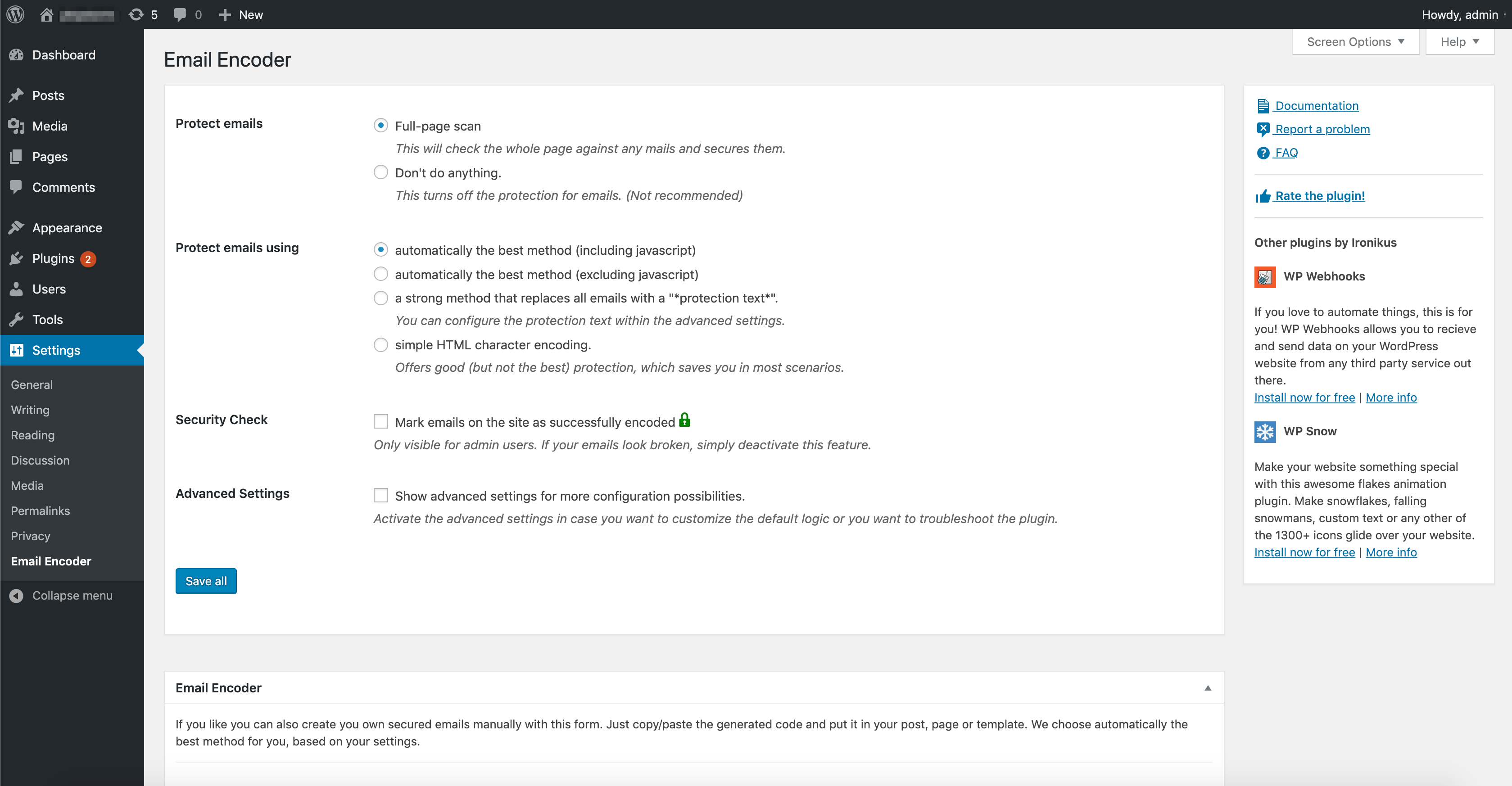
Admin Options Page
-
Check encoded email/content when logged in as admin
-
Email Encoder Form on the Site
About this plugin
Full site protection for your email addresses from spam-bots, email harvesters and other robots. No configuration needed.
It also protects phone numbers or any other text using our integrated [eeb_protect_content] shortcode or href attribute encoding.
Features
- Full page protection for all of your emails
- Instant results (No confiruation needed)
- Protects mailto links, plain emails, email input fields, RSS feeds and much more
- Protect phone number links, ftp, skype, file and other custom link attributes
- Autmoatic protection technique detection (Our plugin chooses automatically the best protection technique for each email)
- Exclude posts and pages from protection
- Automatically convert plain emails to mailto-links
- Automatically convert plain emails to png images
- Supports rot13 encoing, escape encoding, CSS directions, entity encoding and much more
- Deactivate CSS directions manually for browser backwards compatibility
- Shortcode support:
[eeb_protect_emails],[eeb_protect_content],[eeb_mailto],[eeb_form] - Template tag support:
eeb_protect_emails(),eeb_protect_content(),eeb_mailto(),eeb_form() - Protect phone numbers (or any text or html)
- Also supports special chars, like é, â, ö, Chinese characters etcetera
- Use the Encoder Form to manually create encoded scripts
Compatibilities
- The plugin works with mostly any theme and plugin. Some special ones need special treatment. Down below you can learn more about that.
- Compatible with the Maintenance plugin from WP Maintenance
- Divi Theme is fully integrated as well
- Jetpack Image carousel is compatible as well
Free Website Check
We offer you a free tool to test if your website contains unprotected emails. You can use our website checker by clicking here
Easy to use
After activating the plugin all email addresses on your website will be protected out-of-the-box.
We also offer custom shortcodes and template functions to protect phone numbers or other text.
Support
- Documentation – After plugin activation, check the help tab on the plugin options page
- Documentation on wpemailencoder.com
- FAQ
Like this plugin?
Credits
- Adam Hunter for the encode method ‘JavaScript Escape’ which is taken from his plugin Email Spam Protection
- Tyler Akins for the encode method ‘JavaScript ASCII Mixer’
- Title icon on Admin Options Page was made by Jack Cai
Questions
- How can I test if an email address (or other content) is encoded?
You can test this in three different ways.
The easiest (and most efficient) way is to use our website checker, which looks over your website and detects unprotected emails. It is completely free and you can find it here on our website.
The second possibility is to enable the plugin option (in the admin panel) called “Security Check”.
When you are logged in and look on the page there will be a icon on the right side of each email address confirming it was successfully encoded. (This counts only for emails that are displayed within the body tag as HTML. Emails within data attributes or the header won’t show this icon since otherwise the site breaks.)The third possibility is to check the source code yourself by right-clicking on the page and select View Source Code (the exact text depends on the browser).
Now your (real) source code will be shown. Your email address should not be shown in a readable way in the source.Important: in the element inspector of the browser the email address is nearly always shown, so don’t worry about that. That is because the inspector shows a real time representation of the page. This means an encoded email address is already decoded and made usable for the visitor of the page.
- How do I encode my email address(es)?
All email addresses are protected automatically by default, so it is not necessary to configure anything else.
In case you wish to customize it, we also offer some neatsettings, shortcodes and template functions. Please check the settings page within your WordPress website or our documentation
The visitors will see everything as normal, but the source behind it will now be encoded.
For more information, please check out the following page
- How do I encode phone numbers or other text?
Just use the following shortcode within your posts:
[eeb_protect_content]35-01235-468113[/eeb_protect_content]For other parts of your site you can use the template function
eeb_protect_content().- My website looks broken after activating the plugin. What to do?
First: Don’t panic!
Simply create a support request within the support forum and we will come back to you as soon as possible with help.- How can I encode content of BBPress, WP e-commerce or other plugins?
Every content will be automatically protected. In case you find something, that doesn’t work from your end, we are very happy to help!
Our plugin is fully compatible with WP Webhooks and plugins created via Pluginplate- Can I use special characters (like Chinese)?
Yes, since version 1.3.0 also special characters are supported.
sandywp / also on the shelf
Try another plugin

Akismet Anti-spam: Spam Protection
4.7 · 5M+ installs
The best anti-spam protection to block spam comments and spam in a contact form. The most trusted antispam solution for WordPress…

4.8 · 700K+ installs
Sophisticated antispam plugin for effective daily comment and trackback spam-fighting. Built with data protection and privacy in…

WP Armour – Honeypot Anti Spam
5.0 · 400K+ installs
Fastest growing Anti Spam plugin. No API calls, subscriptions, captcha or puzzle. Full GDPR complaint. For comments, contact…
Spin up a real WordPress site in seconds.
Test plugins, build a demo, hand a client a link — then squash it and start again. No local setup, no Docker.