sandywp / plugins / google-language-translator

Translate WordPress
Google Language Translator
Translate WordPress with Google Language Translator multilanguage plugin which allows to insert Google Translate widget anywhere on your website.
Ready in seconds.
v6.0.20 100,000+ installs WP 2.9+
What you get inside
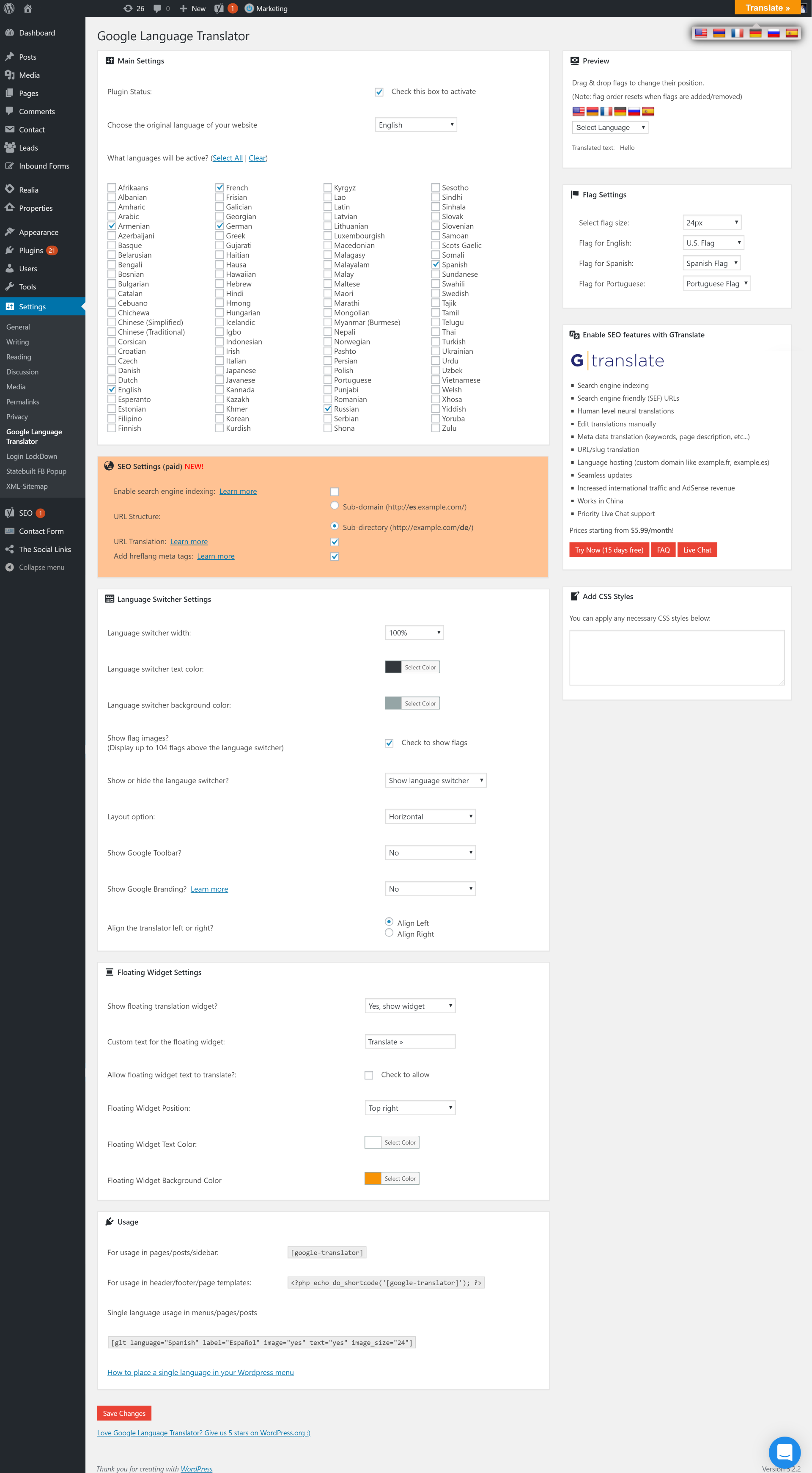
4 screens-
Settings include: inline or vertical layout, hide/show Google toolbar, display specific languages, and show/hide Google branding. Add the shortcode to pages,…
-
Floating language selector
-
Flags and dropdown language selector
-
Language selector in menu with flags
About this plugin
Google Language Translator plugin is now a part of GTranslate family!
GTranslate is a leading website translation services provider since 2008 and powers more than 500.000 multilingual websites worldwide.
Please use Google Language Translator Support for your questions and support requests! We are multilingual!
Please check our FAQ to get quick answers.
Features
- Free Google automatic machine translation
- Option to hide “Suggest better translation” pop-up
- Option to hide Google top frame after translation
- Google Analytics integration
- Translate the site on the fly
- Translate posts and pages
- Translate categories and tags
- Translate menus and widgets
- Translate themes and plugins
- Right to left language support
- Floating language selector
- Language bar with flags in menu
- Translate WooCommerce shop
Paid Features
- Multilingual SEO – Enable search engine indexing
- Neural machine translations with human level translation quality
- Increase traffic and AdSense revenue
- Search engine friendly (SEF) URLs
- Yoast SEO compatible
- WooCommerce compatible
- You can have sub-directory (example.com/es/) or sub-domain (es.example.com) URL structure
- Translate URLs aka slug translation is possible (example.com/about-us → example.es/sobre-nosotros)
- Add hreflang tags for translated alternatives
- You can manually correct translations
- In context translation interface (make corrections without losing the context)
- Translate meta data (meta keywords, meta description)
- Translating schema.org microdata for better search engine appearance
- Seamless updates (cloud service updated on our side – SaaS, you do not need to worry about backups on your side)
- Translate JSON objects (JSON format translation)
- Translate AMP pages (Accelerated Mobile Pages translation)
- Image localization – Translate media
- Translation Proxy (aka Translation Delivery Network)
- Centralized Translation Cache – We revise and improve translations over time
- Language Hosting (example.fr)
- User Dashboard with Analytics
- Live Chat Support
Questions
- It doesn’t translate, what to do?
Please check Google Language Translator Support Forum and feel free to create a new topic if you cannot find answers.
- Is it FREE?
Yes! We have free version and paid versions with advanced features.
- What is the quality of translation?
In our free version we use Phrase Based Machine Translations provided by Google Translate, while in our paid versions use Google Translate Neural Translations which are very accurate for popular language pairs.
In the paid versions you can refine the automatic translations yourself or order professional translations or proofreading of a translated content.
You can get a translation cost estimate by using our Website Translation Cost Calculator- Are the translations provided free of charge?
Yes, we use Google Translate widget for website which provides free phrase based machine translations, which makes it possible to make your wordpress website multilingual instantly upon installation.
In our paid versions we use Google Translate state of the art Neural Translations which are included in the service price and there are no limits on the word count.Besides we offer cost effective automatic translation proofreading service and also professional translation service.
You can get an estimate from our Website Translation Price Calculator- Can I modify the translations?
That feature is available only in our paid version. You will be able to make edits directly on the page without losing the context.
By the way, we can help you to translate your website with a cost effective approach by post-editing your automatic translated content.
The proofreading service will be done by a native speakers and if you want to take the quality to another service, we also have a professional website translation service available.
You can get an instant website translation estimate by using our Website Word Counter tool.- Which languages are supported?
Here is the list: Afrikaans, Albanian, Amharic, Arabic, Armenian, Azerbaijani, Basque, Belarusian, Bengali, Bosnian, Bulgarian, Catalan, Cebuano, Chichewa, Chinese (Simplified), Chinese (Traditional), Corsican, Croatian, Czech, Danish, Dutch, English, Esperanto, Estonian, Filipino, Finnish, French, Frisian, Galician, Georgian, German, Greek, Gujarati, Haitian Creole, Hausa, Hawaiian, Hebrew, Hindi, Hmong, Hungarian, Icelandic, Igbo, Indonesian, Irish, Italian, Japanese, Javanese, Kannada, Kazakh, Khmer, Korean, Kurdish (Kurmanji), Kyrgyz, Lao, Latin, Latvian, Lithuanian, Luxembourgish, Macedonian, Malagasy, Malay, Malayalam, Maltese, Maori, Marathi, Mongolian, Myanmar (Burmese), Nepali, Norwegian, Pashto, Persian, Polish, Portuguese, Punjabi, Romanian, Russian, Samoan, Scottish Gaelic, Serbian, Sesotho, Shona, Sindhi, Sinhala, Slovak, Slovenian, Somali, Spanish, Sudanese, Swahili, Swedish, Tajik, Tamil, Telugu, Thai, Turkish, Ukrainian, Urdu, Uzbek, Vietnamese, Welsh, Xhosa, Yiddish, Yoruba, Zulu
- Is it SEO compatible?
Our free version doesn’t give any SEO advantage. For SEO features and multilingual SEO you need to use our paid versions which have all the SEO advantages.
- What is multilingual SEO?
Multilingual SEO is a SEO strategy which uses new content generation technique by translating your original content and making your website multilingual. By translating your website into many languages you are creating many new multilingual keywords targeted for international market. It helps to increase your search appearnce on search engines results pages (SERPs), which can generate more traffic, increase sales and rise the conversion rate.
sandywp / also on the shelf
Try another plugin

4.8 · 1M+ installs
Translate WordPress plugins and themes directly in your browser. Versatile PO file editor with integrated AI translation…

Translate WordPress with GTranslate
4.9 · 900K+ installs
Translate WordPress with Google Translate multilanguage plugin using AI translation. Complete multilingual SEO solution,…

4.7 · 800K+ installs
Go multilingual in a simple and efficient way. Keep writing posts and taxonomy terms as usual while defining their languages all…
Spin up a real WordPress site in seconds.
Test plugins, build a demo, hand a client a link — then squash it and start again. No local setup, no Docker.