sandywp / plugins / loco-translate

Loco Translate
Translate WordPress plugins and themes directly in your browser. Versatile PO file editor with integrated AI translation providers.
Ready in seconds.
v2.8.8 1,000,000+ installs WP 6.6+ PHP 7.4+
What you get inside
6 screens-
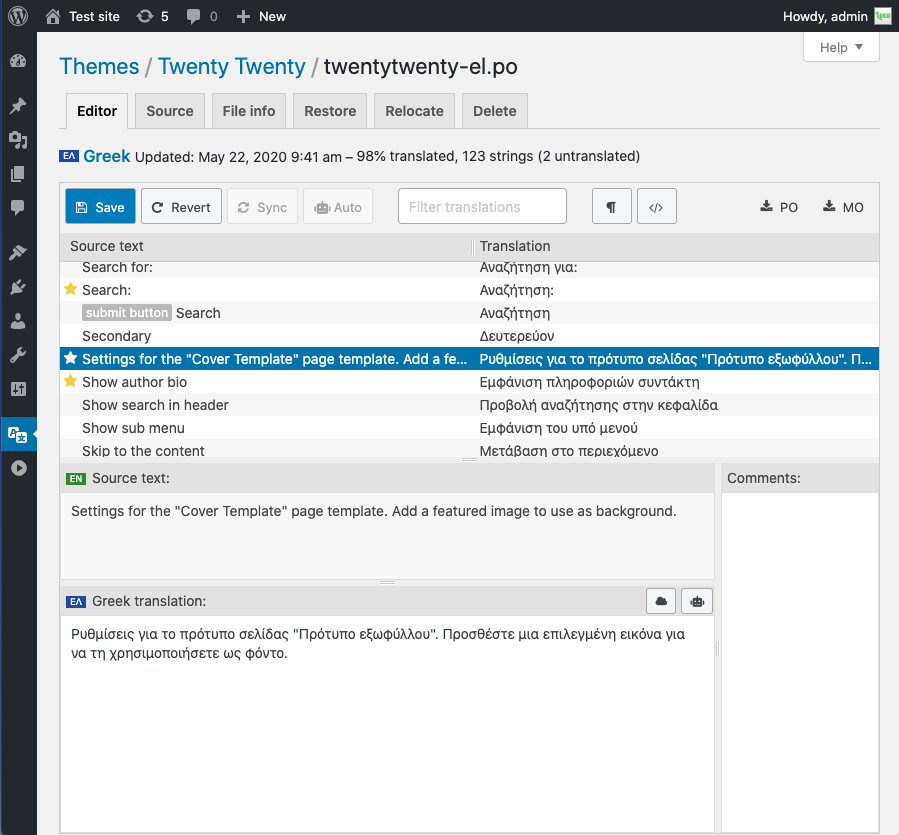
Translating strings in the browser with the Loco PO Editor
-
Showing translation progress for theme language files
-
PO source view with text filter and clickable file references
-
Restore tab showing PO diff view with revert function
-
Showing access to translations by installed language
-
Suggestion feature showing results from several providers
About this plugin
Loco Translate provides in-browser editing of WordPress translation files and integration with automatic translation services.
It also provides Gettext/localization tools for developers, such as extracting strings and generating templates.
Features include:
- Built-in translation editor within WordPress admin
- Integration with translation APIs including DeepL, Google, Lecto, Microsoft and OpenAI.
- Create and update language files directly in your theme or plugin
- Extraction of translatable strings from your source code
- Native MO file compilation without the need for Gettext on your system
- JSON (Jed) file compilation compatible with WordPress script localization
- Support for standard PO features including comments, references and plural forms
- PO source view with clickable source code references
- Protected language directory for saving custom translations
- Configurable PO file backups with diff and restore capability
- Built-in WordPress locale codes
Official Loco WordPress plugin by Tim Whitlock.
For more information please visit our plugin page.
Keyboard shortcuts
The PO file editor supports the following keyboard shortcuts for faster translating:
- Done and Next:
Ctrl ↵ - Next string:
Ctrl ↓ - Previous string:
Ctrl ↑ - Next untranslated:
Shift Ctrl ↓ - Previous untranslated:
Shift Ctrl ↑ - Copy from source text:
Ctrl B - Clear translation:
Ctrl K - Toggle Fuzzy:
Ctrl U - Save PO / compile MO:
Ctrl S - Toggle invisibles:
Shift Ctrl I - Suggest translation:
Ctrl J
Mac users can use ⌘ Cmd instead of Ctrl.
Questions
- How do I use Loco Translate?
Try our Guides and Tutorials.
- How do I get more help?
If you have a problem using Loco Translate, please try our help pages.
There’s a lot of information there to help you understand how it works and the most common pitfalls to avoid.To report a bug please start a new topic in the support forum,
but please check the FAQs for similar issues first.
If you decide to submit a bug report please post enough relevant detail for us to reproduce your issue.- Is my data protected?
We don’t collect your data or track you. See the plugin privacy notice.
sandywp / also on the shelf
Try another plugin

5.0 · 1M+ installs
Multibyte functionality enhancement for the WordPress Japanese package.

4.9 · 40K+ installs
Making internationalization/localization in WordPress faster than ever before.

WPBakery Visual Composer & qTranslate-X
3.2 · 7K+ installs
Enables multilingual framework for plugin "WPBakery Visual Composer".
Spin up a real WordPress site in seconds.
Test plugins, build a demo, hand a client a link — then squash it and start again. No local setup, no Docker.