sandywp / plugins / facebook-page-feed-graph-api

Mongoose Page Plugin
The most popular way to display the Facebook Page Plugin on your WordPress website. Easy implementation using a shortcode or widget.
Ready in seconds.
v1.9.2 10,000+ installs WP 4.6+ PHP 5.3+
What you get inside
3 screens-
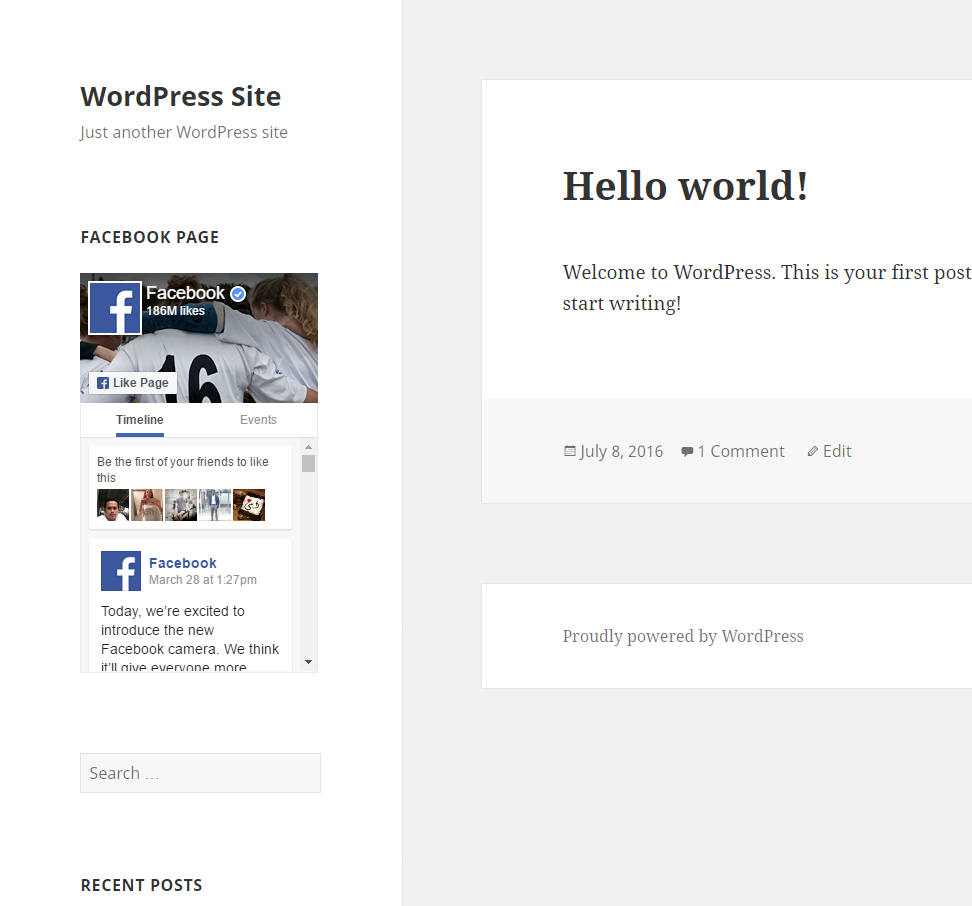
Installation example
-
Example of the new widget introduced in version 1.2.0
-
The new shortcode generator dashboard widget
About this plugin
Seamlessly add a Facebook Page to your WordPress website with the Mongoose Page Plugin! Trusted by more than 30,000 WordPress websites worldwide, the Mongoose Page Plugin is the simplest way to add a Facebook page to your website.
You can add your Facebook page to any widget area with the custom Mongoose Page Plugin widget, with live preview available in the Customizer.
The plugin can be used to add your Facebook page to any post, page or text widget by using the [facebook-page-plugin] shortcode to display the plugin wherever you like, as often as you like.
Other features include:
-
A shortcode generator on the admin dashboard for easy generating of the shortcode
-
Uses your site language by default, but you can display your Facebook page in all 111 languages that Facebook supports, including English, Spanish, Arabic, German, French, Russian and many more
With more than 30,000 installs and over 50 5-star rating, the Mongoose Page Plugin is one of the most popular social media plugins for WordPress.
Plugin Settings
The Mongoose Page Plugin uses a shortcode to insert the page feed. You set your settings within the shortcode.
[facebook-page-plugin setting=”value”]
Available settings:
href (URL path that comes after facebook.com/)

width (number, in pixels, between 180 and 500, default 340)

height (number, in pixels, minimum 70, default 500)

cover (true/false, show page cover photo, default true)

facepile (true/false, show facepile, default true)

tabs (any combination of [posts, messages, events], default timeline)

cta (true/false, hide custom call to action if applicable, default false)

small (true/false, display small header (must be true for height to be lower than 130px), default false)

adapt (true/false, force plugin to be responsive, default true)

language (languageCode_countryCode eg: en_US, language of the plugin, default site language)

method (SDK or iframe embed method, default SDK)
-
Deprecated Settings *
posts (true/false) – posts has been replaced by tabs as of 1.4.0. There is a fallback in place to convert it to tabs
Example: [facebook-page-plugin href="facebook" width="300" height="500" cover="true" facepile="true" tabs="timeline" adapt="true"]
This will display a Facebook page feed that loads in the page facebook.com/facebook that is 300px wide but adapts to it’s container, 500px high, displaying the page’s cover photo, facepile and recent posts in the same language as the site. See the screenshots tab for a demonstration of how it will appear
Filter Reference
facebook_page_plugin_dashboard_widget_capability
Changes who can see the shortcode generator on the dashboard. Default: edit_posts
facebook_page_plugin_app_id
Changes the Facebook App ID.
Questions
- Where do I report security bugs found in this plugin?
Please report security bugs found in the source code of the Mongoose Page Plugin plugin through the Patchstack Vulnerability Disclosure Program. The Patchstack team will assist you with verification, CVE assignment, and notify the developers of this plugin.
- The plugin doesn’t load properly
The most common causes of the plugin not displaying are an ad blocker, audience restrictions or browser privacy settings.
* Disable or whitelist any ad blocking browser extension
* Disable any audience restrictions in your page settings on Facebook.
* Disable any antivirus software on your device.
* If using Safari, disable Hide IP From Tracker.- The plugin loads but doesn’t show the facepile or posts
The default height of the plugin is only tall enough to display the main page header. Increase the height until you can see the additional features you want to display.
- Where is the shortcode generator?
As of version 1.9.0, the shortcode generator has moved to Settings > Mongoose Page Plugin > Shortcode Generator
- Is there a Gutenberg block?
Not yet, but it is on our roadmap.
sandywp / also on the shelf
Try another plugin

Smash Balloon Social Post Feed – Simple Social Feeds for WordPress
4.7 · 200K+ installs
Formerly "Custom Facebook Feed". Display completely customizable Facebook feeds of a Facebook page. Supports Facebook oEmbeds.

Easy Social Feed – Social Photos Gallery and Post Feed for WordPress
4.6 · 30K+ installs
Display Instagram, Facebook, YouTube & X/Twitter feeds with photos, videos, reels, events & galleries. SEO/AEO friendly,…

Social Slider Feed – Social Media Feed & Gallery Widgets
3.9 · 10K+ installs
Display Instagram, Facebook and YouTube feeds in widgets, posts, pages, or anywhere else on your website.
Spin up a real WordPress site in seconds.
Test plugins, build a demo, hand a client a link — then squash it and start again. No local setup, no Docker.