sandywp / plugins / eps-301-redirects

301 Redirects – Redirect Manager
Manage 301 & 302 redirects. Simple redirection & redirects validation. Includes redirect stats & 404 error log.
Ready in seconds.
v2.85 300,000+ installs WP 4.0+ PHP 5.2+
What you get inside
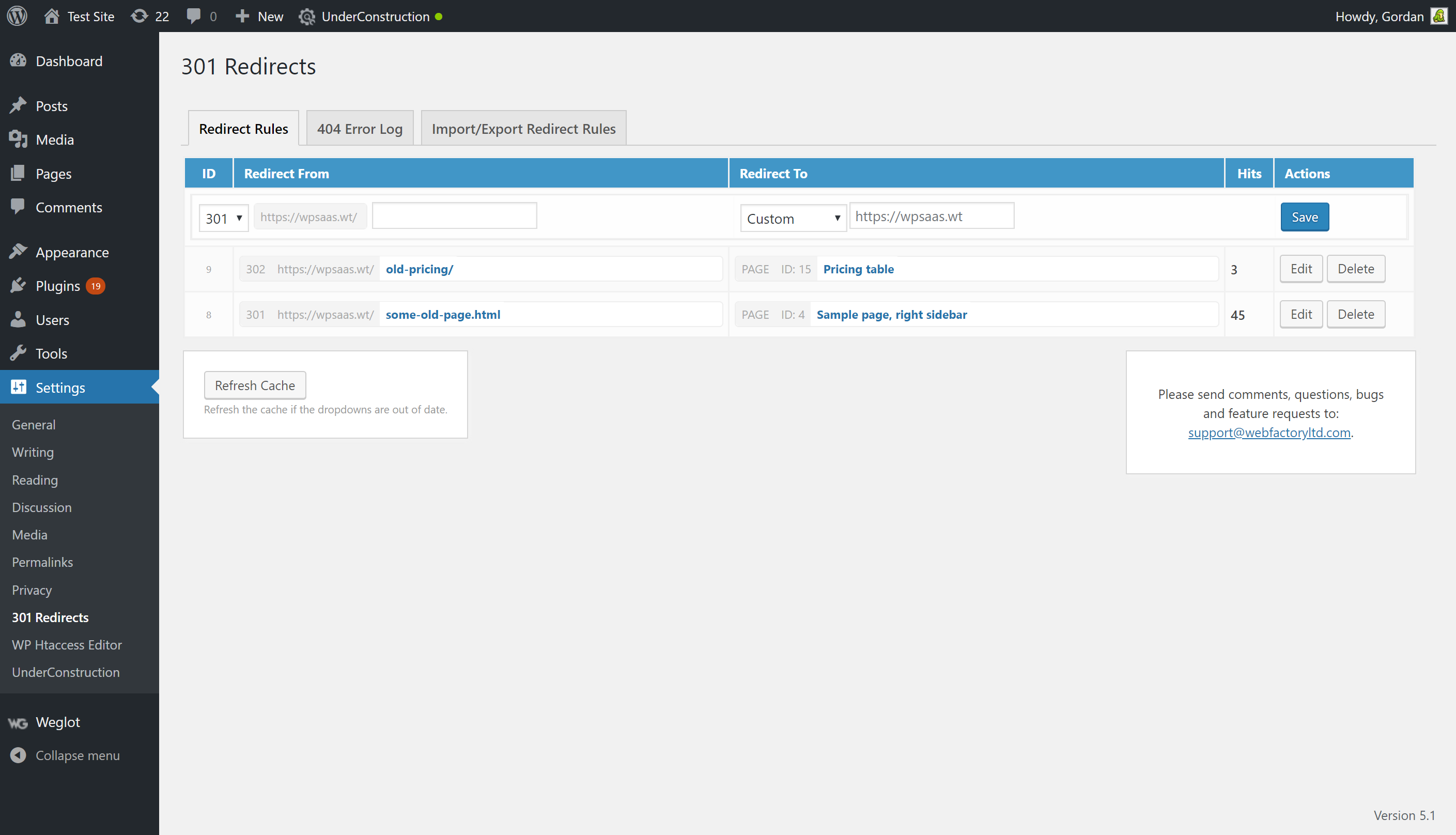
2 screens-
301 Redirects admin area
-
301 Redirects import/export options
About this plugin
301 Redirects helps you manage and create 301, 302, 307 redirects for WordPress site to improve SEO & visitor experience. 301 Redirects is easy to use. Perfect for new sites or repairing links after reorganizing your old content, or when your site has content that expires and you wish to avoid sending visitors to a 404 error page and want to create redirection instead. Use the 404 error log to identify problematic links & create new redirections.
Having problems with spam, bots, or AI scrapers? Have a look at our free Captcha plugin used on over 200,000 sites.
301 Redirects GUI is located in WP Admin – Settings – 301 Redirects
404 Error Log widget can be found in the WP Admin – Dashboard – 404 Error Log
Features
- Choose from Pages, Posts, Custom Post types, Archives, and Term Archives from dropdown menu to create redirection
- Or, set a custom destination URL!
- Retain query strings across redirects
- Super-fast redirection
- 404 error log
- 404 error log widget
- Import/Export feature for bulk redirects management
- Simple redirect stats so you know how much a redirection is used
- Fully compatible with translation plugins (Weglot, TranslatePress, Gtranslate, Loco Translate) that use lang prefix in URL
Need more features?
WP 301 Redirects PRO offers wildcard & regular expression URL matching, auto-typo fixing in URLs, complete redirect and 404 log, link scanner, and a centralized SaaS dashboard to monitor redirects on all your sites from one place.
What is a 301 Redirect?
A redirect is a simple way to re-route traffic coming to a Requested URL to different Destination URL.
A 301 redirect indicates that the page requested has been permanently moved to the Destination URL, and helps pass on the Requested URLs traffic in a search engine friendly manner. Creating a 301 redirect tells search engines that the Requested URL has moved permanently, and that the content can now be found on the Destination URL. An important feature is that search engines will pass along any clout the Requested URL used to have to the Destination URL.
When Should I use 301 Redirects?
* Replacing an old site design with a new site design
* Overhauling or re-organizing your existing WordPress content
* You have content that expires (or is otherwise no longer available) and you wish to redirect users elsewhere
Is the 404 error log GDPR friendly?
The 404 error log does not collect user IPs. It collects the following data: timestamp of the event, the (404) URL that was opened, and the user-agent string.
Having problems with SSL? Moving a site from HTTP to HTTPS?
Install our free WP Force SSL plugin. It’s a great way to enable SSL and fix SSL problems.
External libraries used in the project
* PHP User Agent Parser
Questions
- What is a 301 Redirect?
A redirect is a simple way to re-route traffic coming to a Requested URL to different Destination URL.
A 301 redirect indicates that the page requested has been permanently moved to the Destination URL, and helps pass on the Requested URLs traffic in a search engine friendly manner. Creating a 301 redirect tells search engines that the Requested URL has moved permanently, and that the content can now be found on the Destination URL. An important feature is that search engines will pass along any clout the Requested URL used to have to the Destination URL.
- I’m getting an error about the default permalink structure?
301 Redirects requires that you use anything but the default permalink structure.
- My redirects aren’t working
This could be caused by many things, but please ensure that you are supplying valid URLs. Most common are extra spaces, extra slashes, spelling mistakes and invalid characters. If you’re sure they’re right, chances are your browser has cached the 301 redirect (in an attempt to make the redirection faster for you), but sometimes it doesn’t refresh as fast as we would like. Clear your browser cache, or wait a few minutes to fix this problem.
My redirects aren’t working – the old .html page still shows
For this plugin to work, the page must be within the WordPress environment. If you are redirecting older .html or .php files, you must first delete them. The plugin can’t redirect if the file still exists, sorry! You should look into .htaccess redirects if you want to keep these files on your server.- My redirects aren’t getting the 301 status code
Your Request or Redirect URLS may be incorrect; please ensure that you are supplying valid URLs. Check slashes. Try Viewing the page by clicking the Request URL – does it load correctly?
- How do I delete a redirect?
Click the small X beside the redirect you wish to remove.
- How do I add wildcards. or folder redirects?
Unfortunately this is not supported. You should look into WP 301 Redirects PRO for these advanced features.
- What about query strings?
By default, any URL with a query string is considered unique, and will redirect to a unique page (if you so wish). The query string will be added to the Destination URL, which allows you to keep your tracking codes, affiliate codes, and other important data! If you want to have full control over query strings, ignore them, add or remove them consider upgrading to WP 301 Redirects PRO.
- What happens when I deactivate or delete the plugin?
When you deactivate the plugin, obviously, redirects stop working. But, they are not deleted from your database. When you delete the plugin then the redirects are permanently deleted from the database along with any other data stored by the plugin in your database.
sandywp / also on the shelf
Try another plugin

Simple 301 Redirects By BetterLinks – Easy WordPress Redirect Manager for…
3.8 · 100K+ installs
Simple 301 Redirects provides an easy method of redirecting requests to another page on your site or elsewhere on the web.

404 to 301 – Redirect Manager, 301 Redirection, 404 Error Logs & 404…
4.7 · 100K+ installs
Redirect manager for 301, 302 and 307 redirection. Monitor and fix 404 errors, log every broken link and protect your SEO after a…

301 Redirects & 404 Error Log
4.6 · 30K+ installs
Create & manage 301 redirects. Easily test redirects. Includes 404 error log.
Spin up a real WordPress site in seconds.
Test plugins, build a demo, hand a client a link — then squash it and start again. No local setup, no Docker.