sandywp / plugins / ele-custom-skin

ECS – Ele Custom Skin for Elementor
Seven free modules for Elementor: dark mode, container layouts, mobile menu, editorial text, style presets, JSON editor — all modular, all free.
Ready in seconds.
v4.3.11 100,000+ installs WP 6.0+ PHP 8.0+
What you get inside
3 screens-
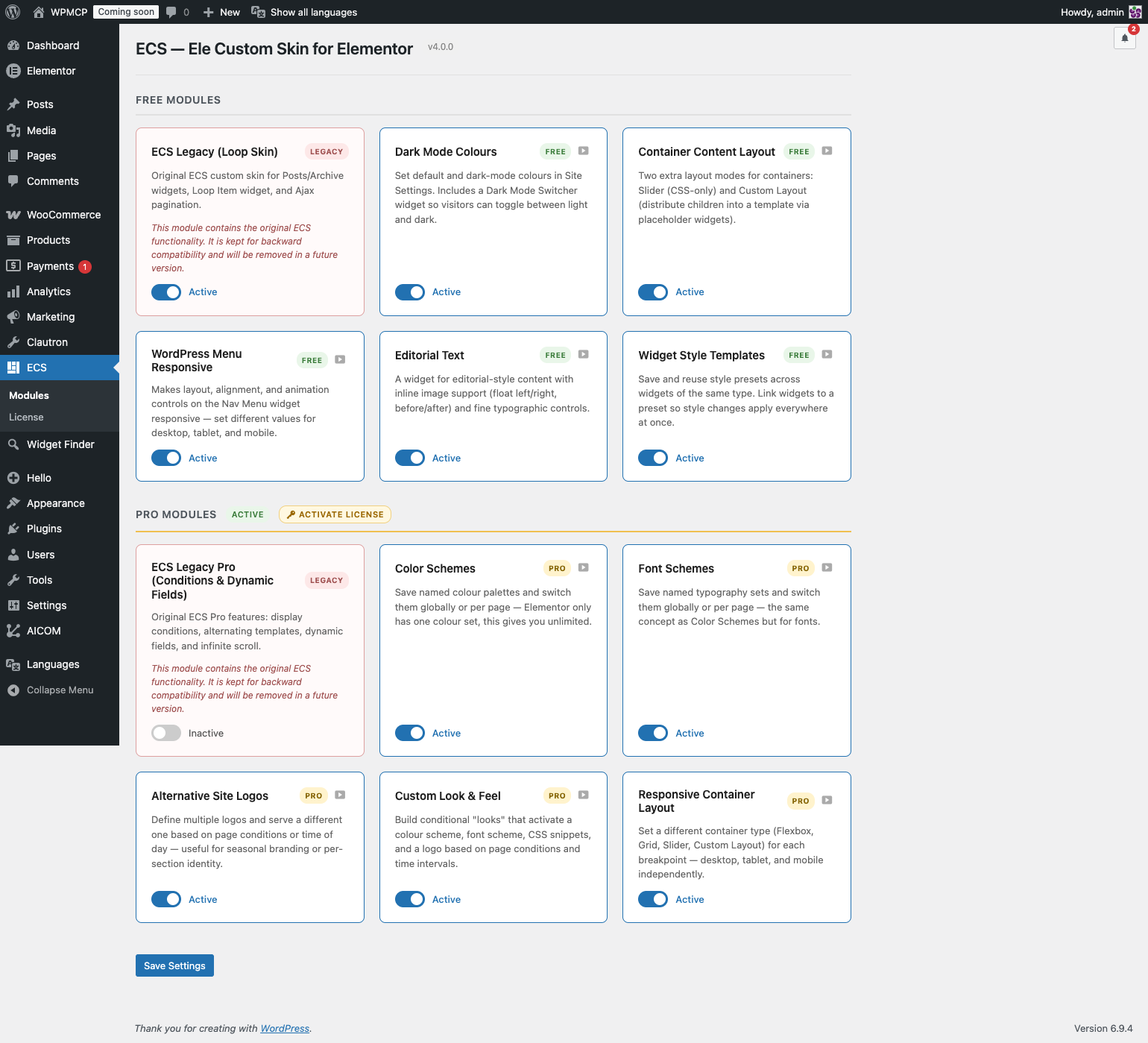
ECS → Modules admin screen — enable or disable each module with a toggle.
-
Default Colours tab in Elementor Site Settings — set default and dark-mode colours side by side.
-
Dark Mode Switcher widget in the Elementor panel.
About this plugin
ECS adds what Elementor doesn’t have — without replacing what it does well.
Every feature is a standalone module. Enable only what you need from ECS → Modules in the WordPress admin. Unused modules load zero CSS, zero JS, and register no hooks.
🎨 Dark Mode Colours
A Default Colours tab appears inside Elementor’s Site Settings, right next to Global Colors.
- Set a Default and a Dark Mode colour for every global colour slot.
- Dark mode colours are written as CSS variables — no JavaScript swapping, pure CSS, zero flash.
- A fallback swatch shows the default colour when the dark slot is empty.
- The Dark Mode Switcher widget lets visitors toggle between light and dark with full style controls.
📐 Container Layout
Two additional layout modes for Elementor Flex Containers:
Slider Mode — Turn any container into a CSS-only slider. No JS library, no dependencies.
Custom Layout — Pick a Theme Builder template as the layout frame. Place ECS Placeholder widgets inside the template; ECS distributes the container’s children into those slots automatically. Supports cycling and graceful fallback. Works live in the Elementor editor.
🔁 Loop Custom Layout
Arrange Loop Grid items inside a Custom Layout template using ECS Placeholder widgets — powered by Elementor’s native Loop Grid query. Full editorial control over the item grid without leaving Elementor.
📱 Menu Responsive
Turn any Elementor Nav Menu widget into a responsive hamburger menu. Layout, alignment, animation, and breakpoint controls — all from the Elementor panel.
✍️ Editorial Text
Wrap images inside text blocks with float controls and captions. Magazine-style editorial layouts built entirely in Elementor.
🎨 Style Templates
Save any widget’s Style tab settings as a named preset and apply them to other widgets of the same type in one click — across pages, templates, and sites. Export and import your full style library as JSON.
🛠 JSON PowerEdit
Edit any Elementor widget’s raw settings JSON directly from the panel. Raw textarea for paste-and-replace, interactive tree view for surgical edits. Keyboard shortcut: Ctrl/Cmd + Enter to apply.
✅ Legacy (ECS 3.x — backward compatibility)
The original loop skin functionality is preserved in the Legacy module for existing sites built with ECS 3.x. If you’re updating from ECS 3.x, this module activates automatically. For new projects, use Elementor’s native Loop Builder.
Note: This plugin requires Elementor (free). Container Layout (Custom Layout mode) and Style Templates require Elementor Pro.
Questions
- I’m updating from ECS 3.x. Will my loop skins break?
No. ECS detects existing loop templates and activates the Legacy module automatically on update. Everything works exactly as before.
- Can I disable features I don’t use?
Yes. Go to ECS → Modules and toggle anything off. Disabled modules load zero CSS, zero JS, and register no hooks on the front end.
- Does Dark Mode require JavaScript?
No JavaScript is needed for the colour switch itself. The CSS variables are written server-side under
[data-ecs-scheme="alt"]. The Dark Mode Switcher widget adds a small script only to set that attribute on<html>when the visitor toggles — a cookie prevents any flash on page load.- Does Custom Layout work in the Elementor editor?
Yes. Layout injection is disabled in the editor so you can edit children normally. A live preview is generated via AJAX when you click away from a child.
- Does Slider Mode require a JS library?
No. It uses CSS scroll-snap — no jQuery plugin, no swipe library.
- Where do I create a Custom Layout template?
Go to Templates → Theme Builder in Elementor. You’ll see a new document type called Custom Layout. Build your frame there and place the ECS Placeholder widget wherever you want a child to appear.
- Do I need Elementor Pro?
Dark Mode Colours, Menu Responsive, Editorial Text, Style Templates, JSON PowerEdit, and Loop Custom Layout work with Elementor free. Container Layout (Custom Layout mode) requires Elementor Pro.
sandywp / also on the shelf
Try another plugin

4.7 · 800+ installs
Select a default admin color scheme for new and existing users. Optionally disable the color scheme picker to force a color…

5.0 · 600+ installs
Force a single admin color scheme for all users of the site.

4.8 · 200+ installs
This is a simple plugin that will make your wp admin panel theme much more pleasant for work.
Spin up a real WordPress site in seconds.
Test plugins, build a demo, hand a client a link — then squash it and start again. No local setup, no Docker.