sandywp / plugins / dark-mode-for-wp-dashboard

Dark Mode for WP Dashboard
A clean, lightweight dark mode for the WordPress admin dashboard.
Ready in seconds.
v1.3.11 3,000+ installs WP 6.0+ PHP 7.4+
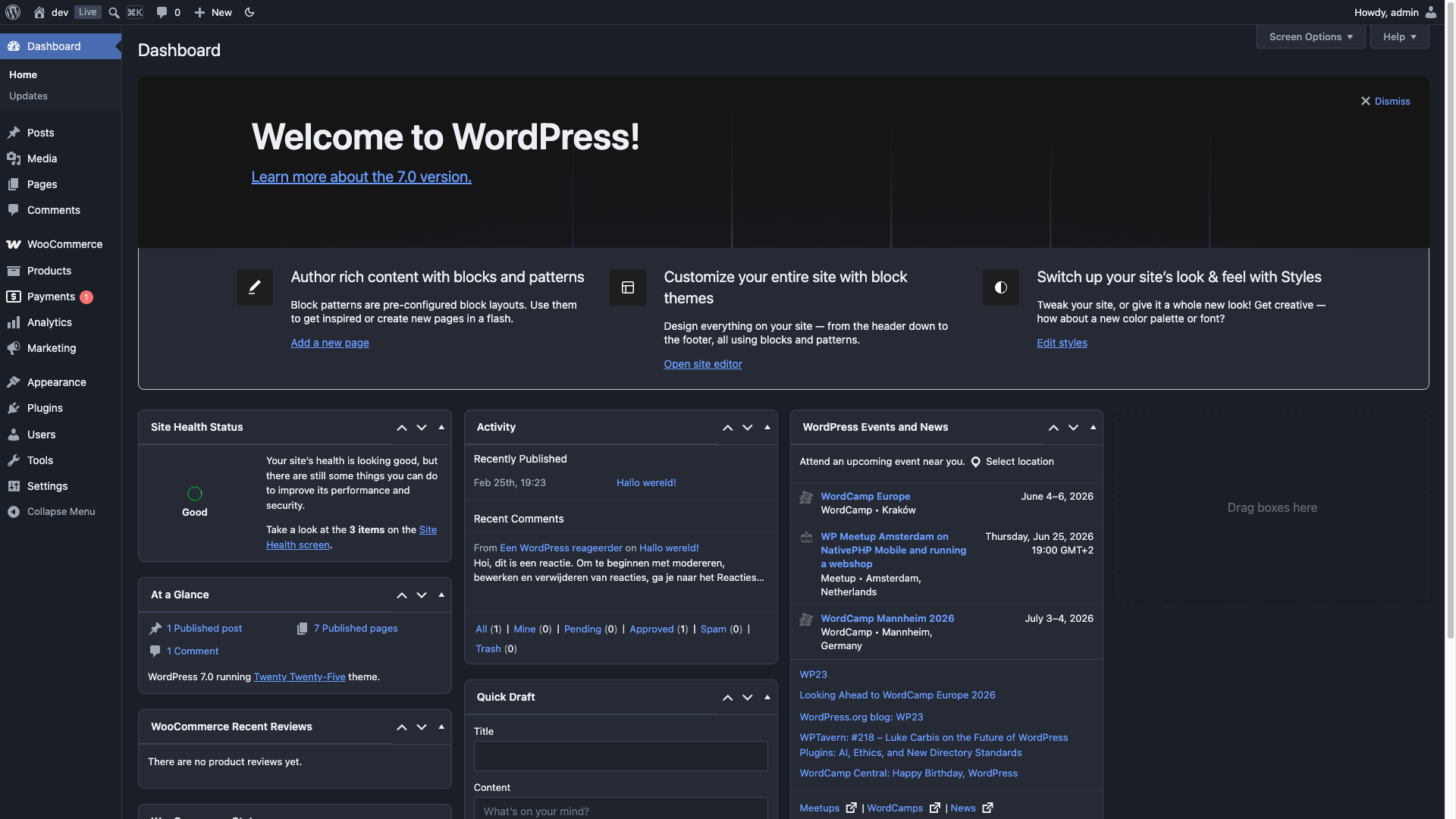
What you get inside
3 screens-
Dashboard
-
Plugins
-
Pages
About this plugin
No settings page, no bloat — just activate and go. Dark mode for every corner of your WordPress admin.
- Instant toggle in the admin bar — no page reload
- Per-user preference: Dark / Light / Auto (follows system)
- Full block editor and Site Editor support
- 14 popular plugins supported out of the box
- Developer-friendly: filters for default preference, custom CSS, and editor canvas control
Supported plugins:
- Advanced Custom Fields
- AIOSEO
- Better Search Replace
- Code Snippets
- Jetpack
- Kadence Blocks
- Nested Pages
- SmartCrawl SEO
- Smush
- The SEO Framework
- WooCommerce
- WPCode (Insert Headers and Footers)
- Yoast SEO (including Premium, Local, News, WooCommerce)
- Zamok
The plugin adds a dark-mode class to the admin body when active, and provides three filters for customization:
add_filter( 'dark_mode_dashboard_css', 'your_stylesheet_url' )— replace the plugin’s admin stylesheet with your own. This swaps the whole file rather than adding to it, so your stylesheet has to cover everything the plugin’s does, and it does not affect the post editor’s content area. To add a few rules of your own instead, enqueue a second stylesheet — see the FAQadd_filter( 'dark_mode_dashboard_default_preference', function() { return 'disabled'; } )— change the default mode for new usersadd_filter( 'dark_mode_dashboard_editor_canvas', '__return_false' )— disable dark mode for the editor content area
Questions
- How do I add my own CSS to the admin?
Don’t edit the files inside the plugin — an update overwrites them. And
dark_mode_dashboard_cssis not the filter for this: it replaces the plugin’s admin stylesheet rather than adding to it, and it does not reach the post editor’s content area, which is a separate stylesheet.To add rules of your own, enqueue your own stylesheet from your theme’s
functions.php:add_action( 'admin_enqueue_scripts', function () { wp_enqueue_style( 'my-admin-tweaks', get_stylesheet_directory_uri() . '/admin-tweaks.css', array( 'dark-mode-dashboard' ), '1.0' ); } );Naming
dark-mode-dashboardas a dependency makes your file load after the plugin’s, so your rules win without needing!important. Note that a dependency also pulls the plugin’s stylesheet in for users who have dark mode switched off, who would otherwise download almost nothing. If that matters to you, drop the dependency and hook in at a later priority instead:add_action( 'admin_enqueue_scripts', function () { wp_enqueue_style( 'my-admin-tweaks', get_stylesheet_directory_uri() . '/admin-tweaks.css', array(), '1.0' ); }, 20 );- How do I change the font or size in the post editor?
The post content renders inside an iframe, and only styles enqueued on
enqueue_block_assetsare carried into it:add_action( 'enqueue_block_assets', function () { if ( ! is_admin() ) { return; } wp_enqueue_style( 'my-editor-fonts', get_stylesheet_directory_uri() . '/editor-fonts.css', array(), '1.0' ); } );One thing catches people out. Inside that iframe the
bodyelement is itself the.editor-styles-wrapperelement — not its parent. So write the selector as a single compound with no space between the two classes:body.editor-styles-wrapper p { font: 22px/1.5 Georgia, serif; }Written as
body.dark-mode .editor-styles-wrapper p, with a space, it looks for a wrapper nested inside the body, finds nothing, and silently does nothing. Usebody.dark-mode.editor-styles-wrapper pto apply a rule in dark mode only, or leave.dark-modeout to apply it in both modes.- Which class does the plugin add?
dark-mode on the admin body when dark mode is on, and
dark-mode-autowhen the preference is Auto. Auto deliberately does not also getdark-mode, so that it can follow the operating system.
sandywp / also on the shelf
Try another plugin

Web Accessibility (formally known as Ally) – WCAG Scanning, Guided Fixes,…
2.9 · 500K+ installs
Web Accessibility (formally known as Ally) is a free, powerful, and user-friendly plugin that helps WordPress creators build more…

Auto Image Attributes From Filename With Bulk Updater (Add Alt Text, Image…
4.8 · 100K+ installs
Automatically add Image Alt Text, Title, Caption and Description from Filename. Bulk update existing images. Great for Image SEO…

4.0 · 80K+ installs
UserWay’s Accessibility Widget creates a simpler and more accessible browsing experience for your users.
Spin up a real WordPress site in seconds.
Test plugins, build a demo, hand a client a link — then squash it and start again. No local setup, no Docker.