sandywp / plugins / category-image-manager-by-devdesigndazzle

Category Image Manager by DevDesignDazzle
Category Image Manager by DevDesignDazzle is a lightweight WordPress plugin to add images to WordPress categories.
Ready in seconds.
v1.0 WP 5.0+ PHP 7.2+
What you get inside
3 screens-
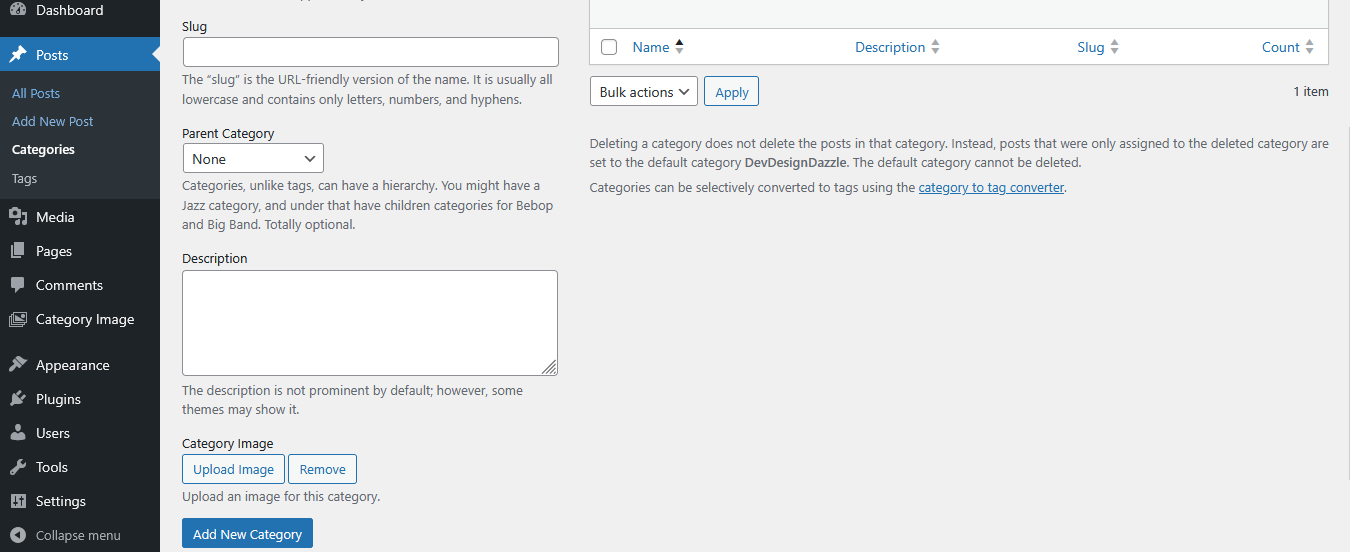
Adding an image in the category creation screen.
-
Editing a category with the image upload field.
-
Help menu in WordPress admin showing usage instructions.
About this plugin
Category Image Manager by DevDesignDazzle enhances your WordPress site! Easily add images to categories for stunning pages, archives, and menus. This lightweight plugin lets you upload category images via the admin panel and display them anywhere with a simple function. Perfect for bloggers, e-commerce, and custom themes. Supports multiple image sizes (thumbnail, medium, large, full) and future-ready for premium upgrades. Boost your site’s visuals—install now!
Usage
- Add Images: Navigate to Posts > Categories, edit or create a category, and use the “Category Image” field to upload an image.
- Display Images: Use this function in your theme files:
- Category Archives Example: Add this to
archive.phporcategory.phpafterget_header():
<?php $category_id = get_queried_object_id(); if (is_category() && function_exists('dddCatImageManager_get_category_image')) { $category_image = dddCatImageManager_get_category_image($category_id); if (!empty($category_image)) { echo '’ . $category_image . ”; } } ?> - Image Sizes: Customize with sizes like
'thumbnail','medium','large', or'full':
Support
- Plugin Website: DevDesignDazzle
- Support Forum
Privacy
Category Image Manager by DevDesignDazzle does not collect or store any personal data.
Questions
- How do I add images to categories?
Go to Posts > Categories, edit a category, and upload an image in the “Category Image” field.
- How do I display category images in my theme?
Use
dddCatImageManager_get_category_image($category_id)in your theme files—see Usage section for examples.- Can I use different image sizes?
Yes, pass a size parameter like
'thumbnail','medium','large', or'full'to the function.- Where can I get support?
Visit DevDesignDazzle.com for help or future premium features.
sandywp / also on the shelf
Try another plugin

4.5 · 50K+ installs
The Categories Images is a Wordpress plugin allow you to add image to category, tag or custom taxonomy.

5.0 · 10+ installs
TCL Categories Images Plugin allow users to add an image to category or custom taxonomies.You can easily assign an image to each…

10+ installs
This plugin allow you set image for category.
Spin up a real WordPress site in seconds.
Test plugins, build a demo, hand a client a link — then squash it and start again. No local setup, no Docker.