sandywp / plugins / categories-images

Categories Images
The Categories Images is a Wordpress plugin allow you to add image to category, tag or custom taxonomy.
Ready in seconds.
v3.3.3 50,000+ installs WP 4.0+
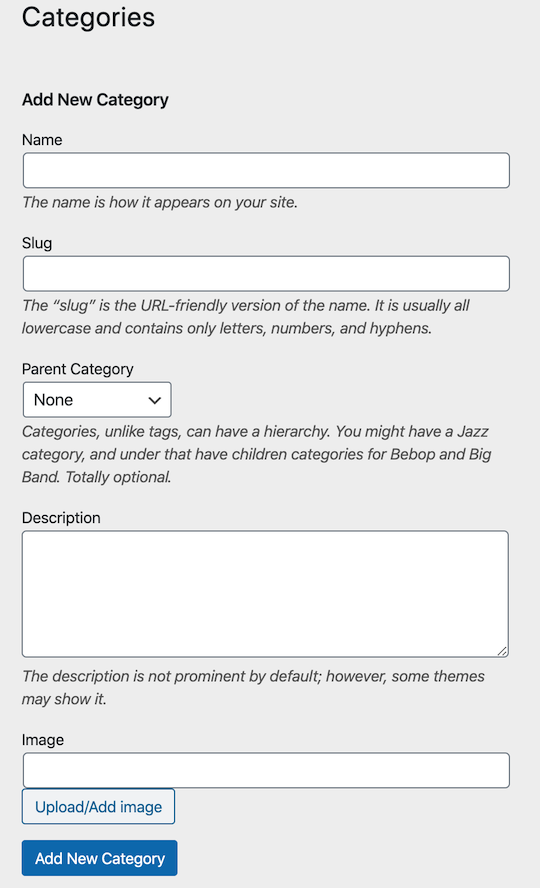
What you get inside
6 screensAbout this plugin
The Categories Images is a WordPress plugin allow you to add image to category, tag or custom taxonomy.
Use <?php if (function_exists('z_taxonomy_image_url')) echo z_taxonomy_image_url(); ?> to get the url and put it in any img tag.
Or simply use <?php if (function_exists('z_taxonomy_image')) z_taxonomy_image(); ?> in (category or taxonomy) template.
REST API Support
Access term images via the WP REST API. The field z_taxonomy_image_url is automatically added to term objects.
Enhanced Shortcodes
[z_taxonomy_image term_id="123" size="medium" link="yes"]– Display a specific term image with a link.[z_taxonomy_list taxonomy="category" style="grid" columns="4" show_name="yes"]– Display a beautiful grid of terms with their images.
Elementor Integration
Use term images dynamically in Elementor via the native Dynamic Tags system.
Settings
Categories Images settings menu is now under Settings > Categories Images to avoid cluttering the main WordPress menu, the settings now is more organized with a dedicated documentation page that includes usage examples and shortcodes.
From the settings menu, you can exclude any taxonomies from the plugin to avoid conflicts with other plugins like WooCommerce!
Documentation
Documentation is now available inside the plugin settings menu. for more information please visit the Categories Images.
sandywp / also on the shelf
Try another plugin

5.0 · 10+ installs
TCL Categories Images Plugin allow users to add an image to category or custom taxonomies.You can easily assign an image to each…

10+ installs
This plugin allow you set image for category.
-
Category Image Manager by DevDesignDazzle is a lightweight WordPress plugin to add images to WordPress categories.

Spin up a real WordPress site in seconds.
Test plugins, build a demo, hand a client a link — then squash it and start again. No local setup, no Docker.