sandywp / plugins / bulk-editor

WOLF – WordPress Posts Bulk Editor and Manager Professional. AI assistant on board (MCP Server)
WOLF - bulk edit WordPress posts, pages and custom post types in one table. Filter, bulk edit, export CSV. AI assistants manage your posts via MCP.
Ready in seconds.
v1.1.3 4,000+ installs WP 5.0+ PHP 7.4+
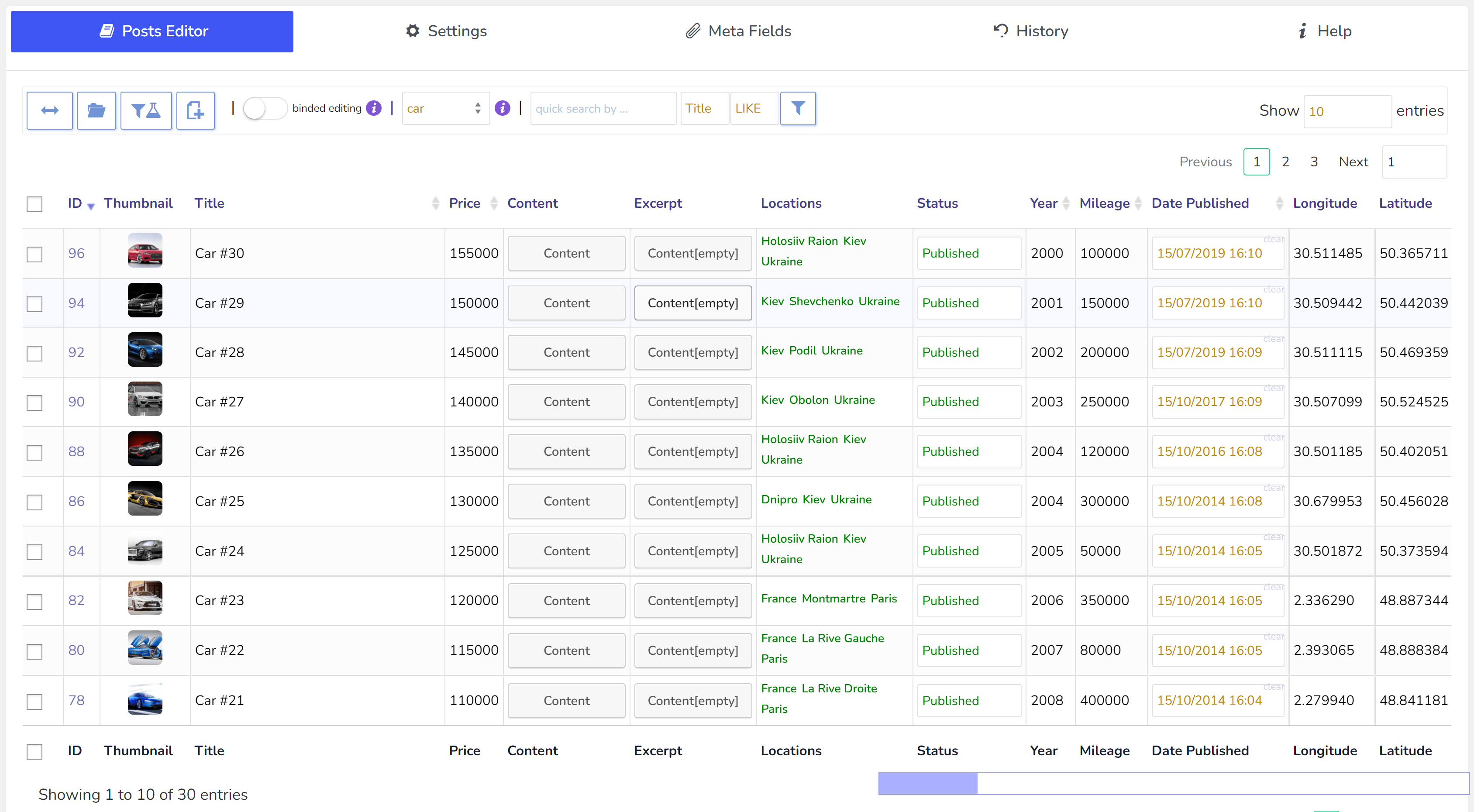
What you get inside
8 screens-
The plugin settings
About this plugin
WOLF – WordPress Posts Bulk Editor and Manager Professional (former name is WPBE) is WordPress plugin for managing, bulk edit and bulk delete WordPress posts, pages and custom post types data edit/delete in robust and flexible way. This plugin helps with managing real estate catalogs, cars and all another WordPress custom post types. With a built-in MCP server, so an AI assistant like Claude can work with your posts directly.
🖥️ Latest PHP 8.x – FULL COMPATIBILITY!
⚠️ ATTENTION: THIS PLUGIN DOESN WORK CORRECTLY WITH WOOCOMMERCE PRODUCTS! FOR WOOCOMMERCE BULK EDIT USE BEAR
🌐 Documentation: https://bulk-editor.pro/documentation/
🤖 MCP Server: https://bulk-editor.pro/document/mcp-server/
🎥 Video tutorials: https://bulk-editor.pro/video/
🔧 Support: https://pluginus.net/support/forum/wpbe-wordpress-posts-bulk-editor-professional/
Editing your site with an AI assistant
WOLF ships an MCP server, the open standard for connecting AI assistants to software. Connect Claude, your own agent or any other MCP client, and manage posts, pages and custom post types by describing what you want:
- Raise the price of every villa by 5%, but show me first
- Publish all drafts in the Guides category
- Write a draft blog post with this photo as its featured image
- Delete the placeholder drafts in Services – actually, put them back
- Export the apartments: title, price and area, as CSV
Every change is previewed before it is written and can be rolled back with one click from History. The MCP server is off until you switch it on; optional two-factor connection and personal keys for editors keep it under your control. How to connect an AI assistant
WOLF Features:
🤖 AI Assistant (MCP Server) – connect Claude or your own agent and manage posts in plain language: filter, bulk edit, create drafts, add photos, export CSV – with a preview before every change and rollback from History
🚚 Bulk Editing of WordPress fields, taxonomies, meta fields
🗂️ Supports all custom post types
🗑️ [Bulk Deleting] – delete posts and custom post types in bulk using any filter combinations
🔍 Filtering fields for further bulk editing or export
📤 Export share selected data with your partners
🔄 History of Bulk and Solo operations with roll-back possibility
🔧 Add necessary Meta Fields to the system and manage by them. JSONed (serialized) metadata bulk editing is possible with nice popup where data constructor is in-built!
🧮 Calculator for decimal meta fields
🔗 Binded editing – edit several posts with two clicks!
✍️ Nice and convenient WordPress Posts Editor with rich HTML elements
💾 Instant saving of entered data by AJAX
📂 Automatic attach of any taxonomies related to the posts for further editing
🔧 POSSIBILITY of joint editing of the posts without interference to each other.
💼 Profiles for any set of columns for quick loading
📁 Profiles for any filters combination for quick loading
🔠 Filter by empty TEXT meta fields for bulk operations
🎣 Hook wpbe_wrap_field_val, allows to customize column cell content
🎲 Randomizer for numeric meta fields
🗣️ Translated into Spanish, German, French, Italian, Portuguese (Portugal and Brazil), Dutch, Polish, Turkish, Russian, Ukrainian, Japanese, Hebrew and Arabic
Fields possible to edit (in bulk) in FREE version of the plugin:
- 🖼️ Thumbnail
- 🏷️ Title
- 📝 Content
- 🔒 Password
- 📜 Post Status
- 📌 Sticky
- 📅 Thumbnail
- ⏲️ Date Published
- ⏲️ Date Modified GMT
- 📋 Menu order
- 📂 1 taxonomy (maybe Category)
- ⚙️ Meta
- 🧩 2 product meta fields
- 📚 2 history records
- 🤖 AI assistant (MCP server): reading is unrestricted; editing works on the fields above, up to 100 posts every 30 minutes (the allowance refills continuously, rollbacks are free)
🌟 In the premium version of the plugin it is possible to manipulate with all fields of the posts + Bulk Delete
🌟 You can get premium version of the plugin on the site
Make your site more profitable with next powerful scripts:
✅ BEAR – WooCommerce Bulk Editor and Products Manager Professional: WordPress plugin for managing and bulk edit WooCommerce Products data in robust and flexible way! Be professionals with managing data of your woocommerce e-shop!
✅ MDTF – WordPress Meta Data Filter and Taxonomies Filter: the plugin for filtering and searching WordPress content in posts and their custom types by taxonomies and meta data fields. The plugin has very high flexibility thanks to its rich filter elements and in-built meta fields constructor!
✅ WOOF – Products Filter for WooCommerce: products filter plugin for WooCommerce that allows your customers filter products by categories, attributes, products tags, products custom taxonomies and price – a must have plugin for your WooCommerce online store!
✅ WOOCS – Currency Switcher for WooCommerce: is WooCommerce multi currency plugin, that allows your site visitors switch products prices currencies according to set currencies rates in the real time and pay in the selected currency (optionally). Allows to add any currency for WooCommerce store!
✅ TABLEON – WordPress Post Tables Filterable: WordPress plugin for displaying site posts and their custom post types in table format. Tables makes focus for your customers on the things they want to get, nothing superfluous, just what the client wants, and full attention to what is offered!
✅ WPCS – WordPress Currency Switcher: is a WordPress plugin that allows to switch currencies and get their rates converted in the real time on your site!
✅ MDTF – WordPress Meta Data Filter and Taxonomies Filter: the plugin for filtering and searching WordPress content in posts and their custom types by taxonomies and meta data fields. The plugin has very high flexibility thanks to its rich filter elements and in-built meta fields constructor!
License
This plugin is copyright pluginus.net © 2012-2027 with GNU General Public License by realmag777.
This program is free software; you can redistribute it and/or modify it under the terms of the GNU General Public License as published by the Free Software Foundation; either version 2 of the License, or (at your option) any later version.
This program is distributed in the hope that it will be useful, but WITHOUT ANY WARRANTY. See the GNU General Public License for more details.
Questions
- Why would I need this?
You need if you want to change a posts data in bulk: title, content, meta fields, post type, taxonomies and etc.
See full list of fields and features on the plugin site- Can I connect an AI assistant to WOLF?
Yes. WOLF has a built-in MCP server: switch it on in WOLF → Settings, then give your AI assistant (Claude, Claude Code, Cursor or your own agent) the address and the key shown there. Every change is previewed before it is written and can be rolled back from History. Step by step: How to connect an AI assistant
- Is the MCP server safe to switch on?
It is off by default, and nothing answers at its address until you switch it on. The key is accepted only in a request header, never in the address. With the optional two-factor connection every assistant session also needs a token that you confirm yourself in the plugin settings. Editors can get personal keys that work only with their own role and rights.
- Where can I get the Premium version of WOLF
- Documentation?
- I have an idea about the plugin, can I discuss it with you?
https://pluginus.net/support/forum/wpbe-wordpress-posts-bulk-editor-professional/
- How to create a custom taxomomy?
Use this plugin https://wordpress.org/plugins/custom-post-type-ui/
- Where can I send security bug report about the plugin?
You can report security bugs through the Patchstack Vulnerability Disclosure Program. The Patchstack team help validate, triage and handle any security vulnerabilities. Report a security vulnerability.
sandywp / also on the shelf
Try another plugin

Elementor Agent Ready Website Builder
4.5 · 10M+ installs
The Elementor Website Builder has it all: drag and drop page builder, Atomic Editor, pixel perfect design, global and reusable…

Jetpack – AI Agents & MCP, Security, Backup & Analytics
3.7 · 3M+ installs
Connect ChatGPT, Claude, or another AI agent to your site. Plus backup, malware scan, firewall, stats, CDN, and SEO tools in one…

All in One SEO – AI SEO Plugin to Boost SEO Rankings & Traffic (Schema,…
4.7 · 2M+ installs
AIOSEO is the WordPress SEO plugin. Boost SEO rankings with AI SEO tools, schema, meta descriptions, XML sitemaps & rank…
Spin up a real WordPress site in seconds.
Test plugins, build a demo, hand a client a link — then squash it and start again. No local setup, no Docker.