sandywp / plugins / browser-theme-color
Browser Theme Color
Add the 'theme-color' meta tag to your website for a seamless user experience on Android & iOS with our easy-to-use plugin.
Ready in seconds.
v1.5 2,000+ installs WP 3.8+

What you get inside
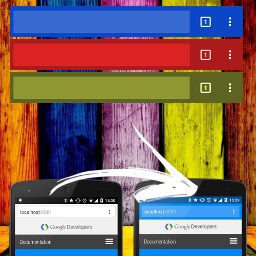
2 screens-
Theme example in Android multitasking developers.google.com
-
Topbar example in Android Chrome developers.google.com
About this plugin
Discover a powerful solution for enhancing your website’s user experience across multiple platforms with our simple, lightweight, and effective plugin that adds the “theme-color” meta tag. Compatible with Android, iOS, and Windows Phone, our plugin is designed based on Google guidelines to ensure a seamless user experience on all devices.
In addition to its seamless compatibility, our plugin is fully customizable, allowing you to style it to match your brand’s unique identity. With the option to choose from a variety of colors, you can easily tailor the “theme-color” meta tag to perfectly complement your website’s design and layout.
When you install the plugin for the first time, the color is automatically set to #23282D, which is the standard WordPress color. From there, you can easily customize the tag to match your brand, ensuring a fully immersive user experience that keeps visitors coming back for more.
Don’t settle for a subpar user experience on mobile devices. Elevate your website’s design and functionality with our “theme-color” meta tag plugin today, for free!
Questions
- How to set the color?
You can set the color in the plugin settings screen (Settings -> Browser Color).
sandywp / also on the shelf
Try another plugin

WPtouch – Make your WordPress Website Mobile-Friendly
3.7 · 50K+ installs
With just a few clicks, make your WordPress website mobile-friendly (iPhone, Android, and more). Recommended by Google, it will…

4.3 · 20K+ installs
Multi Device Switcher plugin allows you to set a separate theme for device (Smart Phone, Tablet PC, Mobile Phone, Game and…

4.8 · 3K+ installs
Android and iOS mobile application. Easy setup, free test.
Spin up a real WordPress site in seconds.
Test plugins, build a demo, hand a client a link — then squash it and start again. No local setup, no Docker.