sandywp / plugins / blogvault-real-time-backup

BlogVault Backup & Staging
Secure incremental backups with staging, migration, and one-click restore for WordPress. Offsite storage and easy recovery.
Ready in seconds.
v6.72 80,000+ installs WP 4.0+ PHP 7.0+
What you get inside
8 screens-
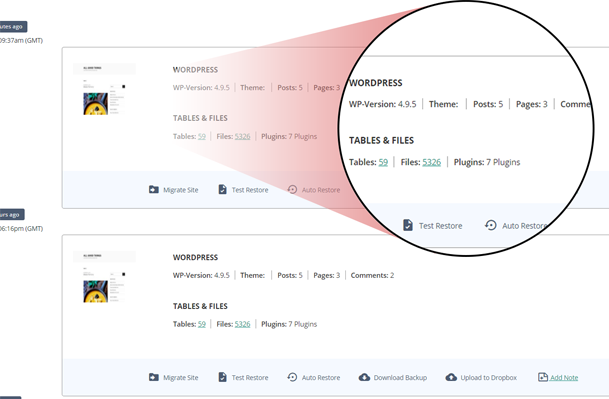
BlogVault provides you with a comprehensive History page that lets you manage all your WordPress backups with ease.
-
Trusted by over 4,00,000+ websites, BlogVault is the best WordPress files and database backup plugin for your website.
-
Check the Performance Speed of your website from the BlogVault dashboard.
-
Manage multiple WordPress sites from one dashboard.
-
With Uptime Monitoring you get notified the moment your website is shut down.
-
With BlogVault's free Staging test updates, WordPress plugins, and WordPress themes without breaking your live site.
-
With BlogVault's White-Label Solution you can showcase our service under your own brilliant brand.
-
For WooCommerce sites, BlogVault’s Real-Time Backups can make all the difference.
About this plugin
BlogVault provides automatic, secure, and incremental backups for your entire WordPress website — including the database, themes, plugins, and media files. It also includes built-in staging and migration features, so you can test changes safely or move your site to a new host or domain with ease.
All backups are stored offsite on BlogVault’s cloud infrastructure, helping keep your data safe even if your server is down. Backup and restore processing runs on BlogVault’s servers to minimize load on your site.
Whether you manage one site or many, BlogVault helps you handle backups, restores, migrations, and updates from a single, easy-to-use dashboard.
Check out more BlogVault customer testimonials from here
Companies you Trust, Trust BlogVault.
Why you need BlogVault?
We officially power migration for some of the largest web hosts from Pantheon, LiquidWeb, Cloudways, Savvii, and many more.
It is the perfect solution for developers and agencies as it comes with all the tools you need to maintain and manage multiple WordPress websites. From One-Click Staging to Flawless Migrations to Complete Website Management and a White Label Solution. It even provides out-of-the-box Client Reporting.
Learn more about BlogVault from here
BlogVault in Numbers
- 1+ million Successful Website Restorations
- 450,000+ WordPress Sites backed up and counting
- 330GB Largest WordPress site Backed Up
- 10,000+ Web hosts Compatibility
- Five Star Support
Key Features
Automatic Incremental Backups
- Backs up only what changed since the last backup to reduce server load.
- Offsite encrypted storage for availability and safety.
- Up to 90 days of backup history.
- Custom schedules: daily, weekly, or monthly.
- Multisite support.
One-Click Restore
- Restore your site in minutes, including when it’s offline.
- Differential restore to speed up recovery.
- Choose from multiple restore points.
Staging Environment
- Create a staging site in one click to test updates safely.
- Staging runs on BlogVault’s cloud.
- Merge selected changes back to live.
- Staging validity can be extended up to 56 days.
Migration
- Move your site to a new host, domain, or server.
- Automatically updates URLs during migration.
- Designed for minimal or no downtime.
- Compatible with major hosts including WP Engine, Pantheon, Flywheel, Liquid Web, Cloudways, and others.
Real-Time Backups for WooCommerce
- Syncs orders and store changes as they happen.
- 24×7 protection with archives available up to 365 days.
- Restore without losing recent orders.
Centralized Site Management
- Manage multiple sites from a single dashboard.
- Update WordPress core, themes, and plugins remotely.
- Invite team members and assign client access.
- White-label and client reporting options.
Secure Service
- BlogVault is a full service with continuous improvements.
- Encrypted offsite backups.
- Independent dashboard for monitoring and control.
Why Choose BlogVault
- Quick setup: Connect your site and start backups in about a minute.
- Built-in staging: Create and test on a staging site at no additional cost, then merge changes to live.
- Minimal site impact: Backup processing runs on BlogVault’s servers to help keep your site responsive.
- Simple workflows: Automatic backups, guided restores, and assisted migrations streamline common tasks.
- Responsive support: Get help with setup, migration, and troubleshooting via email.
Who It’s For
- Website owners who want dependable backups and easy restores.
- Agencies and developers managing multiple client sites.
- Ecommerce stores that need continuous protection for orders and customer data.
- Hosting providers simplifying migrations and backup management for customers.
How It Works
- Install and activate the BlogVault plugin.
- Connect your site to your BlogVault account.
- Backups begin automatically — no extra configuration needed.
- Manage backups, staging, migration, and updates from the BlogVault dashboard.
Have You Tried BlogVault Pro version Yet?
BlogVault WP backup plugin offers an unrestricted 7 days free trial. Explore all features of full BlogVault for FREE.
Try out BlogVault without any commitment. No credit card is needed.
Questions
- Can I set up my BlogVault backup account myself?
This plugin works in tandem with the BlogVault servers. BlogVault servers do all the heavy processing and will alert you if your site has any issues.
This requires an account with BlogVault to be created to use the plugin.
Yes. Take the help of this step-by-step guide.
- Why do you need my email?
We require your email address to keep you informed about important updates related to your website, such as vulnerability alerts, and uptime alerts.
Having an account is necessary to use our service, and your email address serves as a unique identifier for your account.
In addition, we may use your email address to notify you about any changes or updates that we make to our service, as well as any new features or services that we may offer to help enhance your user experience.
- I am unable to reach the WordPress backup plugin. What can I do?
You can send an email to the support team on [email protected] and notify our team regarding this.
- Are there any prerequisites for using the BlogVault backup plugin for the WordPress site?
No. All you need is a WordPress site. We don’t use your website resources for backing up so you will not experience any downtime, or page delay while executing BlogVault functions.
- Do you have a free plan? How does it work?
BlogVault is a paid backup service. But we understand the user’s dilemma before starting a new service, which is why we provide a 7 day free trial period. You can avail free trial without any registration, just enter your email ID, password, and site URL. Moreover, we do not discriminate between our trial period users and premium customers.
- How do I upgrade from my free trial to a premium version of the account?
To upgrade from a free trial version to a premium account, please take the help of this guide.
- How do I upgrade to a bigger Plan?
To upgrade to a bigger Plan, take the help of this guide.
- Do I need to pay for support and help?
Never! We will be with you for any queries regarding backups or anything at all times. Click here to get in touch with us!
sandywp / also on the shelf
Try another plugin

All-in-One WP Migration and Backup
4.5 · 5M+ installs
Trusted by 60M+ sites: The gold standard for WordPress migration and backup. Migrate, backup, and restore your WordPress site…

UpdraftPlus: WP Backup & Migration Plugin
4.8 · 3M+ installs
Backup, restore or migrate your WordPress website to another host or domain. Schedule backups or run manually. Migrate in minutes.

Jetpack – WP Security, Backup, Speed, & Growth
3.7 · 3M+ installs
Improve your WP security with powerful one-click tools like backup, WAF, and malware scan. Includes free tools like stats, CDN…
Spin up a real WordPress site in seconds.
Test plugins, build a demo, hand a client a link — then squash it and start again. No local setup, no Docker.