sandywp / plugins / backup

JetBackup
Backup, Restore & Migrate
Backup, restore, and migrate WordPress sites fast. Supports TAR, remote backups, multi schedules, and full multisite compatibility.
Ready in seconds.
v3.1.23.6 200,000+ installs WP 6.0+ PHP 7.4+
What you get inside
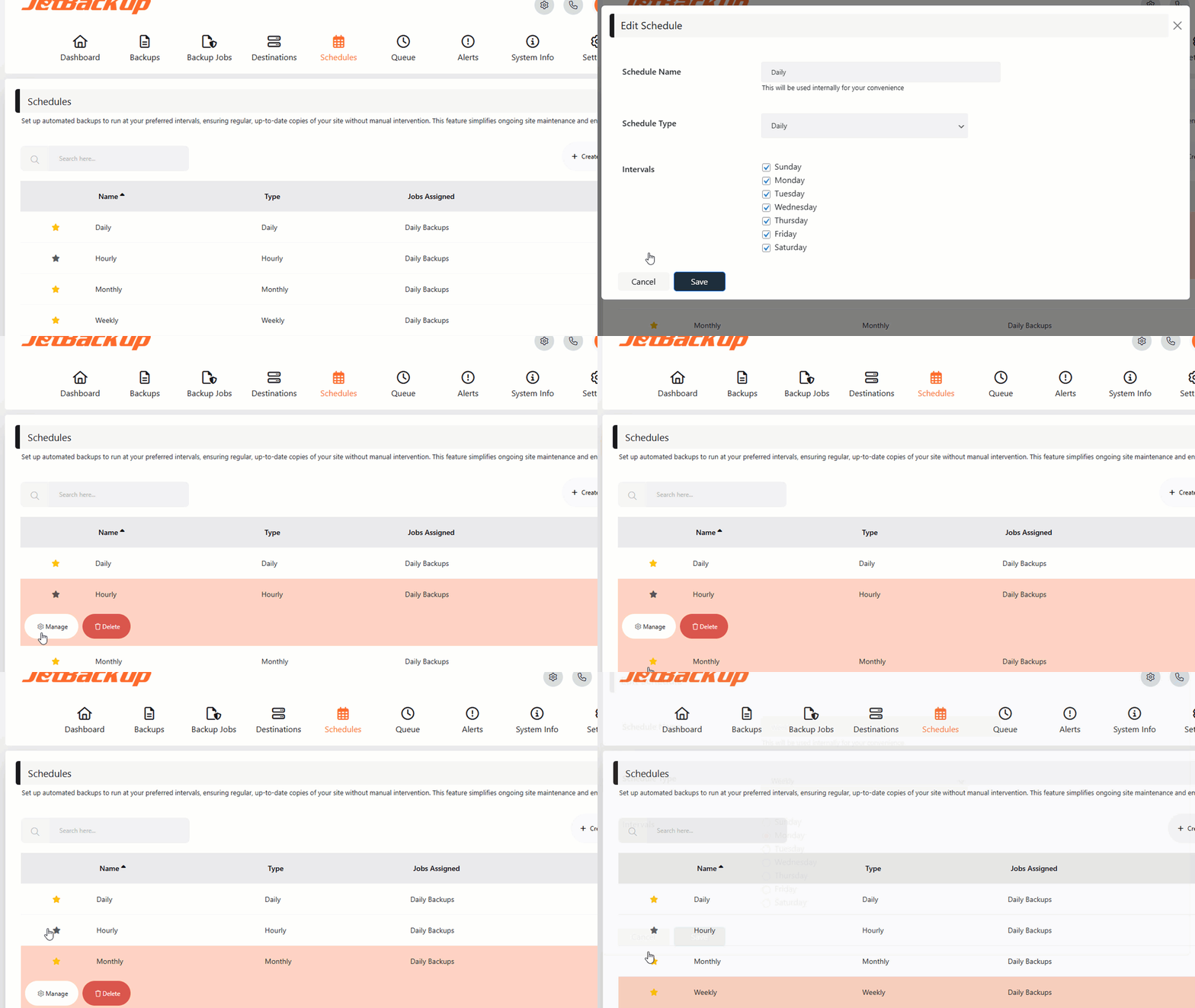
4 screens-
Advanced Scheduling
-
Customized Backups
-
Feature Settings
About this plugin
JetBackup is a powerful, easy-to-use WordPress backup and migration plugin. Create full or partial backups, restore in 1 click, and migrate across domains or hosts. Supports TAR format, cloud storage, and full automation.
Download JetBackup premium versions here: https://www.jetbackup.com/jetbackup-for-wordpress.
See JetBackup in Action Here!
Free Features
- Free Cloud Storage – 2 GB of free off site premium cloud storage
- Unlimited backup – create as many backups as you want, there is no limit
- Backup files, database or both – you can backup your database or files, or both
- Unlimited restore – restore any backup file whenever needed
- Download backup – download your backup files for migration
- Import backup – upload your backup file to restore it right away
- Backup cancellation – cancel the backup process while it is not finished yet
- Manage backups – delete backups, view backup or restore log
- Backup customization – you choose which folders you want to backup
- Live progress – precise progress of the current backup and restore process
- Export Backups – Export backups to hosting control panels (supports cPanel & DirectAdmin)
- MultiSite – Multisite support with selective subsite restore.
- Website migration – migrate your website from one hosting/domain to another one
- Scheduled backup – set the frequency and time to perform automatic backup
- Multiple scheduled profiles – schedule your database and files to backup with different frequencies
- Backup retention – specify the number of backups you want to keep on your server
Premium Features
- Off Site Backups – Support for offsite remote backup destinations: Amazon S3 (and compatible), FTP, SFTP, Google Drive, One Drive, DropBox, Box, pCloud
– 24/7 Premium Support – Industry-leading support with a 15-minute SLA.
Documentation
The documentation can be found here: https://www.jetbackup.com/jetbackup-for-wordpress.
Why JetBackup?
– No extra libraries required
– Supports large websites
– Uses TAR archives for efficient storage
– Optimized for low-memory & shared hosting
– Seamless migration with serialized data refactoring
Minimum Requirements
– WordPress: 6.0 or higher
– PHP: 7.4 or higher (requires zlib & cURL)
Support
https://www.jetbackup.com/jetbackup-for-wordpress/support
Features
One-Click Backup
Perform full or custom backups with a single click.
Reliable Restores
Easily restore backups with a high success rate.
Download & Upload
Download backups or import them via our wizard.
Cloud Storage (Pro)
Automatically store backups on cloud platforms.
Automated Backups
Schedule automatic backups to run at set intervals.
Custom Backup Settings
Select specific files/folders for backup.
Server-Level Integration
Restore backups created by your hosting provider via JetBackup.
Background Mode
Run backups in low-priority mode for better performance.
Email Notifications
Receive alerts on backup success or failure.
Documentation
Perform manual backup
If you want to create a backup manually, follow these steps:
- Go to “Backup jobs” page
- Click “Run now” on the default backup job.
Import backups from local computer
If you have an exported backup file in your PC and you want to import it into your website, follow these steps:
- Go to “Backups” page
- Click on “Import & Restore” and select your file from your local computer
- Go to the kitchen, prepare a cup of coffee and watch the screen 🙂
Restore
Restoring is as easy as backing up. Just follow these instructions:
- Go to “Backups” page
- Choose your backup and click on the “Restore” button.
Questions
- Why is it important to back up my website?
Your website is at risk of data loss due to hacking, hardware failure, or accidental deletions. Regular backups ensure you can restore your website anytime.
- How often should I create backups?
It depends on how frequently your website content changes. Daily backups are ideal for dynamic sites, while weekly backups may be sufficient for static websites.
- What is included in the free version?
The free version allows unlimited backups and restores, migration capabilities, and local storage management.
- Why upgrade to JetBackup Premium?
Premium users get cloud storage options, scheduled backups, priority support, and advanced backup management.
- What are the minimum requirements?
JetBackup requires PHP 7.4+ and a Linux-based server for optimal performance. Windows is supported but may have limitations due to known PHP issues.
- Is JetBackup suitable for migration?
Yes! JetBackup creates an exact snapshot of your website. When restored, it maintains the same state, making migrations effortless.
sandywp / also on the shelf
Try another plugin

All-in-One WP Migration and Backup
4.5 · 5M+ installs
Trusted by 60M+ sites: The gold standard for WordPress migration and backup. Migrate, backup, and restore your WordPress site…

UpdraftPlus: WP Backup & Migration Plugin
4.8 · 3M+ installs
Backup, restore or migrate your WordPress website to another host or domain. Schedule backups or run manually. Migrate in minutes.

Jetpack – WP Security, Backup, Speed, & Growth
3.7 · 3M+ installs
Improve your WP security with powerful one-click tools like backup, WAF, and malware scan. Includes free tools like stats, CDN…
Spin up a real WordPress site in seconds.
Test plugins, build a demo, hand a client a link — then squash it and start again. No local setup, no Docker.