sandywp / plugins / aria-accessibility-toolkit

Web Accessibility Toolkit
Accessibility Checker & ARIA for WCAG, Section 508 & ADA Compliance
Add ARIA labels, roles, alt tags, contrast & form accessibility fixes. Accessibility checker scans for WCAG, Section 508 & ADA compliance.
Ready in seconds.
v1.7.0 500+ installs WP 5.9+ PHP 7.0+
What you get inside
6 screens-
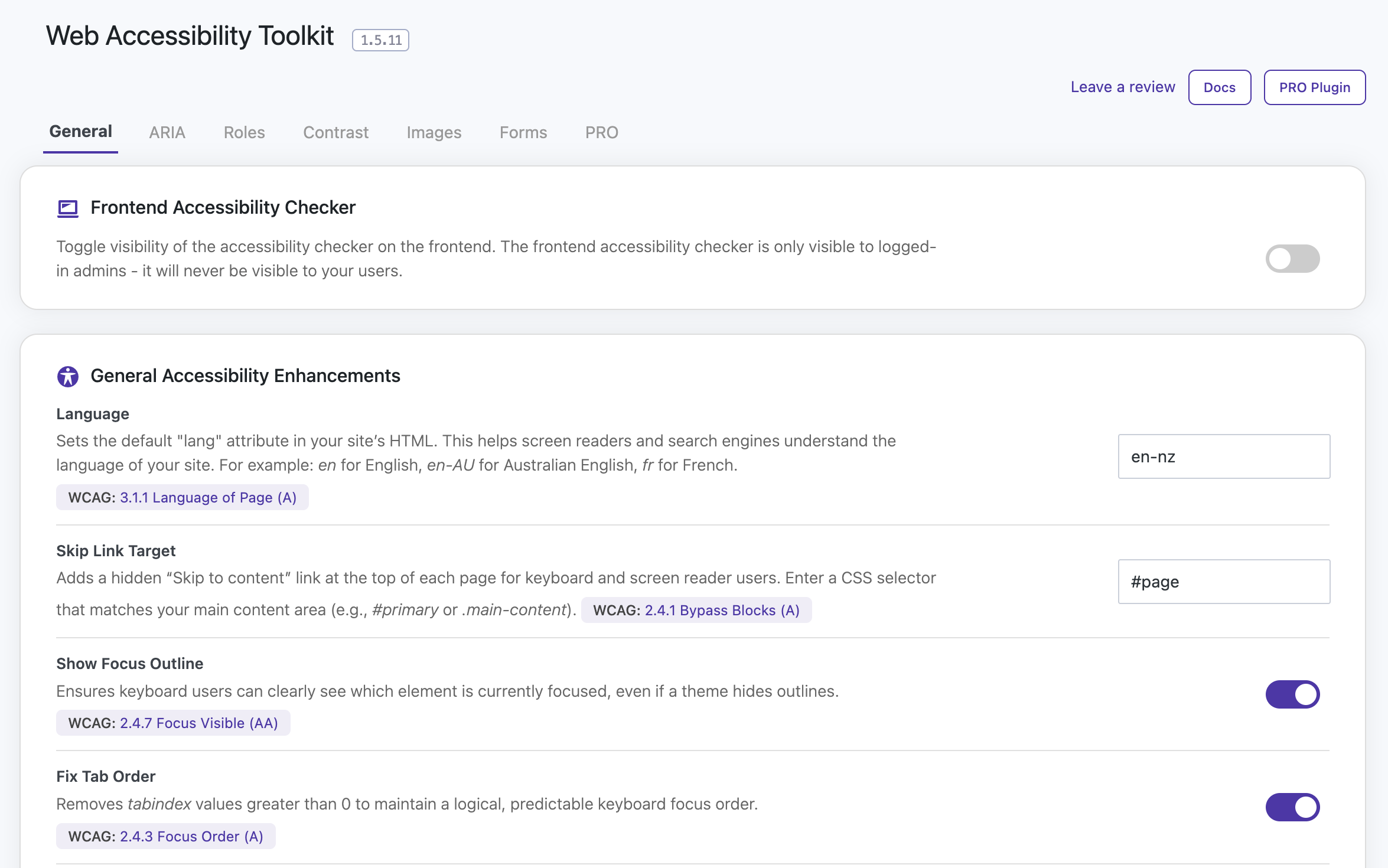
The General Settings section - configure general accessibility options
-
The ARIA attributes section - configure ARIA attributes options
-
The Roles section - configure landmark roles options
-
The Contrast section - configure contrast accessibility options
-
The frontend accessibility scanner - check your site for accessibility issues
-
The Images section - update alt tags on your images
About this plugin
Web Accessibility Toolkit helps your WordPress site meet ADA compliance and WCAG compliance standards. It includes powerful accessibility checking and fixing tools.
This plugin is not an ‘overlay’ or a ‘widget’. It provides real code fixes to assist with WCAG & ADA compliance for WordPress.
Scan your site with the built-in Accessibility Checker to identify issues such as missing ARIA labels, low contrast text, missing alt tags, incorrect heading structure & plenty more.
Apply one-click fixes for many common accessibility issues to improve usability. Web Accessibility Toolkit helps meet requirements for laws and standards like WCAG, ADA, EAA, Section 508, EN 301 549, and AODA.
Check Your Site Now | Docs | PRO Plugin
Accessibility Checker
The built-in Accessibility Checker scans your WordPress site in real time. It can identify common accessibility issues that could affect WCAG compliance and ADA compliance. With a single click, you can run an accessibility check on any page and get clear, actionable details.
The checker highlights issues directly on the page, including:
- Missing or empty ARIA labels.
- Low color contrast between text and background.
- Missing alt text on images.
- Skipped heading levels (e.g., jumping from H2 to H4).
- Broken ARIA references.
- Interactive elements without keyboard focus.
- Improper tab order.
- Missing page titles.
- Duplicate link text with different destinations.
- Duplicate IDs in the DOM.
- Form fields without labels or ARIA labels.
- Use of user-scalable=no in viewport meta tags.
- Non-focusable interactive elements.
Each issue includes details on what it means, why it matters for accessibility and how to fix it. Many problems can be resolved instantly using the plugin’s one-click fixes. While others provide guidance so you can address them in your theme or content.
Accessibility Fixes for WCAG, Section 508 & ADA Compliance
-
ARIA Attributes
Add ARIA attributes such as
aria-label,aria-hidden,aria-expanded,aria-live,aria-level, and more to any element. -
ARIA Roles
Assign semantic roles like
banner,navigation,main,complementary, andcontentinfoto improve screen reader navigation. -
Image Alt Tags
Shows a list of all images that are missing alt tags, and allows you to easily update them all from the one spot.
-
Contrast Adjustments
Override text and background colors for low-contrast elements using accessible HEX values.
-
Skip Link Target
Add a keyboard/screen-reader-visible “Skip to content” link by defining a main content selector.
-
Language Override
Set or override the HTML
langattribute for improved screen reader compatibility. -
Focus Outline Enhancements
Ensure visible focus styles are enforced for better keyboard navigation.
-
Fix Tab Order
Remove tabindex values greater than 0 to maintain a logical focus order.
-
Make Viewport Scalable
Remove user-scalable=no from the viewport meta tag to allow pinch-zooming.
-
CSS Selector-Based Targeting
Use any valid CSS selector to apply changes without modifying theme or template files.
Why Use Web Accessibility Toolkit?
Most WordPress themes don’t include full accessibility support. Web Accessibility Toolkit lets you patch those gaps quickly, keeping your site more inclusive and compliant with ADA & WCAG guidelines.
Whether you’re a developer working on a client site or a business owner aiming for better usability, this plugin makes accessibility updates faster and easier.
The Web Accessibility Toolkit is NOT an overlay widget, which can often do more harm than good for accessibility. This plugin fixes underlying code issues.
Compatibility
- Compatible with all WordPress themes
- Compatible with all WordPress plugins
- Works alongside popular page builders
- Designed with WCAG 2.1 AA standards and ADA compliance in mind
Questions
- What does this plugin do?
Web Accessibility Toolkit scans your site with an accessibility checker and helps you fix ADA compliance and WCAG compliance issues. It lets you add ARIA attributes, landmark roles, adjust contrast, fix alt tags, and more — no coding required.
- Can this help my WordPress site be ADA compliant?
Yes. While no plugin alone guarantees compliance, this tool helps you meet several key WCAG 2.1 success criteria like semantic structure, sufficient contrast, and accessible navigation.
- Does it work with any theme?
Yes. The plugin is designed to work with any WordPress theme, including those built with page builders like Elementor, WPBakery, or Gutenberg.
- Will it slow down my site?
No. It’s lightweight and only outputs a small block of CSS (and optionally JavaScript) based on your settings. There’s no third-party code or unnecessary overhead.
- Can I use it without JavaScript?
Sort of. The plugin uses CSS & PHP where possible. JavaScript is used for the accessibility checker and dynamic updates that can’t be done with CSS alone.
- What kind of selectors can I use?
Any valid CSS selector is supported — including classes (
.my-button), IDs (#main-header), or element types (nav,section, etc.).- Can I apply multiple ARIA attributes to the same element?
Yes. Simply add another row targeting the same selector with a different ARIA attribute.
- What is the accessibility checker for?
It shows a small box on your site (for admin users only) highlighting common accessibility issues like empty buttons, missing labels, broken ARIA references and low contrast.
sandywp / also on the shelf
Try another plugin

Web Accessibility (formally known as Ally) – WCAG Scanning, Guided Fixes,…
2.9 · 500K+ installs
Web Accessibility (formally known as Ally) is a free, powerful, and user-friendly plugin that helps WordPress creators build more…

Auto Image Attributes From Filename With Bulk Updater (Add Alt Text, Image…
4.8 · 100K+ installs
Automatically add Image Alt Text, Title, Caption and Description from Filename. Bulk update existing images. Great for Image SEO…

4.0 · 80K+ installs
UserWay’s Accessibility Widget creates a simpler and more accessible browsing experience for your users.
Spin up a real WordPress site in seconds.
Test plugins, build a demo, hand a client a link — then squash it and start again. No local setup, no Docker.