sandywp / plugins / announcement-notification-bar
Announcement Notification Bar
Notification Top Bar & Sticky Call to Action Banner
Boost sales & engagement with a customizable Announcement Bar, Scrolling Notification Bar, Floating Bar, or Sticky Header. Mobile-friendly & fast.
Ready in seconds.
v1.0.4 60+ installs WP 5.0+ PHP 7.4+
What you get inside
5 screens-
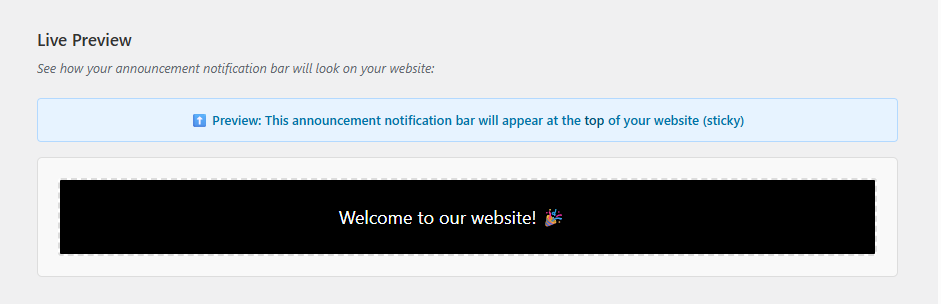
Simple Announcement notification bar preview
-
Running text announcment notification bar preview
-
Carousel style announcment notification bar preview
-
Plugin settings page with all customization options
-
Plugin settings page 2 with all customization options
About this plugin
The Announcement Notification Bar is your go-to solution for creating effective announcement bars, scrolling notification bars, ** sticky notification banners**, and sticky headers on any WordPress site. If you are struggling to get visitors to notice your promotions or important updates, this WordPress top bar plugin provides a simple, high-visibility area that grabs attention without ruining the user experience.
Unlike aggressive popups that can annoy users, a floating bar or footer notification offers a polite way to highlight discount codes, shipping policies, or maintenance alerts. It sits efficiently at the top or bottom of the screen, ensuring your key messages – like a Black Friday deal or a new feature launch – are always visible, helping you reduce bounce rates and improve conversions.
Use Cases
This versatile message bar adapts to various needs across different industries:
- Retail & E-Commerce: Run a free shipping bar or a flash sale countdown message to encourage instant purchases. A sticky promo bar ensures the offer stays in view as customers scroll.
- Bloggers & Publishers: Drive consistent traffic to your newest articles or affiliate partners with a scrolling news ticker or a catchy headline in a fixed header bar.
- Business & Corporate: Inform clients about holiday operating hours, service outages, or vital company news using a clear, professional alert banner.
- Events & Webinars: Build hype for upcoming live streams or workshops by placing a clickable event notification right where every visitor looks first.
Why Choose This Notification Bar?
We built this plugin to be both powerful for developers and easy for beginners. You don’t need to touch a single line of code to get a professional-looking marketing bar up and running. From the live preview in the dashboard to the smart targeting rules that let you show specific messages on your homepage versus your blog, every feature saves you time.
- Boost Sales: Highlight discount codes, flash sales, and special offers in a promo bar.
- Increase Engagement: Use emojis and animated scrolling text (running line) to catch eyeballs.
- Inform Users: Post important updates, maintenance alerts, or holiday hours in a clear top bar.
- Responsive & Lightweight: Loads fast and looks great on all mobile devices.
Key Features
- Multiple Display Styles: Choose from Simple Text, Running Line (Marquee/Ticker), or Carousel (Rotating Slider) styles.
- Flexible Positioning: Place your sticky bar at the Top or Bottom of the page; keep it fixed or let it scroll.
- Full Customization: Control colors, fonts, and heights to match your brand identity perfectly.
- Emoji Support: Add emojis directly to your message for a friendly, modern touch 🎉.
- Advanced Call-to-Action (CTA): Add a button, make the whole bar clickable, or keep it as simple text.
- Smart Display Logic: Target your notification bar to the Homepage, Blog, or specific Posts/Pages.
- User-Friendly Controls: Includes a dismiss/close button so users can hide the bar (cookie support included).
- Mobile Responsive: Looks great on all devices (iPhone, Android, Tablet).
- Performance Optimized: Lightweight code ensuring fast page load times.
Display Styles
- Simple: Clean and straightforward display
- Running Line: Scrolling text animation for attention-grabbing messages
- Carousel: Rotate between multiple messages automatically
Call-to-Action Options
- No call-to-action for simple announcements
- Add a button with custom text and link
- Make the entire announcement notification bar clickable
Display Control
Choose exactly where your announcement notification bar appears:
* Homepage
* Blog page
* Individual post types (Posts, Pages, Custom Post Types)
* Automatic detection of public custom post types
Privacy Policy
This plugin includes an optional deactivation feedback form. If you choose to submit feedback when deactivating the plugin, the plugin collects and transmits the following data to the developer:
- Plugin name and version
- WordPress version
- Site name and URL
- The deactivation reason you select
- Any optional text you enter in the feedback field
- Your email address (only if you tick “You may contact me to help resolve the issue”)
Purpose: We use this data solely to improve the plugin. We never sell, share, or use it for any other purpose.
Retention: We permanently delete all submitted feedback within 7 days of receipt.
Opt-out: Submitting feedback is entirely optional. You can click “Skip & Deactivate” at any time to deactivate without sending any data. Site owners can also disable the feedback form entirely by adding the following to their theme’s functions.php or a custom plugin:
add_filter( 'anb_enable_feedback_collection', '__return_false' );
Questions
- How do I create multiple rotating messages?
For the Carousel style, separate your messages with ” | ” (pipe symbol with spaces). For example: “First message | Second message | Third message”
- Can I use emojis in my announcement?
Yes! The plugin fully supports emojis. Just paste them directly into the announcement text field. 😊
- Will this work with my theme?
Announcement Notification Bar works with any properly coded WordPress theme. The announcement notification bar uses fixed positioning and does not interfere with your theme’s layout.
- Can visitors close the announcement notification bar?
Yes, you can enable the close button option in the settings. When visitors close the announcement notification bar, it won’t show again during their current session.
- Does it work on mobile devices?
Absolutely! The announcement notification bar is fully responsive and adapts to different screen sizes automatically.
- Can I choose which pages show the announcement notification bar?
Yes, you have full control over where the announcement notification bar appears. You can choose homepage, blog page, and select specific post types.
- Can I position the announcement notification bar at the bottom of the page?
Yes! You can choose to display the announcement notification bar at either the top or bottom of your website. You can also enable sticky positioning to make it stay visible when scrolling.
- Does the announcement notification bar affect my site’s performance?
No! The plugin is highly optimized and uses minimal resources. It only loads its assets when the announcement notification bar is enabled and displayed.
sandywp / also on the shelf
Try another plugin

HashBar – Announcement, Notification Bar & Popup Campaign
4.2 · 9K+ installs
Create Announcement Bars, Notification Bars & Popup Campaigns with countdown timers, A/B testing, smart targeting &…
Advanced Floating Content Lite
4.1 · 7K+ installs
Create high-impact floating content that stays visible without annoying visitors. Perfect for announcements, CTAs, and promotions.

4.6 · 5K+ installs
Smooth, accessible scrolling announcement bars and news tickers for your header, footer or any page. Live preview, block and…
Spin up a real WordPress site in seconds.
Test plugins, build a demo, hand a client a link — then squash it and start again. No local setup, no Docker.