sandywp / plugins / marquee-running-text

Marquee Running Text
Smooth, accessible scrolling announcement bars and news tickers for your header, footer or any page. Live preview, block and Elementor widget.
Ready in seconds.
v2.0.3 5,000+ installs WP 6.3+ PHP 7.4+
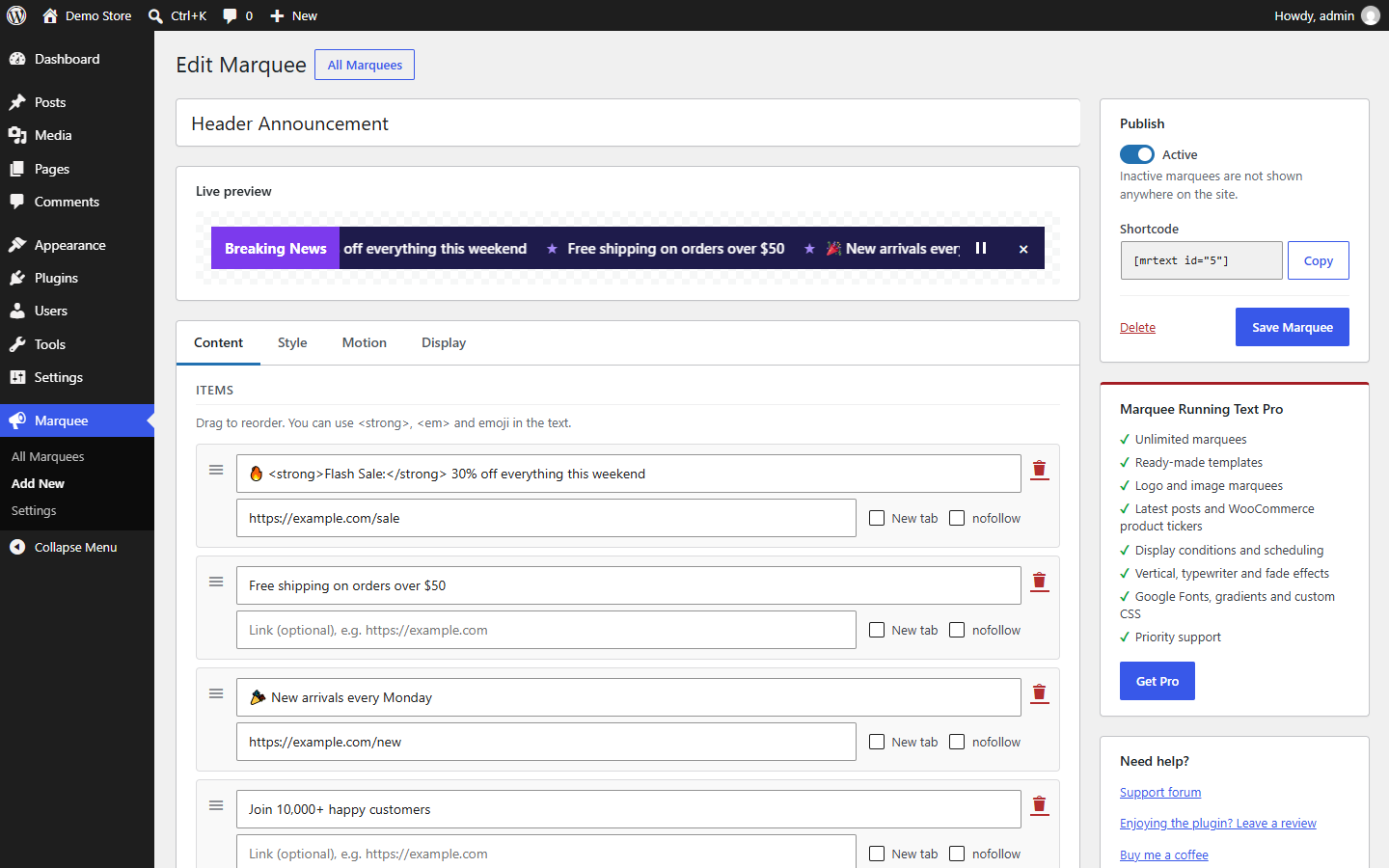
What you get inside
3 screens-
The marquee builder with live preview.
-
The list of marquees.
-
A marquee with a "Breaking News" label on the front end.
About this plugin
Marquee Running Text adds a smooth scrolling text bar — a news ticker, offer banner or announcement bar — to your website in a minute. Build it with a live preview, then show it at the top of every page, as a sticky bar, as a fixed bottom bar, or anywhere with a shortcode, block or Elementor widget.
Version 2.0 is a complete rebuild: a modern, lightweight animation engine replaces the old <marquee> tag, and everything you set up in 1.x is moved over automatically.
Features
- Live preview builder — see every change instantly while you edit.
- Up to 5 marquees, each with its own items, colors and placement.
- Unlimited items per marquee, each with an optional link (new tab and nofollow options). Drag and drop to reorder.
- Placements: top of the page, sticky top bar, fixed bottom bar, or shortcode/block only.
- Shortcode:
[mrtext id="123"], or[mrtext]for your default marquee. - Gutenberg block and Elementor widget.
- Label box such as “Breaking News” or “Notice”.
- Styling: background, text, hover, separator and label colors; font size and weight; bar height; spacing; rounded corners.
- Separators: dot, line, star, any character or emoji, or none.
- Motion: direction, speed, pause on hover, optional pause/play button.
- Close button that remembers the visitor’s choice.
- Show on the entire site or the homepage only; hide on mobile or desktop.
- Accessible: keyboard friendly, respects “reduce motion”, optional pause button.
- Fast: a tiny dependency-free script (no jQuery) that only loads on pages with a marquee, and pauses when off-screen.
- RTL ready and translation ready.
- Works with any theme — including themes that do not support
wp_body_open.
Marquee Running Text Pro
Need more? Marquee Running Text Pro adds:
- Unlimited marquees
- 25 ready-made templates
- 1,800+ modern icons with an icon picker
- Logo and image marquees
- Latest posts and WooCommerce product tickers
- Display conditions (pages, categories, user roles, devices) and scheduling
- Vertical, typewriter and fade effects
- Google Fonts, gradients and custom CSS
- Priority support
Privacy
This plugin uses the Freemius SDK. On first use you are asked whether to share basic site information (opt-in) to receive security and feature updates; nothing is sent if you skip. See the Freemius privacy policy.
Questions
- I updated from version 1.x. Are my texts and colors still there?
Yes. On the first load after the update, your five texts, links, colors, font size, direction, speed and show/hide setting are moved into a marquee called “Header Marquee”. It is shown in the same place as before, and
[mrtext]keeps working. Your old settings are also kept in the database.- The marquee does not appear in my header.
Check that the marquee is Active and its placement is Top of page, Sticky top bar or Fixed bottom bar. If you use a caching plugin, clear its cache.
- How many marquees can I create?
Up to 5 in the free version. Marquee Running Text Pro removes the limit.
- Can I use bold text or emoji?
Yes. Emoji work everywhere, and you can use
<strong>,<em>,<b>,<i>and<u>in item text.- Does it work with right-to-left languages?
Yes. Arabic, Hebrew, Urdu and other RTL text is displayed correctly, and the label is placed on the right on RTL sites.
- What about visitors who get motion sickness?
If a visitor has turned on “reduce motion” in their operating system, the marquee does not move; they can scroll it by hand. You can also add a pause/play button.
sandywp / also on the shelf
Try another plugin

HashBar – Announcement, Notification Bar & Popup Campaign
4.2 · 9K+ installs
Create Announcement Bars, Notification Bars & Popup Campaigns with countdown timers, A/B testing, smart targeting &…
Advanced Floating Content Lite
4.1 · 7K+ installs
Create high-impact floating content that stays visible without annoying visitors. Perfect for announcements, CTAs, and promotions.

1.0 · 3K+ installs
A fixed position (header) HTML with jQuery drop-down announcement bar using Custom Post Types.
Spin up a real WordPress site in seconds.
Test plugins, build a demo, hand a client a link — then squash it and start again. No local setup, no Docker.