sandywp / plugins / ai-product-tools

AI Product Tools for WooCommerce
MCP Server & Bulk Product Description Generator
WooCommerce AI toolkit: bulk product descriptions, titles, SEO meta, FAQs, chatbot. Run it from ChatGPT or Claude via MCP. Less effort, more output.
Ready in seconds.
v2.8.3 500+ installs WP 6.6+ PHP 7.4+
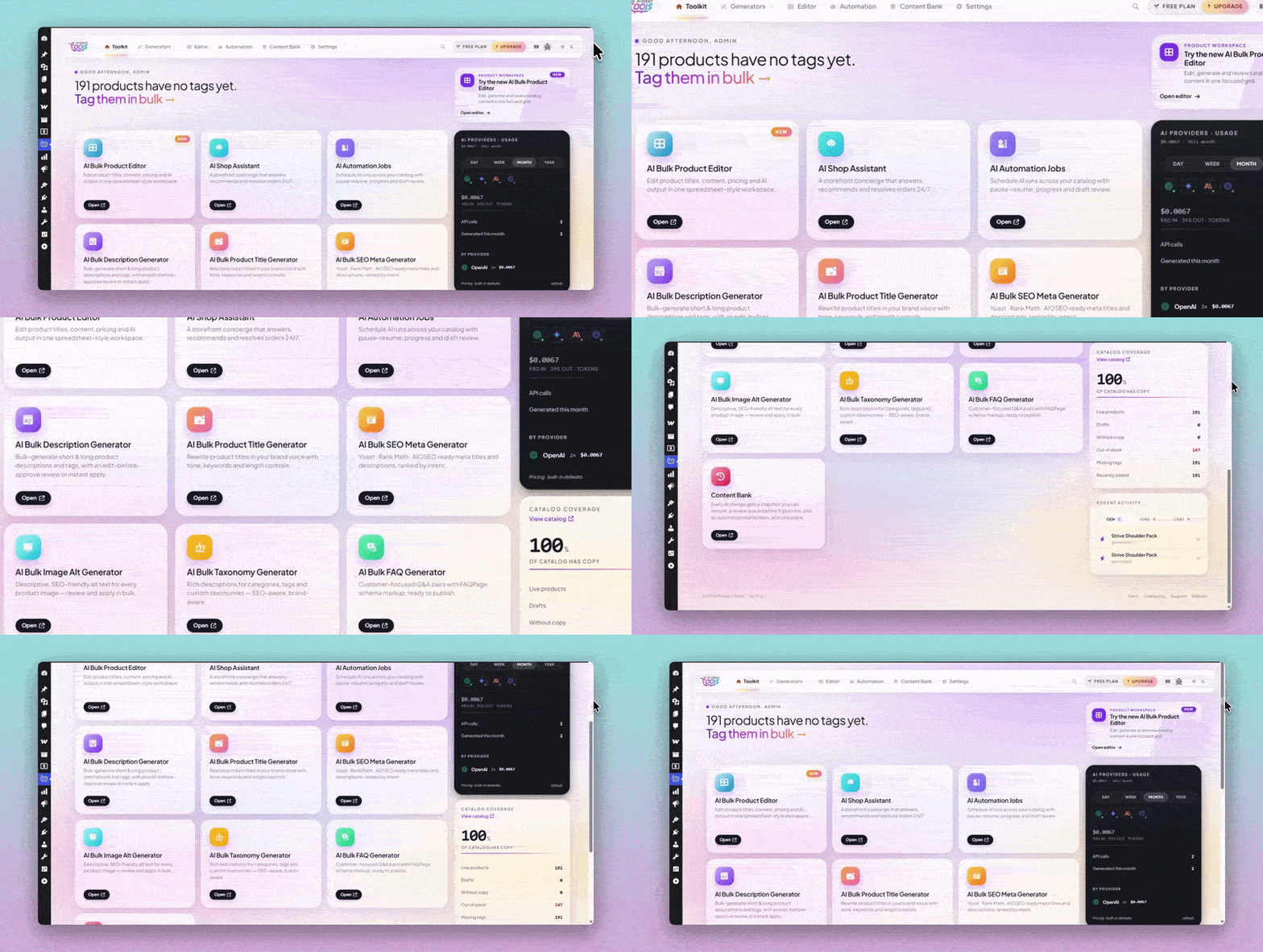
What you get inside
8 screens-
AI Toolkit Dashboard
-
AI Bulk Product Description Generator
-
AI Bulk Product Title Generator
-
AI Bulk SEO Meta Generator
-
AI Bulk FAQ Generator
-
AI Bulk Product Editor
-
AI Bulk Taxonomy Generator
-
AI Bulk Image Alt Generator
About this plugin
AI Product Tools is a WooCommerce AI toolkit. At its core is bulk content: descriptions, titles and SEO meta for up to 1,000 products in one run. Rather not learn another screen? Connect ChatGPT or Claude to the built-in MCP server and work on your catalog by chat.
You bring your own key: OpenAI, Google Gemini, Anthropic Claude, or OpenRouter, billed directly by that provider at your own rates. No credits to buy from us, no usage meter, no markup. Switch provider or model anytime and test with a free OpenRouter model.
🚀 What you can do
- Set how each kind of content should look in a content template, and every generator follows it.
- Generate product descriptions, titles, tags, FAQs, SEO meta, and image alt text for many WooCommerce products at once.
- Edit hundreds of products in a spreadsheet-style grid without opening each one.
- Check and edit every AI result before it touches your live products.
- See what a product said before every AI change.
- Answer shopper questions on your storefront with an assistant that reads your real catalog.
- Schedule content work to run in the background.
- Let AI agents work on your catalog through the built-in MCP server.
🧩 Content Templates
A content template is your recipe for one kind of content: the parts it has, the voice it uses, the product details it may use, and rules such as length limits. Every generator, the product screen, the Product Editor, and scheduled runs follow it.
- Each kind of content has one template for your whole store, with ready-made ones to start from.
- Edit a template right on the generator page and try it on one of your products first.
- Before any AI call, each generator shows which template will write your products and which do not match it yet.
- The Content Templates page keeps your templates and voices in one place and shows where each one is used.
- Content Bank’s Changes tab shows which template wrote each change.
- Content Template Mode is on by default. Custom Prompt Mode in Settings runs every generator on prompts you write instead.
- Different templates for specific categories, a web page or your own product fields as a source, more than one voice, and writing samples. (Business)
- Your own instructions and banned phrases in every template: product description, title, FAQ, SEO meta, image alt, and category description. (Business)
- “What customers say”, a short summary of a product’s approved reviews, and “Compare with similar products”, a table of similar products from your store. (Business)
- Catalog watch, a daily check that shows which products need a content update. (Business)
⚡ Bulk Product Content Generators
Choose your products, check the template, then show results first, send them to a review queue (Business), or apply them now. Large runs can continue in the background, writing straight to your products unless Business sends them to review. Retry a failed product alone. Reviewing results on the page is free for everyone.
Product descriptions. Your template decides which parts a description has, such as an opening paragraph, features, specifications, shipping and returns, fixed text the AI never changes, or a part of your own. Short and long descriptions plus product tags, up to about 1,000 products per run, in plain text or HTML and 42 languages. Keep, replace, or improve what is already there.
Product titles. Your template decides which parts a title is made of and how they are joined. Up to 5,000 products per run, 1 to 3 alternatives each, with an optional URL slug update. Business adds keywords in every title, improving the current title, and more product details to draw on: title, tags, categories, and attributes.
Product SEO meta. Your template decides how meta titles and descriptions are put together and where the focus keyword comes from. Up to about 1,000 products per run, with a live search preview and a score, up to two alternatives, titles within 60 characters and descriptions within 160. Works with Yoast SEO, Rank Math, All in One SEO, SEOPress, SiteSEO, The SEO Framework, and Squirrly SEO. Business adds a third alternative, AI suggested keywords, and longer limits, up to 300 and 500 characters.
Product FAQs. Your template groups questions by topic and sets how many each group gets, up to 20 per product. FAQs show on the product page as an accordion or a simple list, or anywhere with [aipt_faq] and [aipt_faq product_id="123"], and new FAQs are added next to existing ones. Business adds replacing existing FAQs, answers from tags, categories, and attributes, questions-only and answers-only modes, five more display themes with style controls, custom CSS, and FAQ structured data.
Product image alt text. Your template decides whether the AI reads your product data or the image itself. Length from 50 to 250 characters, 125 by default, for images up to 20 MB. Ready-made alt text styles, including A/B mode with two versions to pick from, are free templates. Business adds product attributes such as color, and every gallery image when you process a whole product.
Category and tag descriptions. Your template decides which parts a category or tag description has, such as an introduction, product groups, a buying guide, and a closing note. Works for categories, tags, and custom taxonomies, in a split screen with a rich text editor. Add to, replace, or skip existing descriptions, using up to 10 sample products each. Business adds a separate template for product tags, the details a category’s products share, and up to 20 sample products. Bulk tag suggestions are free.
🧮 AI Bulk Product Editor
A spreadsheet-style grid for editing many products at once.
- Edit titles, descriptions, tags, FAQs, SEO fields, slugs, and image alt text in the cell.
- Compare an AI suggestion against your current text word by word, then accept or reject per cell.
- Undo and redo up to 100 steps, save up to 25 personal views, and stay protected against overwriting a colleague’s change.
- Generate AI content one row at a time.
- Generate or retry many selected rows in one action, with advanced per run settings. (Business)
🛍️ AI Shop Assistant
An assistant on your storefront that answers from your own catalog, not from generic web knowledge.
- Recommends up to 10 products per answer, with View Product buttons and live stock status.
- Answers store questions from knowledge pages you choose, such as shipping or returns.
- Replies in the visitor’s language and works on mobile and in right to left languages.
- Add a WhatsApp button and an optional pre-chat form for name and email, with a consent line.
- Set the bot name, greeting, colors, typography, position, and launcher icon.
- Saves questions it could not answer to an admin queue.
- Spend limits: 50 chat requests per visitor a day, 1,500 an hour and 3,000 a day per store; 0 turns one off.
- Add an Add to Cart button, choose response depth and behaviour, upload a custom icon or hero image, add custom CSS, pick extra themes and launcher animations, translate labels, and reply to queued questions yourself. (Business)
📦 Store index for the assistant
The assistant answers from a compressed, searchable copy of your catalog, built in batches so large stores stay responsive.
- On every plan the index covers product title, short and full description, categories, tags, price, and stock status.
- Build one index profile manually, filtered by stock status or date, covering up to 50,000 products per build, 10,000 by default.
- Add SKU, stock quantity, and product attributes, run several profiles, filter by category and tag, and rebuild on a schedule. (Business)
🗓️ Scheduled Bulk Runs
Set up a content job and let it run in the background.
- Run one job at a time, covering one content type, started manually or at a time you choose.
- Filter by price range, product IDs, description or keyword match, include and exclude lists, and whether the AI already processed a product.
- Watch progress and estimated completion, read logs, retry failed products, and pause, resume, or stop anytime.
- Run several jobs at once, each covering several content types, on daily, weekly, or monthly schedules. (Business)
- Filter by category, tag, stock status, and product status, so a job can run on draft, pending review, or private products. (Business)
- Start a run when a product is published or changes, and use review policies and draft review. (Business)
On Business, this area is called Automation in the admin menu.
🗂️ Content Bank
One page for everything the AI changes on your store.
Changes is available on every plan. Before any AI change, the plugin saves the previous value and shows a before and after timeline. Keep 1 to 10 versions per field, 5 by default; the original is never removed. AI-touched products are marked, so you can filter by AI status and skip what is done.
To review keeps generated results on your site until you approve or discard them, so they survive a page reload. (Business)
Drafts holds scheduled run results waiting for your approval. (Business)
- Restore an earlier version with one click or in bulk: up to 50 selected items, or 200 for a whole product. Each restore is recorded, so you can undo an undo. (Business)
🛠️ Dashboard and integrations
- A Home page for every tool: recent activity, usage statistics, provider connection status, and quick search on
Ctrl+KorCmd+K. - Set your brand voice and store details once, and every generator reuses them.
- Generate and apply every kind of content for one product from the AI content panel on its edit screen.
- FAQ, SEO fields, and image alt text travel in WooCommerce’s product CSV export and import.
- A short AI note on each product, such as “fragile, ships boxed”, that every kind of content uses, with its own CSV column. (Business)
- Connect OpenAI, Google Gemini, or Anthropic Claude through WordPress AI Connectors on WordPress 7.0. OpenRouter keys stay in the plugin.
- The WooCommerce Products list and a Dashboard widget point out products missing content.
- AI assistants connected to your site can preview what a content run would write, then confirm it, before anything changes.
- In Custom Prompt Mode, custom prompts for titles, FAQs, SEO meta, category descriptions, and image alt text, with your own variables and AI prompt improvement. (Business)
🤖 MCP Server for AI Agents
Connect Claude, ChatGPT, Cursor, and other MCP clients on the AI Agents page. Each connection is approved on a WordPress screen or uses an API key, has a permission level, and is logged.
💡 What is free and what Business adds
Creating content is free. Business adds the tools for stores that run this work regularly.
Free on every site:
- Bulk generation for product descriptions, titles, tags, FAQs, SEO meta, image alt text, and category descriptions.
- A content template for each kind of content, with ready-made ones to start from, and the AI content panel on the product screen.
- Preview, edit, approve, or reject every result before it is saved.
- Content History of what a product said before each AI change.
- The AI Shop Assistant, with product recommendations and appearance settings.
- The AI Bulk Product Editor grid, generating one row at a time.
- One scheduled bulk run, started manually or at a time you pick.
- All four AI providers, every model in the list, and your own OpenRouter model IDs.
- The MCP server for AI agents, with up to 5 connections and 10-product batches without an AI key.
Business Plan adds:
- A review queue that survives a page reload.
- One click restore and bulk rollback from Content History.
- Draft review for scheduled runs.
- More from content templates: category templates, more sources and voices, your own instructions and banned phrases, an AI note on each product, the “What customers say” and “Compare with similar products” sections, and deeper options in every generator.
- Catalog watch, a daily check that shows which products need a content update.
- Recurring daily, weekly, and monthly schedules, several jobs at once, and category, tag, stock, and product status filters.
- Add to Cart in the shop assistant, plus extra themes, custom CSS, and label translation.
- Generating many selected rows at once in the Product Editor.
- Unlimited agent connections, 20-product batches, 5-product AI generation, bulk jobs with review and restore, per-connection tool permissions, and a 90-day log with CSV export.
Pro plan customers keep their Pro features; sites running the plugin before version 2.7.2 keep To review and Drafts access.
🔒 External Services and Privacy
The plugin contacts the services below only after an administrator sets them up or opts in, and only when a feature that needs them is used. AI keys are stored encrypted in your database or managed by WordPress AI Connectors, and are never sent to AI Product Tools servers.
AI providers: OpenAI (api.openai.com), Google Gemini (generativelanguage.googleapis.com), Anthropic Claude (api.anthropic.com), and OpenRouter (openrouter.ai), with your own key; the provider bills you directly. Generation, automation, and chatbot requests send the model, your key, prompts, and the product or store details they use: titles, descriptions, categories, tags, attributes, prices, stock, SEO inputs, prompt variables, chat messages, and store-index snippets. Image alt text can also send the image. Key checks send the key, and model lists are fetched when needed. OpenRouter also receives your site URL and the plugin name. Terms and privacy: OpenAI (terms, privacy), Gemini (terms, privacy), Anthropic (terms, privacy), OpenRouter (terms, privacy).
Freemius (freemius.com): licensing, checkout, plan checks, updates, and optional usage reporting, only after you connect or opt in; free features need no licence. It may receive site and administrator contact details, environment and plugin data, usage events, and install and licence data for plan checks, never product content, chat messages, or AI keys. Terms, privacy.
AI Product Tools pricing feed (api.aiforwoo.com): after the setup opt-in, public AI provider prices for cost estimates, on a schedule or on request. It sends only the plugin version and your site URL. Terms, privacy.
Provider status pages: after a provider error holds a queued chat request, the plugin checks status.openai.com, status.claude.com, or status.cloud.google.com to see whether the service is back, sending no store data, chats, settings, or keys.
Remote images: to write alt text for an image stored on another site, the plugin first downloads it from that host, which receives only the request for the image, never keys or prompts; that host’s own terms apply.
AI agents (MCP): the MCP server runs inside your site, agents you connect call it directly, and AI Product Tools never sees that traffic. Your site may download a connecting client’s public metadata file.
Questions
- Is AI Product Tools free to use?
Yes. The plugin runs on your own AI provider API key, so we do not meter or resell your AI usage and we add no markup. Content creation, in-session review, Content History, the AI Shop Assistant, the Product Editor grid, and one scheduled bulk run are all included at no cost.
Practical batch limits apply per run: about 1,000 products for product descriptions and SEO meta, about 5,000 for product titles, and about 1,000 products per Product Editor selection.
Business adds a saved review queue, draft review, one click rollback, more automation, Add to Cart in the shop assistant, and multi row generation in the Product Editor.
- Do I have to pay for AI usage separately?
Yes, and you pay your provider directly rather than us. You connect your own key, in the plugin or through WordPress AI Connectors, and the account, the billing, and the rates stay between you and that provider.
You can switch providers whenever you like, add your own OpenRouter model IDs, or try a free OpenRouter model while you evaluate. You are not buying credits from us, so there is nothing to top up, nothing that expires, and no cap we place on how much you generate, apart from the limits you can set for AI agents and the Shop Assistant. If you stop using the plugin, your provider account and your key carry on as they were.
- What exactly are the free scheduling limits?
Three limits apply to scheduled background work on the free plan:
- One job. You can configure one job at a time.
- One-time or manual runs only. Recurring daily, weekly, and monthly schedules require Business.
- One content type per job. Covering several content types in one job requires Business.
Free filters cover price range, specific product IDs or a product selection, description and keyword matching, include and exclude lists, AND/OR logic, and skipping products the AI has already processed. Category, tag, stock status, and product status filters require Business; without a product status filter, a job runs on published products.
Background processing, progress monitoring, logs, and retry work on every plan.
- Can I check the content before it goes live?
Yes, and this is free for everyone. Every generator can show you the result first, so you can read it, edit it, approve it, or reject it before anything is written to your products. That review happens in your browser session, so nothing is stored on your site if you navigate away. Saving results to the To review tab in Content Bank, so they survive a page reload, requires Business.
- Can I undo an AI change?
Content History records the previous value before every AI change, on every plan, so you can always see what a product said before. Restoring that earlier version with one click, or rolling back in bulk, requires Business.
- Does the Drafts tab work on the free plan?
No. Viewing the Drafts tab and every draft action, including approving, discarding, and the bulk actions, requires Business. Sites that were already running the plugin before version 2.7.2 keep that access automatically, even if they had never opened the screen.
- How does the image alt text generator work?
With the built-in templates it writes alt text from your product data and does not send the image. Set a template to Analyse each image and it sends each image to an image-capable model from your AI provider, which describes what it sees; Custom Prompt Mode always sends the image. You can review and edit the text before it is saved to the image.
- How does the shop assistant know about my products?
It reads a compressed index of your catalog that the plugin builds. On every plan that index covers seven fields: product title, short description, full description, categories, tags, price, and stock status. SKU, stock quantity, and product attributes require Business.
sandywp / also on the shelf
Try another plugin

AutoWP – AI Content Writer & Rewriter
3.8 · 900+ installs
AI Content Writer & Rewriter. Write content with AI from zero. Import content from RSS, Wordpress, Google News and rewrite…

AI Content Generator For Elementor
4.3 · 200+ installs
Create and improve Elementor content instantly using Chrome’s built-in AI. Generate, rewrite, and optimize text directly in the…

PurePen AI – AI Content Generator with Claude, GPT-4o, Gemini & More
5.0 · 100+ installs
AI content generator for WordPress. Generate SEO-ready blog posts, titles, and tags in one click using Claude, GPT-4o, Gemini,…
Spin up a real WordPress site in seconds.
Test plugins, build a demo, hand a client a link — then squash it and start again. No local setup, no Docker.