sandywp / plugins / ai-auto-content-generator-for-elementor

AI Content Generator For Elementor
Create and improve Elementor content instantly using Chrome’s built-in AI. Generate, rewrite, and optimize text directly in the editor.
Ready in seconds.
v1.3.2 200+ installs WP 5.0+ PHP 7.2+
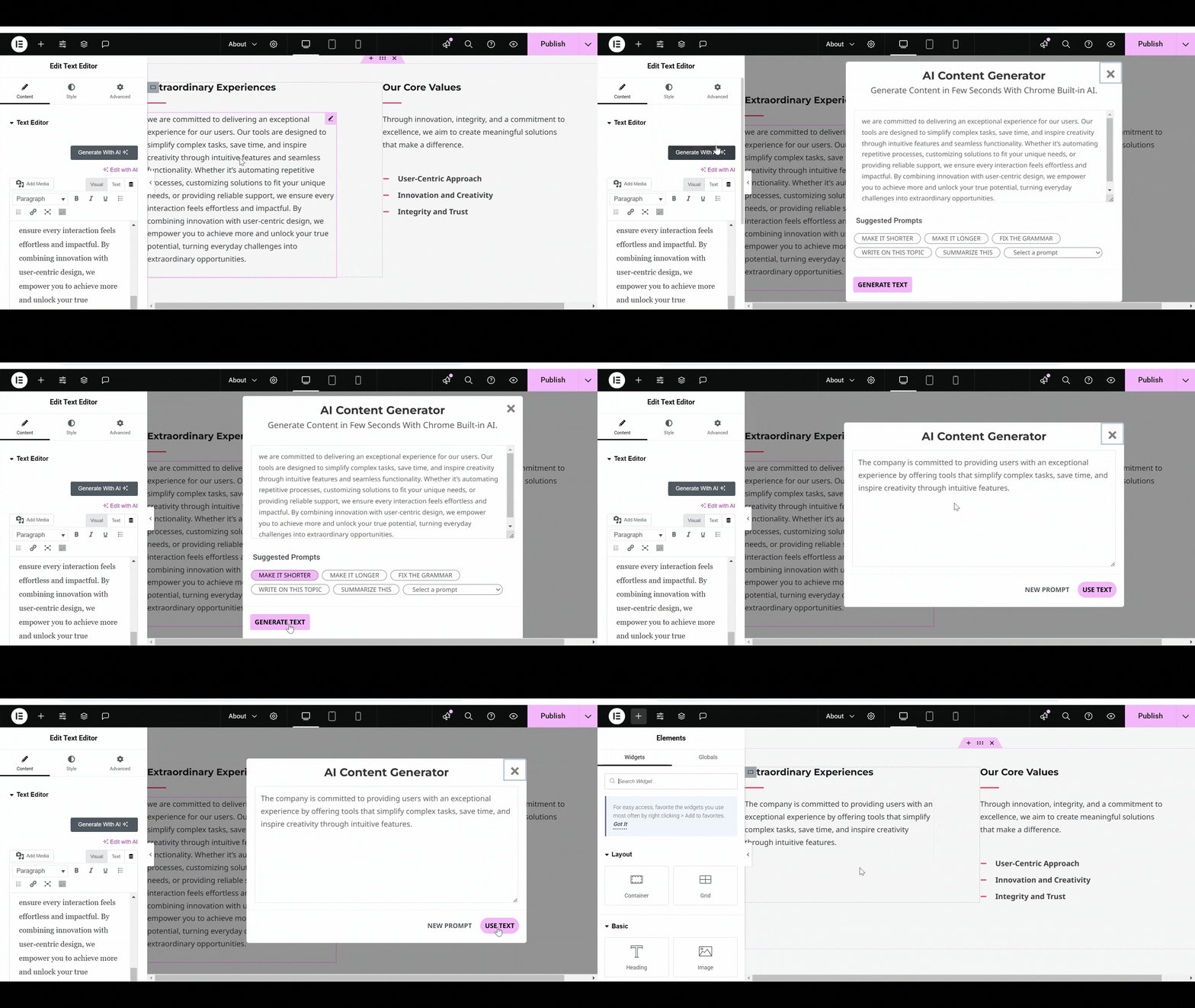
What you get inside
3 screens-
Adjust Content Make it shorter, longer, or more professional
-
Generate New Idea for content.
-
Correcting spelling and grammar.
About this plugin
AI Content Generator for Elementor is a powerful WordPress plugin that helps you create, edit, and improve website content directly inside the Elementor editor.
It uses Google Chrome’s built-in AI models to generate new text, summarize long articles, fix grammar, and even suggest content ideas, all without needing paid subscriptions or third-party API keys.
Why Choose AI Content Generator for Elementor?
This plugin is perfect for bloggers, marketers, and website owners, because:
- Free and Fast: No subscriptions required!
- Secure and Private: Your data stays local.
- Save Time: Automate content creation and editing.
- User-Friendly: Easy to use for all skill levels.
- Versatile: Supports various content needs.
Key Features
-
Chrome’s Built-in AI: Quickly generate accurate content using Chrome’s built-in AI, which adapts to different writing styles and understands context.
-
Automatic Content Generation: Create high-quality paragraphs, blogs, product descriptions, and stories within minutes.
-
Summarize Articles: Turn lengthy articles into concise summaries to highlight key information.
-
Create TL;DR Summaries: Generate short, engaging summaries for posts and articles.
-
Content Ideas: Provide a prompt to the AI and get unique topic ideas.
-
Grammar Correction: Fix errors, from simple typos to complex grammar issues, for polished content.
-
Adjust Content Length: Expand or shorten content to fit your website’s design and tone.
-
No Paid Subscription: Fully free to use.
-
Elementor Compatibility: Seamless integration with Elementor page builder.
Enable Chrome AI Models
To enable the AI Content Generator features:
- Update your Chrome browser to the latest version.
-
Open Chrome and enable these flags:
- chrome://flags/#optimization-guide-on-device-model (set to Enabled BypassPerfRequirement).
- chrome://flags/#prompt-api-for-gemini-nano.
- chrome://flags/#summarization-api-for-gemini-nano.
-
Use this code to confirm the Summarizer API is enabled:
if (‘ai’ in self && ‘summarizer’ in self.ai) {
console.log(“Model Exists”);
} - Restart Chrome to apply changes.
Here are some helpful resources to learn more about the APIs used in this plugin:
- Chrome Built-in AI APIs Documentation
- Chrome Summarizer API Documentation
- Chrome Prompt API Documentation for Extensions
Explore More Cool Addons For Elementor
-
Cool FormKit For Elementor: Add advanced fields like conditional logic, range sliders, calculator fields, and country code selection to Elementor forms.
-
Conditional Fields For Elementor Form: An essential addon for Elementor forms that allows you to add conditional logic to input fields, enabling fields to show/hide based user input.
-
Country Code For Elementor Form Telephone Field: Enhances phone fields with a country code selection feature for accurate data input.
-
Timeline Widget for Elementor: Use this plugin to showcase your history in a stylish vertical or horizontal timeline layout on Elementor pages.
-
Events Widgets for Elementor: This plugin provides The Events Calendar widgets for Elementor, allowing you to easily display events in a grid, list, or carousel layout.
Use of 3rd Party Services: This plugin connects to the Cool Plugins feedback server only for optional usage data sharing and voluntary feedback submission (for example, during plugin deactivation). Data is transmitted solely after explicit user consent. No hidden tracking is performed, and no frontend visitor or site user data is collected. For more details, please review our Data Usage Policy, TOS, and Privacy Policy
and this plugin also includes SweetAlert2 which is distributed under the MIT License.
Questions
- Can I use this plugin on multiple websites?
Yes, you can use the plugin on multiple websites without any restrictions.
- Does the plugin require an active internet connection?
Yes, an internet connection is required for Chrome’s built-in AI features to function properly.
- What happens if I don’t enable the required Chrome flags?
If the Chrome flags are not enabled, the AI features like content generation and summarization will not work. Follow the setup instructions to enable these flags.
-
Update your Chrome browser to the latest version.
-
Open Chrome and enable these flags:
- chrome://flags/#optimization-guide-on-device-model (set to Enabled BypassPerfRequirement).
- chrome://flags/#prompt-api-for-gemini-nano.
- chrome://flags/#summarization-api-for-gemini-nano.
Use this code to confirm the Summarizer API is enabled:
> if (‘ai’ in self && ‘summarizer’ in self.ai) {
console.log(“Model Exists”);
}
- Restart Chrome to apply changes.
-
- Is this plugin compatible with Elementor Pro?
Yes, the plugin works seamlessly with both the free and Pro versions of Elementor.
- Can I generate content in languages other than English?
Currently, the plugin primarily supports English, but Chrome’s AI might offer limited functionality for other languages depending on availability.
- Does this plugin work on mobile devices?
The plugin is designed for desktop usage, as Chrome’s AI features require a desktop environment.
- Will this plugin slow down my website?
No, since all the AI processing happens locally in the browser, it doesn’t impact your website’s performance.
- Can I use this plugin with custom Elementor widgets?
Yes, the plugin can be used with custom widgets, as long as they support text editing.
sandywp / also on the shelf
Try another plugin

AutoWP – AI Content Writer & Rewriter
3.8 · 1K+ installs
AI Content Writer & Rewriter. Write content with AI from zero. Import content from RSS, Wordpress, Google News and rewrite…

AI Marketing Expert — AI Email Marketing, Content Generator, SEO Analyzer,…
5.0 · 900+ installs
All-in-one AI marketing: AI email campaigns, AI content generation, AI SEO analyzer, social media scheduling, AI chatbot, and AI…

PurePen AI – AI Content Generator with Claude, GPT-4o, Gemini & More
5.0 · 100+ installs
AI content generator for WordPress. Generate SEO-ready blog posts, titles, and tags in one click using Claude, GPT-4o, Gemini,…
Spin up a real WordPress site in seconds.
Test plugins, build a demo, hand a client a link — then squash it and start again. No local setup, no Docker.