sandywp / plugins / ad-inserter

Ad Inserter
Ad Manager & AdSense Ads
Manage Google AdSense ads, banners, ad rotation, sticky widgets, AMP ads, ads.txt, tracking, header and footer code, PHP code, global custom fields
Ready in seconds.
v2.8.18 300,000+ installs WP 6.0+ PHP 7.4+
What you get inside
8 screens-
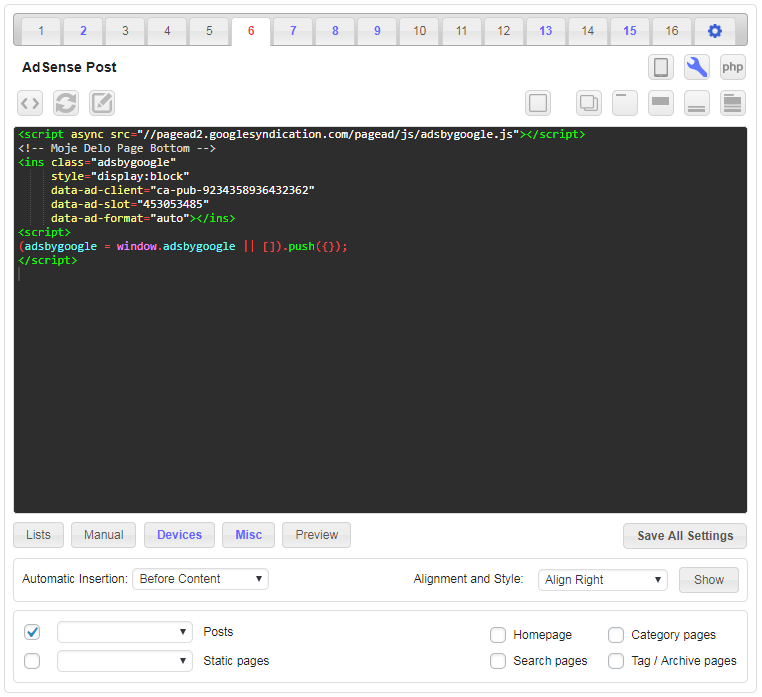
Settings for one code block (Before content).
-
Code preview with visual CSS editor
-
Code preview with visual CSS editor - highlighted code
-
Post / Page Ad Inserter Individual Exceptions
-
Some Ad Inserter Pro features: IP address and country lists, Scheduling between dates with fallback
-
Ad Inserter plugin settings
-
Visualization of HTML tags in post
-
Visualization of positions for automatic insertion in post
About this plugin
Ad management plugin with many advanced advertising features to insert ad codes at optimal positions.
Supports all kinds of ads including Google AdSense, Google Ad Manager (DFP – DoubleClick for publishers), Media.net , Infolinks and rotating banners.
This plugin is more than AdSense plugin or plugin for ads. It provides many advanced options to insert opt-in forms, header scripts, Javascript, CSS, HTML, PHP, analytics, tracking or advert code anywhere on the page.
Insert ads where other plugins fail.
It’s all about the settings.
I’ve been using another ad placement manager for a couple years and just recently started using Ad Inserter.
I’m blown AWAY with the power and flexibility of it.
I can HIGHLY recommend this plugin to anyone looking for an easy way to manage ads within WordPress.
Difficult to choose, but certainly top 3 plugins I’ve ever used in WordPress, ever.
Features – check documentation for the complete list
- AdSense integration
- Support for Google Ad Manager (DoubleClick for publishers)
- Syntax highlighting editor
- Plain JavaScript code on front-end – no library dependencies
- Code preview with visual CSS editor
- Automatically inserts ads on posts and pages
- Insert before or after post
- Insert before or after content
- Insert before or after paragraph
- Insert before or after random paragraph
- Insert before or after multiple paragraphs
- Insert before or after image
- Insert before or after comments
- Insert before or after excerpt
- Insert near any element on the page (using CSS selectors)
- Insert above the header (after
<body>tag) - Insert in the footer (before
</body>tag) - Insert at relative positions in posts
- Insert between posts on blog pages (in-feed AdSense)
- Insert between excerpts on blog pages
- Insert between comments
- Insert at custom hook positions (
do_action ()WP function) - Insert before or after any HTML element using CSS selectors
- Visual HTML element selector (DOM explorer)
- Avoid inserting ads near images or headers (AdSense TOS)
- Disable ads on individual posts or pages
- Insert header (
<head>section) and footer code - Insert raw HTTP response header lines
- Insert Google Analytics, Matomo (Piwik) or any other tracking code
- Insert images, HTML, CSS, Javascript or PHP code
- Insert into Ajax, RSS and REST requests
- Insert with Gutenbeg blocks
- Code generator for banners and placeholders
- AdSense code generator
- Support to detect, hide or replace blank AdSense blocks
- Visual advert editor – create adverts from scratch
- Manual insertion: widgets, shortcodes, PHP function call
- Sticky (fixed) widgets (sticky sidebar – the sidebar does not move when the page is scrolled)
- Custom alignments and styles
- Insert different ad codes on AMP pages
- Custom CSS class name for wrapping divs to avoid ad blockers
- Use shortcodes from other plugins
- Use custom fields as defined in posts
- Use post title, tags or category names to create contextual adverts
- PHP code processing
- Ad labels – show customized label above adverts
- ads.txt editor
- Global custom fields
- Support for GDPR consent checks
- Support for IAB TCF 2.0 GDPR consent API (used by Quantcast Choice)
- Ad rotation (server-side and client-side – works with caching)
- Timed ad rotation – define times to rotate adverts in a single ad block
- Create rich media ads with standard WordPress TinyMCE editor
- Ad blocking detection – popup message, page redirection
- Desktop/mobile device detection (server-side and client-side – works with caching)
- Blacklist/Whitelist categories, tags, taxonomies, post IDs, urls, url query parameters, cookies, referrers, browsers, operating systems
- Easy copying and pasting ads or settings using internal clipboard
- Use it with Google Site Kit or replace it to have more control over ad placement
- Simple troubleshooting with many debugging functions
- Function to visualize inserted blocks
- Function to visualize AdSense ads with ad names and IDs
- Function to visualize available insertion positions
- Function to visualize HTML tags
- You name it 🙂
The Best WordPress Ad Management Plugin?
Both Google and Amazon recommend this plugin for inserting ads, which is a testament to its quality
Endorsed by Google – How to insert ad code in your WordPress site
If you’re new to AdSense, one of your first tasks is to connect your site to AdSense. This requires you to copy the code on your AdSense homepage and paste it into the HTML of your page, between the
<head>and</head>tags.
👉 Pro version supports additional advanced features:
- Geolocation using internal or MaxMind databases (works also with caching)
- Country, state, region and city level geotargeting
- Blacklist/Whitelist IP addresses or countries/cities (works also with caching)
- Ad impression and click statistics (works also with
<iframe>Javascript ads like Google AdSense) - Statistics reports for clients in PDF format or public web pages
- External tracking via Google Analytics or Matomo (Piwik)
- A/B testing – discover adverts and settings that perform best
- Frequency capping – limit impressions or clicks
- Click fraud protection
- reCaptcha v3 score check to hide ads from invalid traffic
- Delayed loading of ad scripts until user interacts with the website
- Lazy loading – delayed loading of ad scripts until the page is scrolled
- Sticky ads with optional close button
- Sticky sidebar ads (stick to the screen or to the content)
- Floating slide-in banner adverts
- Sticky (floating) ads with animations (fade, slide, turn, flip, zoom)
- Animation trigger for sticky ads (page scroll in % or px, HTML element becomes visible)
- background ads (skin ads)
- Parallax ads
- Support for sticky ad bar
- Support for scheduling date and time with fallback option
- Support to show ads as soon as the GDPR consent is given
- Support for ads in iframes
- Anti ad blocking features – replace ads, protect content
- Ad blocking statistics
- Multisite options to limit settings on the sites
- Individual post/page exception management
- Export and import of settings
- Support via email
Run a WordPress related blog? Have experience with AdSense? Interested in reviewing the plugin or would like to become an affiliate? Introduce yourself.
Have experience with WordPress theme or plugin translation? We are looking for translators! Contact us.
Check documentation pages for detailed description of all the features and some common settings for quick start.
You can also use shortcodes from other plugins (for example, to insert content from other plugins).
Looking for AdSense plugin with simple setup for ads at best positions?
Ad Inserter can insert ads where other plugins fail.
It’s all about the settings.
Average Rating: 5 out of 5 stars – check Ad Inserter reviews
One of the best adsense plugins …
Most comprehensive Ad plugin available …
Better than the old Google adsense plugin …
The best WP Ad management plugin …
Very flexible and excellent documentation …
Excellent Ad Plugin …
Easy to use and also does more than I need …
Exactly what I needed to sell advertising spots …
Awesome Plugin and Super Support! …
Lots of options and easy to use …
Crazy flexible …
Great plugin that makes it simple …
Superb Plugin and Support team also so good …
Best in same kind of plugins …
Must Have Plugin for Each WP Site …
Best Ad Placement Plugin …
Best Solution for Advertisement Management …
Comprehensive, flexible and well supported …
God bless these guys! …
PRO for Free …
Please support plugin development
Support the advancement of this plugin:
- Rate it – positive ratings and reviews are a great way to show your appreciation for my work. Besides being an incredible boost to my morale, they are also a great incentive to fix any bug found in the software and to add new features for better monetization of your website.
- Donate if Ad Inserter helps you to make money with advertising
- Register for Ad Inserter Pro Affiliate, promote the plugin on your website and earn commission for each purchase you refer
- Buy license for Ad Inserter Pro
Questions
- Settings for …
Check common settings
- Does Ad Inserter insert any internal ads?
No revenue sharing and no such thing as “internal ads” or “our ads” on your website. Period. What you configure is what will be inserted (+ some internal scripts for plugin features).
Ad Inserter is free, open source plugin and inserts only the code you configure (blocks, Header, Footer). The code you see is the code that will be inserted. Please check page source code before you make any conclusion.
Of course, if you configure block with some JavaScript ad code, then this code may insert some additional code or show ads. But please, don’t blame the plugin for this.
You can also use this plugin to insert code for AdSense Auto ads on each page (usually in the header). However, the exact placement of ads will be done by the ad code, not Ad Inserter!
https://adinserter.pro/documentation/adsense-ads#auto-adsThe easiest way to check inserted blocks is to use Label blocks debugging function:
https://adinserter.pro/documentation/debuggingPlease note that when you disable the plugin you also disable insertion of all codes and blocks you have configured.
Therefore, if your issues go away when you disable the plugin THIS DOES NOT INDICATE any issue with the plugin! You need to try to disable individual codes to see which one is causing trouble.- What is remote debugging?
Ad Inserter is basically used to insert ad codes according to the settings.
When the code is not inserted where it is expected or the inserted HTML/Javascript code does not display anything, you as the site administrator can use debugging functions to diagnose insertions.Those tools are normally available to the administrator of the website and are shown as a menu item in the admin bar.
When you will ask for help on the support forum we’ll ask you to enable remote debugging so the support team will be able to access debugging tools via url.This will allow the support team to:
- Label inserted blocks – a border will be drawn around the blocks and a bar will be shown above them so the support will be able to see if/where and which blocks are inserted.
- Show possible positions for automatic insertion – in places where WP hooks are called a label is placed so the support will be able to see where your theme calls WP hooks
- See processing log – the log is inserted as HTML comment at the end of the page and shows data and settings used by Ad Inserter and the log of the plugin functions/hooks called during page generation – the support will be able to see the reason why some block was not inserted, how many times
the_contenthook is called, etc. - Disable block insertions – sometimes the issues are caused by the inserted code – this way the support will be able to quickly disable insertions of Ad Inserter blocks to see the difference
Pages with debugging info are not cached – the debugging process will not be visible to anybody else. Once the help is not needed anymore you can disable remote debugging.
- I have installed code for AdSense and I see ads placed at random positions.
You are probably using code for AdSense Auto ads.
Auto ads (known also as Page Level Ads) is a code that you insert on every page once and it will automatically display ads on positions chosen by the code.
The code uses Google’s machine learning to pick the best placements on your pages to show adverts.Auto ads may not be suitable for some WordPress themes or layouts. In such cases it is easier to place ads at wanted locations by using normal AdSense code and specifying exact locations where the code should be inserted.
- I have installed code for AdSense but the ad blocks are blank.
Blank ad block means that the code is inserted properly, only the ad code doesn’t display ads.
This happens when Google for some reason does not serve ads for the website, page or specific ad block – the block remains unfilled.
Ad Inserter can detect, hide or replace blank AdSense blocks.
Please check Ads Not Displayed for more information.- What is GDPR?
The GDPR (General Data Protection Regulation) is a regulation in European Union (EU) on data protection and privacy for all individuals within the EU and the European Economic Area (EEA) that was designed to harmonize data privacy laws across Europe. If you collect personal information from any EU citizen (within or outside the EU), you must first obtain explicit and unambiguous consent.
- GDPR compliance: What cookies does the plugin use
Ad Inserter itself does not use cookies except for ad blocking detection when you use delayed action.
In this case 3 cookies may be used (to store pageviews and action settings):
aiADB,aiADB_PVandaiADB_PR. However, no personal data is stored in the cookies.Of course, the ads you may insert with the plugin may use own cookies – please check with ad networks for details.
- How to display a GDPR compliant cookie message?
You can use any plugin for GDPR compliance / cookie consent. You can also prevent inserting ad codes and displaying ads before the consent is given – check How to show ads based on visitors’ consent.
PLEASE NOTE: Installing GDPR plugin alone does not make your site GDPR compliant. Since ads you insert may use various cookies, you may need to make sure you have necessary configurations in place. Please check next question regarding showing ads based on visitor’s consent.
sandywp / also on the shelf
Try another plugin

4.7 · 100K+ installs
Create, manage, and validate your ads.txt and app-ads.txt from within WordPress, like any other content asset.

Advanced Ads – Ad Manager & AdSense
4.9 · 100K+ installs
The only complete toolkit for all ad types. Grow your revenue with AdSense, Amazon—or any affiliate network. Get pinpoint…

4.3 · 20K+ installs
Easily manage, and schedule ads on your WordPress site with AdRotate. Support for Google AdSense, Amazon, and custom banners.…
Spin up a real WordPress site in seconds.
Test plugins, build a demo, hand a client a link — then squash it and start again. No local setup, no Docker.