sandywp / plugins / aaa-option-optimizer

AAA Option Optimizer
Plugin that tracks autoloaded options usage and allows the user to optimize them.
Ready in seconds.
v1.6.1 9,000+ installs WP 6.7+ PHP 7.4+
What you get inside
2 screens-
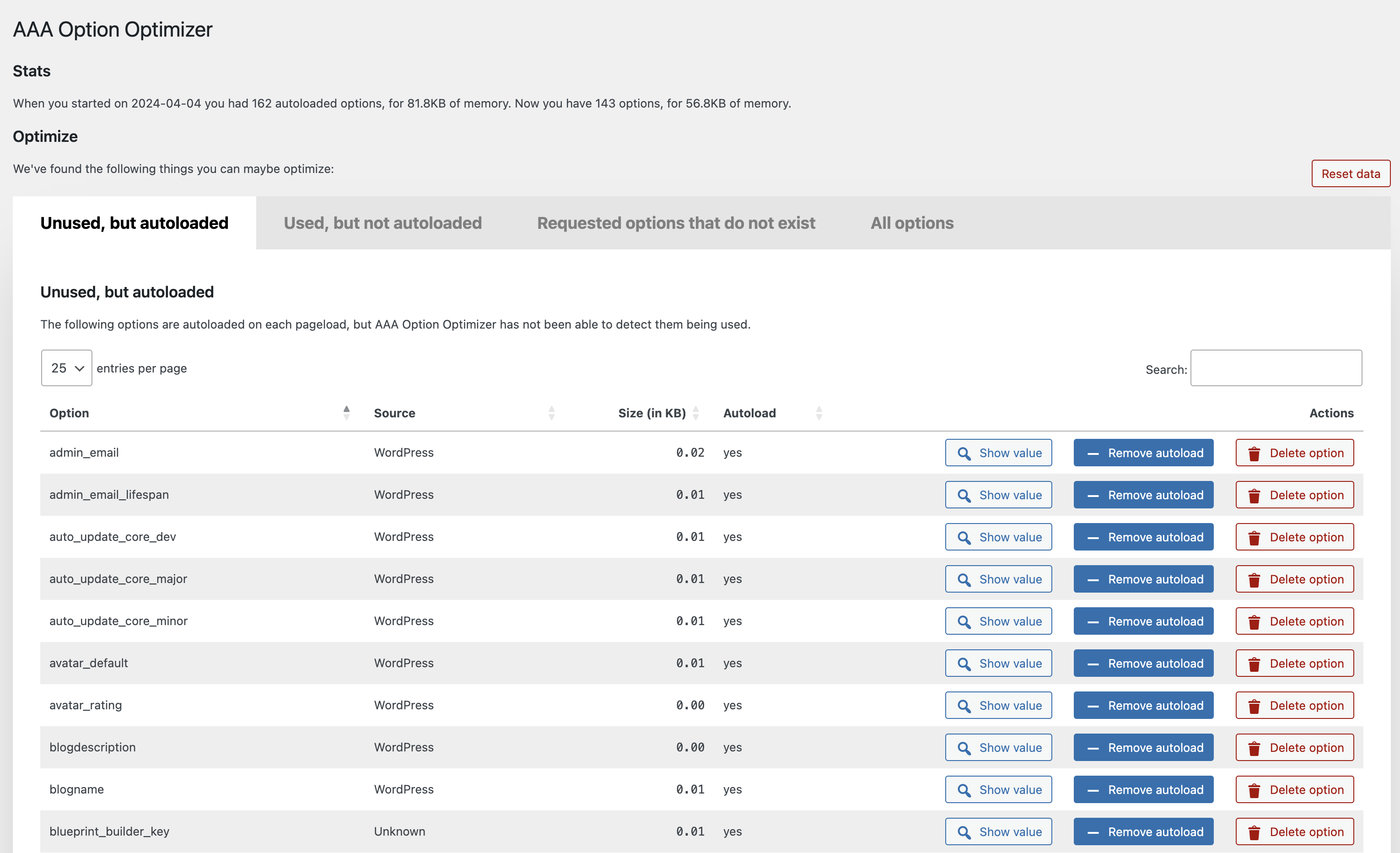
Screenshot of the admin screen, initial tab.
-
Screenshot of the "All options" screen, showing you can browse all the options.
About this plugin
This plugin tracks which of the autoloaded options are used on a page, and stores that data at the end of page render. It keeps an array of options that it has seen as being used. On the admin page, it compares all the autoloaded options to the array of stored options, and shows the autoloaded options that have not been used as you were browsing the site. If you’ve been to every page on your site, or you’ve kept the plugin around for a week or so, this means that those options probably don’t need to be autoloaded.
How to use this plugin
Install this plugin, and go through your entire site. Best is to use it normally for a couple of days, or to visit every page on your site and in your admin manually. Then go to the plugin’s settings screen, and go through the unused options. You can either decide to remove an unused option (they might for instance be for plugins you no longer use), or to set it to not autoload. The latter action is much less destructive: it’ll still be there, but it just won’t be autoloaded.
Questions
- Why the AAA prefix in the plugin name?
Because the plugin needs to measure options being loaded, it benefits from being loaded itself first. As WordPress loads plugins alphabetically,
starting the name with AAA made sense.- Do I need to take precautions?
Yes!! Backup your database.
- Where can I report bugs?
Please use our GitHub for reporting bugs or making code suggestions. Feel free to use the forums for asking questions too, of course.
For security issues, please see the next question.
- How can I report security issues?
You can report security bugs through the Patchstack Vulnerability Disclosure Program. The Patchstack team help validate, triage and handle any security vulnerabilities. Report a security vulnerability.
- How can I add recognized plugins?
Please do a pull request via GitHub on this file in the plugin.
sandywp / also on the shelf
Try another plugin

4.7 · 100K+ installs
WP-Sweep allows you to clean up unused, orphaned and duplicated data in your WordPress. It also optimizes your database tables.

4.9 · 10K+ installs
Simple Revisions Delete adds a discreet link within a post submit box to let you purge (delete) its revisions via AJAX. Bulk…

4.8 · 10K+ installs
Get rid of duplicate posts and pages (any post type) on your blog with manual or automatic modes.
Spin up a real WordPress site in seconds.
Test plugins, build a demo, hand a client a link — then squash it and start again. No local setup, no Docker.