sandywp / plugins / delete-duplicate-posts

Delete Duplicate Posts
Get rid of duplicate posts and pages (any post type) on your blog with manual or automatic modes.
Ready in seconds.
v5.2.2 10,000+ installs WP 4.7+ PHP 7.4+
What you get inside
7 screens-
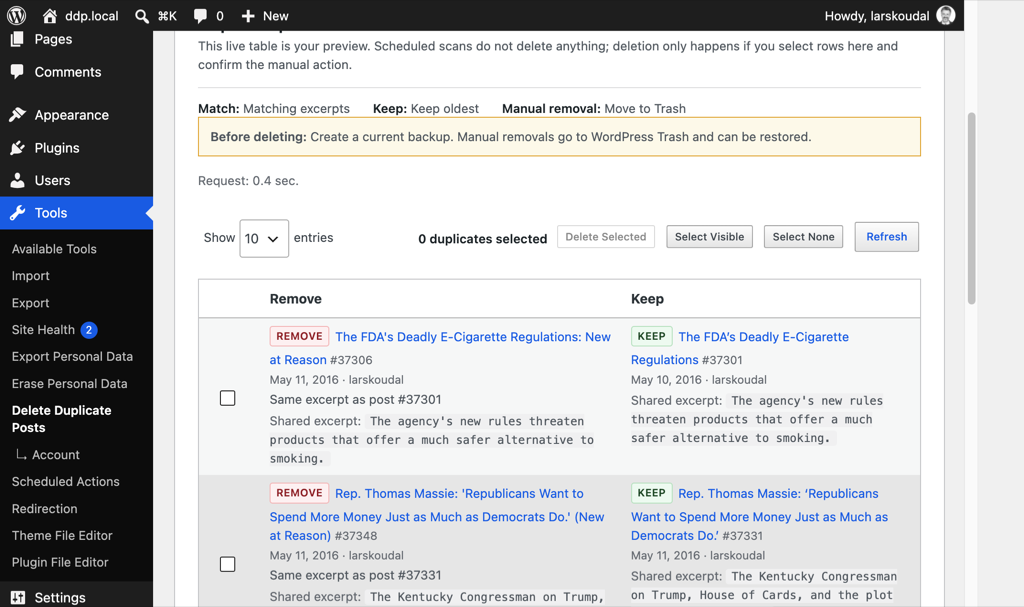
Duplicate review table with Remove vs Keep labels, match reason, date, and author.
-
Confirm deletion dialog with count, trash-first outcome, and keep preference.
-
Scheduled report-only status next to the live duplicate preview table; deletion stays a manual step.
-
Activity log of scans, report-only cron runs, deletions, and email notices.
-
Pro: Matching settings for title, meta, excerpt, or content comparison.
-
Pro: URL preservation with built-in or Redirection storage, plus CSV export for built-in redirects.
-
Pro: Redirects tab for the built-in store, with provider status, CSV export, and bulk deletion. Redirects stored in Redirection are not listed here.
About this plugin
Delete Duplicate Posts helps you declutter your WordPress site by removing duplicate posts along with their metadata. Whether you choose to run the cleanup process manually or set it to operate automatically on a schedule, our plugin ensures a thorough cleanup, improving your website’s loading speed and overall performance.
Why Choose Delete Duplicate Posts?
- Comprehensive Cleanup: Not just posts or pages, but also any Custom Post Type you have enabled, along with all related metadata.
- Space Efficiency: By eliminating unnecessary duplicates, it frees up space, facilitating better website performance.
- Scalability: Designed for websites of all sizes, it efficiently manages and optimizes large-scale websites without causing timeouts.
Features
Find duplicates on posts, pages, and custom post types—then decide what stays.
Included free
- Review matches before anything is removed, with clear keep vs remove labels.
- Match by post title; choose whether to keep the oldest or newest post.
- Move duplicates to the WordPress trash by default (recoverable).
- Protect specific post IDs so they are never deleted.
- See date and author on each post in a duplicate pair.
- Run cleanup manually, or schedule scans that only report what would be removed—or delete on a schedule when you are ready.
- Optional status emails and a full activity log of what the plugin did.
Pro unlocks
- Find duplicates by identical post content, excerpt, or any custom field—not only titles.
- Include drafts, scheduled, private, and other post statuses in the scan.
- Delete permanently when trash is not enough.
- Preserve removed URLs with 301 redirects using built-in storage or the Redirection plugin. The Redirects tab lists only built-in redirects. When Redirection is selected, new redirects are created in its group and are not listed here.
Experience its Efficiency
Our plugin’s unique approach to handling large datasets ensures that your website remains operational and improves progressively. By removing a few posts at a time, the plugin prevents site timeouts and enhances your website’s performance seamlessly.
For a cleaner, smoother, and more efficient WordPress site, Delete Duplicate Posts is the solution you need.
Learn more about the plugin and its features.
Eliminate duplicate posts, pages, and custom post types with Delete Duplicate Posts. Review matches, keep the version you want, and clean up manually or on a schedule—with trash-first defaults so mistakes are recoverable.
How can I report security bugs?
You can report security bugs through the Patchstack Vulnerability Disclosure Program. The Patchstack team help validate, triage and handle any security vulnerabilities. Report a security vulnerability.
Questions
- Should I take a backup before using this tool?
Yes. Always take a full site backup before deleting posts or pages, even when using trash.
- What happens if it deletes something I do not want to delete?
Restore from the backup you took before running the tool. If duplicates were only moved to trash, you can also restore them from the WordPress trash.
- What happens when I move built-in redirects into Redirection?
Each built-in redirect is created in the Redirection “Delete Duplicate Posts” group, then removed from this plugin. If that URL is already in the group, it is only removed here. A redirect that fails to move stays in the built-in list. Changing the provider setting does not move or delete existing records by itself. Redirects stored in Redirection are not listed in this plugin.
sandywp / also on the shelf
Try another plugin

4.7 · 100K+ installs
WP-Sweep allows you to clean up unused, orphaned and duplicated data in your WordPress. It also optimizes your database tables.

4.9 · 10K+ installs
Delete the revisions of a post one by one or all at once, from the block editor, the classic editor or a bulk action.

Database Cleaner: Cleanup, Optimization & Repair
5.0 · 10K+ installs
Clean up and optimize your WordPress database: revisions, transients, autoload, orphaned data. Built for large databases, safe…
Spin up a real WordPress site in seconds.
Test plugins, build a demo, hand a client a link — then squash it and start again. No local setup, no Docker.